
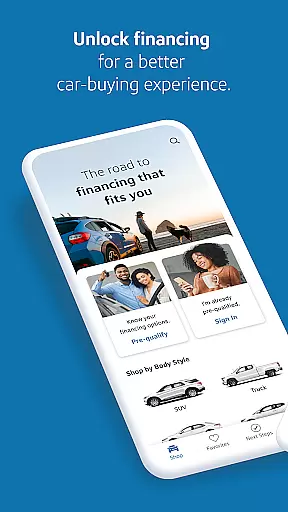
Capital One Auto Navigator is a comprehensive car shopping app designed to simplify the vehicle purchasing process. The app provides users with access to millions of new and used cars for sale across the nation, allowing them to search, compare, and save their favorite vehicles. With customizable search filters, users can refine their options by make, model, year, price, and more, ensuring they find a car that fits both their preferences and budget.
A standout feature of Auto Navigator is its financing tools. Users can pre-qualify for an auto loan quickly without affecting their credit score, view real monthly payments while browsing cars, and adjust terms like down payment and loan length to suit their financial situation. This empowers buyers to make informed decisions about their purchases. Additionally, the app streamlines the dealership experience by enabling users to show their pre-qualification status, complete financing applications digitally, and save time during the final steps of the car-buying process.
Whether you're a first-time car buyer or looking for a family vehicle, Capital One Auto Navigator offers valuable resources to guide your journey. By combining extensive inventory options with transparent financing solutions, this app ensures a seamless transition from car shopping to ownership.
Capital One Auto Navigator stands out with its robust set of features tailored to modern car buyers. One of the app's core strengths is its vast inventory database, which includes millions of listings for both new and used vehicles. This extensive selection allows users to browse through countless options and discover cars that match their specific needs. Each listing comes with detailed information, including photos, specifications, and pricing, helping users make well-informed decisions.
The app also excels in personalization and convenience. Users can customize their searches using advanced filters such as make, model, year, mileage, fuel economy, and body style. Once a preferred vehicle is identified, users can save it to a favorites list for easy comparison later. Furthermore, direct communication with dealerships is facilitated through in-app calling features, enabling users to inquire about availability and negotiate terms effortlessly.
Another key highlight is the app’s integrated financing tools. These include a quick pre-qualification process that provides real rates and monthly payments without impacting credit scores. Users can experiment with different financing scenarios by adjusting variables like down payment amounts and loan durations. This flexibility ensures that customers can tailor their deals to align perfectly with their financial capabilities, making Capital One Auto Navigator an indispensable tool for anyone navigating the complexities of car buying.
When it comes to purchasing a new or used car, having access to detailed vehicle information is crucial for making an informed decision. Capital One Auto Navigator provides comprehensive details on millions of cars for sale nationwide. Each vehicle listing includes essential specifications such as make, model, year, mileage, fuel economy, and more.
The app's intuitive filtering system allows users to narrow down their search based on specific criteria that matter most to them. Whether you prioritize fuel efficiency, body style, or price range, the app ensures you can find vehicles that match your preferences quickly and efficiently.
By offering this level of detail, Capital One Auto Navigator empowers users to compare different vehicles side by side. This feature not only saves time but also enhances the overall car-buying experience by ensuring shoppers have all the necessary information at their fingertips.
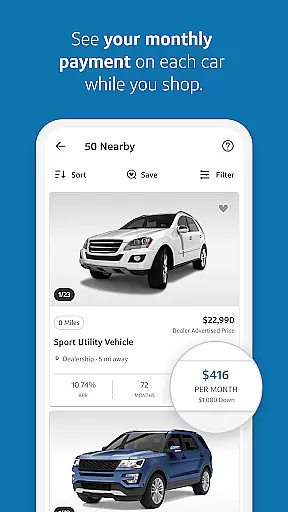
One of the standout features of Capital One Auto Navigator is its commitment to price transparency. The app provides users with real monthly payments and interest rates after a quick pre-qualification process that doesn't affect their credit score. This transparency allows users to see exactly how much they would be paying each month for their chosen vehicle.
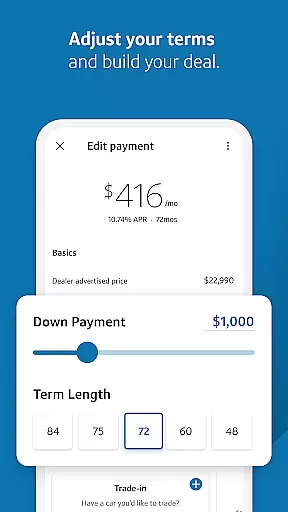
Moreover, the app enables users to adjust various financing parameters such as down payment amount and loan term length. By doing so, buyers can customize their auto loans to fit their financial situations better. This flexibility ensures that users can explore multiple financing options and choose the one that best suits their budget.
Capital One Auto Navigator also facilitates comparing different vehicles' monthly payments side by side. This comparison tool helps users make well-informed decisions by clearly showing how different cars and financing terms impact their monthly expenses. Ultimately, this transparency leads to a more confident and satisfying car-buying experience.
User-friendly interface
Extensive vehicle database
Quick loan pre-qualification
Transparent pricing details
Time-saving at dealerships
Limited to Capital One loans
Requires internet connection
No trade-in valuation tool
Dealer availability varies
Occasional app glitches

Ultimate OBD2 Car Scanner: Diagnostics, Service and Modification Tool
 4.30
4.30
Take Control of Your Car
4.80
OBD1 ECMs application. Data log or tune directly from your phone or tablet!
4.60
Monitor specific TOYOTA parameters by adding this plugin to Torque Pro.
2.00
Theme for Car Launcher
4.4
Read and delete OBD codes with any ELM327 OBD scanner. Coding functions included
3.40
Discover new and used cars in Syria easily! Browse ads and connect with sellers.
3.70
Simplify your drive
3.90
Your go-to app for car, truck & SUV parts, DIY tools, and expert repair help.
4.70
Shop, finance, or sell today.
4.80
Car Values, Research and More
4.80
Buy and sell your boat
4.70
The ExtraMile App allows you to pay for fuel from the comfort of your car!
4.70
Find Fast EV Chargers | Charge Your Vehicle at 1,100+ Fast Car Charging Stations
4.60
Autolist - The Largest Selection of Local Used Cars and Trucks
4.50
Get price alerts, vehicle history details and more for cars near you!
4.50
Your Path to Driving Licensing Success Begins Here! Develop your driving skills.
4.40
ODB2 based monitoring application for the Chevy Bolt (2017-2021)
4.00
Club Car Wash Mobile App—the fast lane to managing your wash membership.
3.30






User Reviews