
GBC.emu is an advanced open-source Gameboy emulator that offers a minimalist UI with a focus on low audio and video latency. It supports a wide range of devices, from the original Xperia Play to modern devices like the Nvidia Shield and Pixel phones. The app allows users to enjoy classic GB and GBC games with features such as multiple color palettes for original GB games, cheat codes in Game Genie & Gameshark formats, and support for .gb and .gbc file formats.
With configurable on-screen controls and Bluetooth/USB gamepad & keyboard support, GBC.emu provides a versatile gaming experience. Users can supply their own ROMs and access them through Android's storage access framework, making it easy to manage files on both internal and external storage. This emulator is ideal for retro gaming enthusiasts who want an authentic and customizable experience on their mobile devices.
GBC.emu stands out with its advanced feature set tailored for retro gaming aficionados. One of its key features is the support for multiple color palettes for original GB games, allowing users to customize the visual experience to their liking. Additionally, the inclusion of cheat codes in popular formats like Game Genie and Gameshark enhances gameplay flexibility.
The app supports various file formats including .gb and .gbc, optionally compressed with ZIP, RAR, or 7Z, providing users with convenience and versatility. Configurable on-screen controls and compatibility with Bluetooth/USB gamepads and keyboards ensure a comfortable and personalized gaming setup. With Android's storage access framework, users can seamlessly access their game files stored on both internal and external storage, making GBC.emu a comprehensive solution for enjoying classic Gameboy games on modern devices.
Arcade authenticity and nostalgia are crucial elements for any gaming emulator, ensuring that users can relive the classic gaming experiences of the past. GBC.emu (Gameboy Emulator) excels in this area by providing an advanced emulation experience based on the Gambatte engine.
This emulator focuses on delivering low audio and video latency, which is essential for recreating the responsive feel of arcade games. By supporting a wide range of devices from older models like the Xperia Play to modern ones such as the Nvidia Shield and Pixel phones, it ensures broad compatibility and performance.
GBC.emu also includes multiple color palettes for original Game Boy games, enhancing the nostalgic experience while maintaining the authenticity of these classic titles. The inclusion of cheat codes in formats familiar to retro gamers, such as Game Genie and Gameshark, further enriches the nostalgic value.
By offering configurable on-screen controls and support for Bluetooth/USB gamepads, including popular controllers like Xbox and PS controllers, GBC.emu allows users to choose their preferred control scheme. This flexibility enhances the authentic arcade experience, making it more enjoyable and true to the original gameplay.
Control responsiveness is a key factor in the enjoyment and playability of any game, especially when emulating classic arcade titles. GBC.emu (Gameboy Emulator) places a strong emphasis on this aspect, ensuring that users have a seamless and immersive gaming experience.
The emulator's focus on low audio and video latency directly contributes to its excellent control responsiveness. Players will find that their inputs are registered almost instantly, mimicking the immediate feedback expected from arcade machines. This responsiveness is consistent across a variety of supported devices, from older models to the latest smartphones.
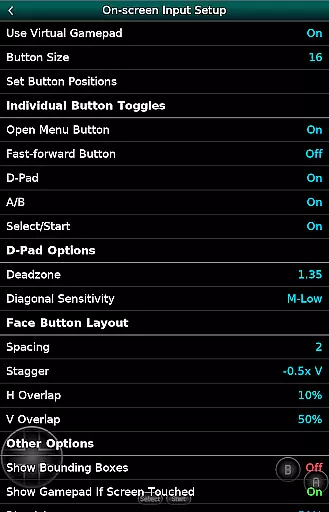
Configurable on-screen controls allow users to customize the layout and size of buttons to suit their preferences, enhancing the precision and comfort of their gameplay. This level of customization ensures that players can achieve optimal control responsiveness tailored to their individual play styles.
In addition to on-screen controls, GBC.emu supports external input devices such as Bluetooth and USB gamepads. This includes compatibility with HID devices recognized by the operating system, such as Xbox and PS controllers. By integrating these options, the emulator provides a versatile and responsive control scheme that caters to both casual and hardcore gamers alike.
Low audio/video latency
Wide device compatibility
Customizable color palettes
Cheat code support
Versatile file format options
No included ROMs
Limited to GB/GBC games
Requires manual updates
Occasional crashes reported
Device-specific issues

Bomb the communists back to 1916!
 4.70
4.70
GBA Emulator
4.40
Use superpower in your magic hands. Defeat the enemies in a fun elemental game.
4.50
Eat & evolve your shark in the ultimate shark survival game!
4.50
Fast reflexes, glowing obstacles, endless action.
4.0
Cool car builder & racing simulator: make a car to win the obstacle course race!
4.60
Running game: dance in a twerk battle and become the twerk hero in our fun race!
4.30
The only Sega Saturn emulator for Android
4.40
You are a Black Hole, escaping the darkness trying to swallow you!
3.60
Full featured version of Pizza Boy A (GBA emulator)
4.80
Millions of crafters have smashed billions of blocks! Now you can join the fun!
4.40
Bounce through platforms. Avoid obstacles. Get the bouncing ball to the finish.
4.00
This app is a very fast emulator
3.40
Neogeo MVS/AES Emulator
3.30
Restore peace and order in the city
3.20
John GBA is GBA emulator. This emulator is easy to use.
3.10
Machine Gun Fire Rumbles in the Jungle
4.4
A retro-flavoured infinite scroller Glyph toy for the Nothing Phone (3)
4.3
Sharpen your mind and reflexes while playing 4Way Dash
4.3



User Reviews