
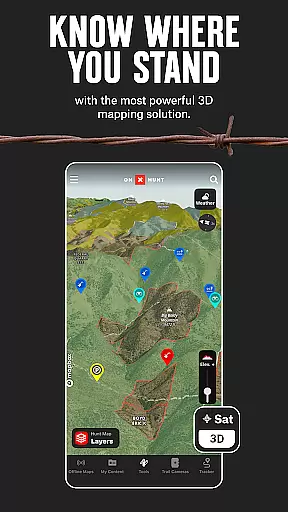
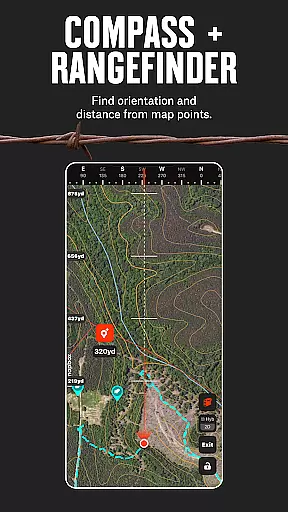
onX Hunt is a comprehensive hunting application designed to enhance your outdoor experience through advanced mapping and GPS navigation technologies. The app provides hunters with detailed topographic maps, property boundary information, and species distribution data, allowing for strategic planning and confident navigation in the field.
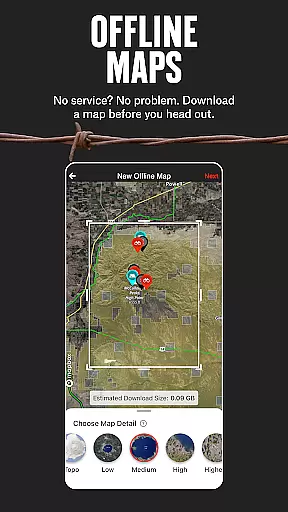
With features like offline map downloads, 3D terrain visualization, and real-time trail camera integration, onX Hunt ensures you're equipped with the necessary tools regardless of cellular coverage. Whether you're scouting from home or tracking game in remote areas, this app delivers crucial recon data that can make your hunt more efficient and successful.
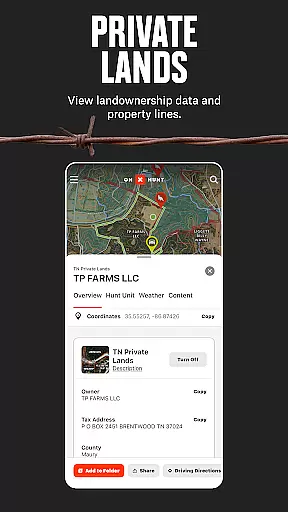
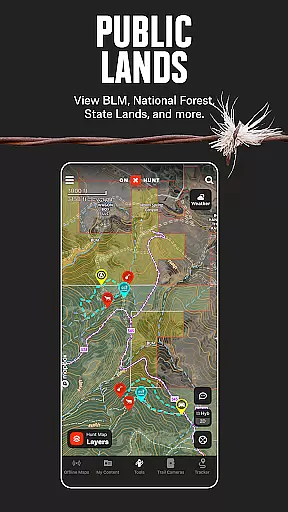
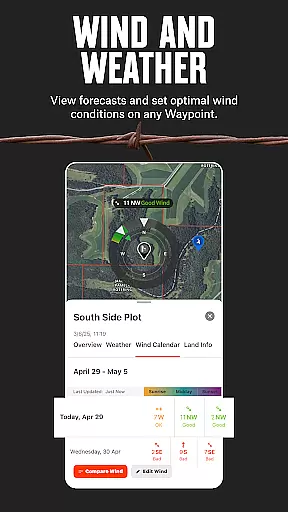
The app's land ownership maps include both public and private boundaries across the U.S., giving hunters critical knowledge about where they stand legally. By offering state-specific layers, weather forecasts, and optimal wind direction indicators, onX Hunt empowers sportsmen to maximize their time afield while respecting wildlife management regulations.
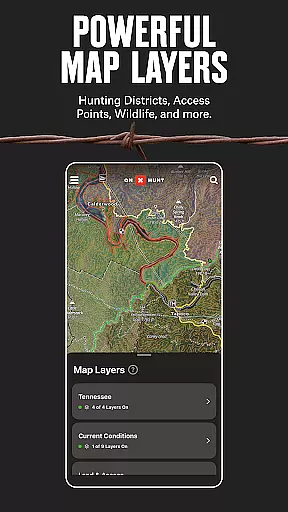
onX Hunt stands out with its robust feature set tailored specifically for hunters. The app offers proprietary mapping technology that includes topo maps, satellite imagery, and hybrid basemaps, all of which are customizable to suit individual preferences. Users can toggle between different map layers such as deer, elk, turkey, or waterfowl distributions, providing targeted insights based on the game they pursue.
A key innovation is the ability to save offline maps complete with personal markups, waypoints, and route plans. This ensures uninterrupted access to vital navigation data even without internet connectivity. Additionally, the inclusion of advanced tools like TerrainX 3D Viewer and Route Builder allows users to visualize terrains accurately and plan efficient travel paths through challenging landscapes.
Another standout feature is the integration with Moultrie trail cameras, enabling real-time image viewing and analysis directly within the app. Coupled with weather forecasting and wind calendar functionalities, these capabilities give hunters an edge by helping them anticipate animal movements and choose ideal stand locations. With tiered membership options ranging from single-state to nationwide coverage, onX Hunt caters to various needs and budgets while consistently delivering value through cutting-edge technology.
onX Hunt delivers an immersive hunting experience by integrating realistic gameplay elements with accurate physical representations of terrains and landscapes. The app provides topographic maps, 3D views, and detailed satellite imagery to help hunters understand the lay of the land before setting foot in the wilderness.
The level of detail in terrain visualization allows users to plan their hunts effectively. By toggling between different map layers such as topo, satellite, and hybrid basemaps, hunters can strategize their approach based on real-world geographical features. This ensures that every movement and decision made during a hunt is grounded in actual environmental conditions.
Furthermore, the app's GPS navigation and offline mapping capabilities enhance the authenticity of the hunting simulation. Hunters can confidently explore remote areas without worrying about connectivity issues, as they have access to precise land boundary data and customizable waypoints even when offline.
This combination of realistic environmental modeling and reliable navigation tools makes onX Hunt an indispensable companion for both novice and experienced hunters looking to elevate their outdoor adventures.
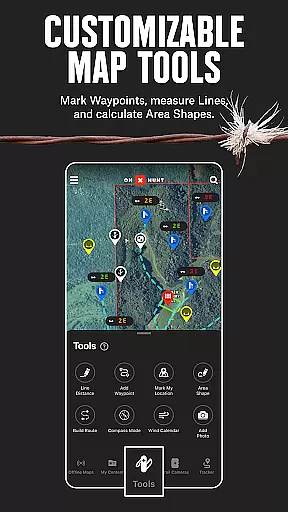
onX Hunt excels in providing an intuitive control scheme that simplifies complex tasks associated with hunting preparation and execution. With easy-to-use interface elements, users can effortlessly switch between various map types, set waypoints, measure distances, and save offline maps for later use.
The app's design emphasizes user-friendliness, ensuring that hunters spend less time figuring out how to operate the app and more time focusing on their hunting strategies. For instance, marking crucial locations or planning routes is streamlined through straightforward touch controls that respond quickly and accurately.
In addition to its intuitive touch-based interactions, onX Hunt also supports Wear OS devices, allowing hunters to drop waypoints directly from their wrists. This seamless integration across multiple devices enhances the overall user experience by providing flexible control options tailored to individual preferences.
By prioritizing simplicity and responsiveness in its control scheme, onX Hunt empowers hunters to efficiently manage their expeditions while enjoying a hassle-free interaction with technology.
User-friendly interface
Comprehensive mapping data
Offline functionality
Real-time trail camera integration
Customizable map layers
Limited international availability
Premium features require subscription
Occasional syncing issues
Steep learning curve for beginners
Some regions lack detailed data

Feel combo thrills in Challenge! Aim, strategize, and master your billiard skill
 4.60
4.60
Join over 10,000,000 people in the only official PBA bowling game!
4.40
Extreme Downhill Freeriding
3.20
Grab the ball and play your Basketball career in this 3D Real-time Sport Game!
4.60
Coach a franchise of NFL PA licensed pro football players to gridiron glory
4.60
Golfing in an Endless Desert
4.10
Webcam based exercise and learning game with rock climbing!
4.2
Play football like it's 1987! Classic retro arcade action and franchise mode.
4.60
The NFHS Network delivers high school sporting events from across the country.
3.70
The ultimate Golf game! Compete in 6 player real-time multiplayer golf battles!
4.70
Kick into action! Score goals & climb 100+ levels to become a soccer super star!
4.70
Let's play catch and throwing game!
4.60
BE A SOCCER HERO! Pass, Shoot & Score your way to legendary status!
4.50
Enjoy an easy to play multiplayer Baseball game!
4.40
The King of Retro Soccer!
3.60
Run the ball into the endzone in AR.
4.2
Play fun baseball with doodle-style characters and hit massive home runs!
4.1
Mental skills exercise/training - improve your power of focus and concentration
4.4
Play T20 Cricket World Cup 2025. Real matches, offline & tournament mode!
4.4




User Reviews