
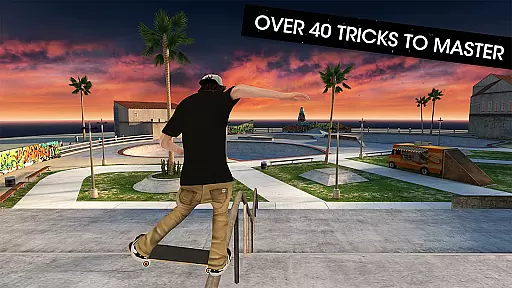
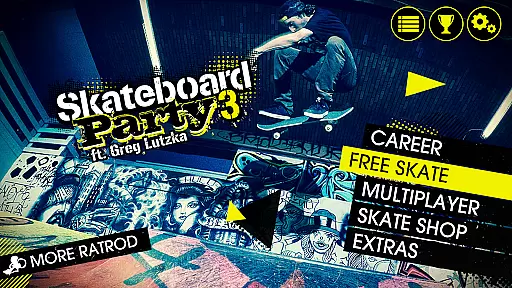
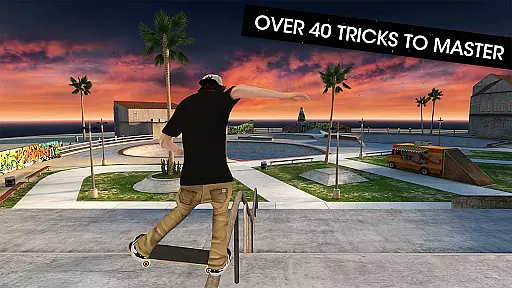
Skateboard Party 3 Pro delivers an authentic skateboarding experience right on your mobile device. The app features professional skater Greg Lutzka and offers players the chance to master over 40 unique tricks across 8 diverse locations, including skate parks and city streets. With its robust career mode, users can complete more than 70 objectives to unlock new gear and locations while upgrading their skater's abilities.
In addition to its engaging single-player content, Skateboard Party 3 Pro boasts an online multiplayer mode, allowing players to compete against friends or other skaters globally. The game supports extensive customization options for characters and boards with licensed brands, alongside a fully customizable control system that accommodates various play styles. Whether you're executing complex combos or simply enjoying a free skate session, this app provides countless hours of entertainment for skateboarding enthusiasts.
Skateboard Party 3 Pro stands out with its comprehensive feature set tailored for skateboarding fans. The app includes a detailed career mode where players can level up their skater by completing objectives and earning experience points. This progression system allows users to enhance their character's attributes, enabling them to perform better tricks and achieve higher scores as they advance through the game.
Customization is at the heart of Skateboard Party 3 Pro, offering players a vast selection of gear from real-world skateboarding brands. Users can personalize their skater's appearance and board setup with items from companies like Osiris and Darkstar. Furthermore, the app supports a highly adaptable control scheme compatible with most game controllers, ensuring a seamless experience whether using touch controls or external devices. These features collectively create an immersive and personalized skateboarding simulation that caters to both casual players and hardcore fans alike.
Skateboard Party 3 Pro delivers an impressive level of gameplay realism that mirrors the true physics of skateboarding. The game meticulously simulates the mechanics of tricks, grinds, and flips, ensuring each move reflects real-world physics. This dedication to authenticity allows players to experience the genuine feel of skateboarding right on their mobile devices.
The developers have integrated a highly responsive physics engine that captures the nuances of board control and rider balance. As players progress, they encounter varying environmental factors like ramps and rails that interact realistically with their virtual skateboard. These elements combine to create a dynamic and challenging skateboarding simulation.
For users, this means mastering actual skateboarding techniques without leaving home. The accurate physics model rewards skill development, making practice sessions in Free Skate mode both productive and gratifying. Players can genuinely improve their understanding of skateboarding fundamentals through repeated gameplay.
Ultimately, the game's commitment to realism enhances its replay value. Whether pulling off complex combos or perfecting basic tricks, players appreciate the tangible sense of achievement that comes from overcoming challenges rooted in authentic skateboarding physics.
A standout feature of Skateboard Party 3 Pro is its intuitive control scheme, designed for ease of use while maintaining depth for advanced maneuvers. Players can quickly grasp basic controls, allowing newcomers to start performing tricks almost immediately. At the same time, the system offers enough complexity to satisfy experienced gamers looking to execute sophisticated combinations.
The game provides a fully customizable control layout, letting users tailor the interface to their preferences. Options include left or right-handed modes, analog stick or accelerometer input, and adjustable truck tightness affecting steering sensitivity. Such flexibility ensures that every player can configure controls that feel natural to them.
This adaptability significantly enhances user engagement by removing barriers to entry. Gamers can focus on honing their skills rather than struggling with awkward controls. Furthermore, compatibility with most game controllers expands accessibility, offering console-quality precision on mobile devices.
By prioritizing intuitive controls alongside customization options, Skateboard Party 3 Pro creates an inclusive environment where both casual players and skateboarding enthusiasts can enjoy mastering virtual tricks with comfort and confidence.
Realistic skateboarding physics
Extensive customization options
Engaging career mode
Multiplayer functionality
High-quality graphics
In-app purchases can be costly
Steep learning curve for beginners
Occasional performance issues
Limited offline content
Ads between sessions

This is the most realistic 3D bowling game on the Android phones.
 4.70
4.70
Join over 10,000,000 people in the only official PBA bowling game!
4.40
8 Pool Master is an interesting billiard game
4.70
Play one of most famous lawn games in America called foot bag toss family games!
4.30
The ultimate Golf game! Compete in 6 player real-time multiplayer golf battles!
4.70
Challenging 1vs1 online matches! Strike, score, and be a soccer champion!
4.40
Play the 3 classic Duck Life games like you've never seen them before!
4.10
It’s time to play pool in the world’s No.1 arcade style Pool game on Android!
4.70
Realistic PvP Multiplayer Dart game blending sports games and simulation fun!
4.50
Establish a stable of talented boxers to take on the world.
4.80
Play the hit multiplayer Carrom Disc Pool board game and become the best!
4.60
NFL & NBA Real Money Team & Player Picks
4.60
Play the World's Soccer Game Anywhere with Premier League, UCL & LALIGA stars.
4.60
Old-School Football
4.40
Out of the Park Baseball Go is a strategy & sports gaming fan’s dream come true.
4.40
Fun multiplayer golf game! Prove you’re a golf legend and play with friends!
4.40
Pixel Cup Soccer is a retro-style arcade game, just the fun part of soccer!
4.00
Relive the second baseball game in the Backyard Sports franchise!
4.00
Webcam based exercise and learning game with rock climbing!
4.5



















User Reviews