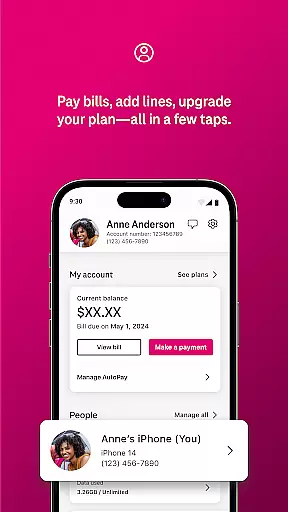
T-Life is a comprehensive lifestyle app designed to enhance the digital and physical lives of T-Mobile users. The app serves as an all-in-one platform for managing your T-Mobile account, shopping for new devices, accessing exclusive benefits, and exploring rate plans. With its user-friendly interface, T-Life allows you to pay bills, track usage, and configure your T-Mobile Home Internet gateway with just a few taps.
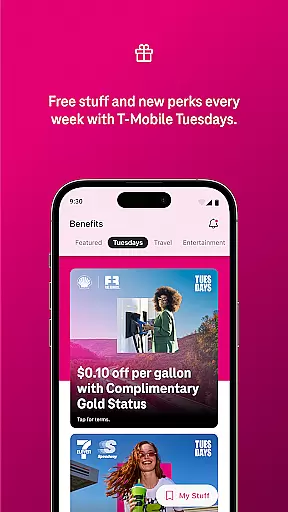
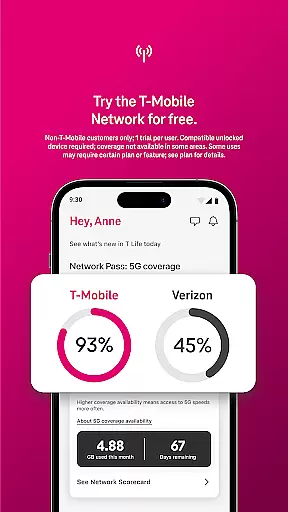
One of the standout features of T-Life is its ability to provide users with free trials of America’s Best Network, giving non-T-Mobile customers a chance to experience top-tier network performance for 30 days at no cost. Additionally, the app offers unique perks such as Netflix On Us, savings on travel and dining, and participation in T-Mobile Tuesdays, where users can snag freebies and enter for a chance to win epic prizes.
Whether you're looking to switch to T-Mobile, manage your finances through T-Mobile MONEY®, or protect yourself from spam calls using Scam Shield, T-Life provides a seamless and integrated experience. This makes it an essential tool for anyone seeking to maximize their T-Mobile benefits while simplifying everyday tasks.
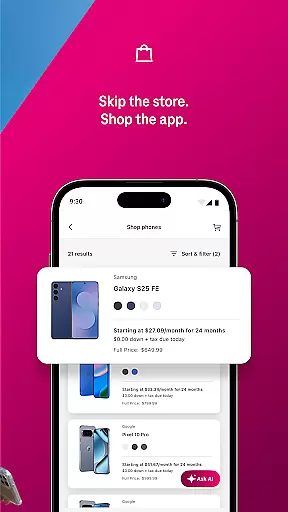
T-Life stands out with its extensive range of features tailored to meet the diverse needs of T-Mobile users. One of the core functionalities is the ability to shop for a wide selection of devices directly from the app, allowing users to browse and purchase without leaving their couch. This feature is complemented by tools that let users manage their accounts efficiently, including bill payments, usage tracking, and device configuration.
The app also provides access to exclusive benefits such as Netflix On Us, travel and dining savings, and T-Mobile Tuesdays, which offer freebies and chances to win prizes. For those considering a switch to T-Mobile, the app offers a limited-time trial of America’s Best Network, based on Speedtest Intelligence® data, ensuring users can make informed decisions about their network choice. Furthermore, T-Life integrates financial services like T-Mobile MONEY® and T-Life VISA® accounts, adding another layer of convenience.
Security and connectivity are prioritized with features like Scam Shield, which protects users from spam and robocalls, and SyncUP devices that keep you connected at home, in the car, and with family. These robust features collectively ensure that T-Life is not just an app but a complete ecosystem designed to simplify and enhance the T-Mobile user experience.
T-Life offers an extensive range of services and features that cater to various aspects of everyday life, ensuring users have access to everything they need in one place. The app provides functionalities for shopping, account management, exclusive benefits, and even network trials.
With T-Life, users can shop for devices from the comfort of their homes, manage their accounts, pay bills, and configure home internet gateways effortlessly. Additionally, it offers unique benefits such as Netflix On Us, savings on travel and dining, and participation in T-Mobile Tuesday events where users can get freebies and win prizes.
The app also supports SyncUP devices, keeping users connected at home, in the car, and with family. It integrates financial services like T-Mobile MONEYu00ae and T-Life VISAu00ae accounts, along with protective features against spam and robocalls through Scam Shield.
This comprehensive approach ensures that users have a wide array of lifestyle services available, enhancing convenience and providing valuable perks that improve overall user experience.
Authenticity and credibility are crucial for any lifestyle app, and T-Life excels in these areas by offering verified and reliable content directly from T-Mobile. As a trusted telecommunications provider, T-Mobile ensures that all information and services provided within the app are accurate and beneficial.
T-Life delivers exclusive benefits such as Netflix On Us and savings on travel and dining, which are genuine offers aimed at enhancing customer satisfaction. These benefits are well-documented and come directly from partnerships and collaborations, ensuring their legitimacy.
Moreover, the app includes features like Scam Shield, developed to protect users from spam and robocalls. This feature is built using advanced technology and expertise, demonstrating T-Mobile's commitment to providing secure and trustworthy solutions.
By leveraging T-Mobile's industry expertise and reputation, T-Life guarantees that its content and services are not only attractive but also credible and reliable, fostering trust and long-term engagement with its users.
User-friendly interface
Exclusive benefits
Comprehensive account management
Free network trial
Integrated financial services
Limited to T-Mobile users
Trial restrictions apply
Device compatibility required
Benefits region-specific
Occasional bugs reported

Unique informative Dial with Live Moon Phase at a glance!
 3.60
3.60
Duo Watch Face (animated)
4.5
Easily manage your child's playtime, spending messaging and more.
3.50
A watch face with transparency and fluid visuals inspired by liquid glass design
4.5
Cute animated Thanksgiving watchface for your WearOS smartwatch
4.1
A smart Siddur with halachic times
4.50
The Wyze app is your gateway to a smarter life and a safer home.
4.40
Remotely monitor the time and temperature of food cooking on your grill.
4.60
No more juggling multiple apps, now you can control everything in one place!
4.60
Pay your rent, submit work orders and much more with the RentCafe Resident App.
4.70
Mixing Colors for Menswear
4.20
Spiritus Ghost Box is an Audio and Visual ITC tool for paranormal research.
4.00
Your home in your hand
3.80
Take Hobby Lobby with you wherever you go!
3.40
Healthy eating timer app to track meal pace, improve habits, and eat slowly.
4.5
Discover how to help puppies stay calm around noise with this helpful app.
4.3
A daily quote for success
4.2
A uniquely designed isometric digital watch face made for Wear OS
4.0
Futuristic watchface inspired by Back to the Future: sleek, retro, timeless
4.4




User Reviews