
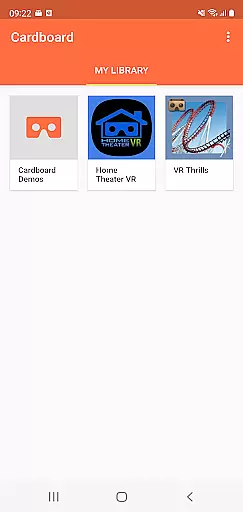
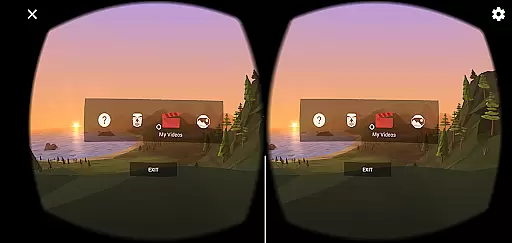
Cardboard is an innovative virtual reality platform that transforms your smartphone into a VR device. The app serves as the gateway to immersive VR experiences, allowing users to explore new worlds and interact with apps in a completely different way. With its user-friendly interface, Cardboard makes it easy to discover and launch VR content while providing setup guidance for Cardboard viewers.
The application's core functionality lies in its ability to deliver high-quality VR experiences directly to your phone. Whether you're exploring 3D environments, playing games, or watching videos, Cardboard ensures smooth performance and intuitive controls. Its compatibility with affordable Cardboard viewers makes virtual reality accessible to everyone, offering an engaging experience without requiring expensive equipment.
For those new to VR, Cardboard provides step-by-step instructions to assemble and configure your viewer. This ensures users can quickly start enjoying VR content. By integrating with Google's ecosystem, the app also fosters community engagement through platforms like Google+, where users can share their VR experiences. Overall, Cardboard democratizes access to virtual reality, making it an ideal choice for tech enthusiasts and casual users alike.
Cardboard stands out with its diverse range of features designed to enhance the VR experience. One of its key strengths is the seamless integration with third-party VR apps, enabling users to explore a vast library of immersive content. From educational simulations to interactive games, the app acts as a hub for discovering and launching VR applications tailored to various interests.
Another notable feature is the intuitive viewer setup process. Cardboard provides clear instructions for assembling and calibrating the viewer, ensuring optimal performance. Additionally, the app supports both Android and iOS devices, broadening its accessibility. Advanced functionalities such as head tracking and stereoscopic rendering further elevate the sense of immersion, delivering a truly captivating experience.
Cardboard also emphasizes user safety and convenience. It includes warnings against using VR while driving or walking, prioritizing responsible usage. Furthermore, its lightweight design and compatibility with affordable viewers make it an attractive option for users seeking an entry point into virtual reality. These features collectively position Cardboard as a versatile and user-friendly VR solution.
Functionality completeness in a virtual reality app like Cardboard is crucial for delivering an immersive experience. This refers to the app's ability to provide all necessary features that allow users to fully interact with VR environments without limitations.
The Cardboard app excels in functionality by offering intuitive controls for launching VR experiences, discovering new apps, and setting up viewers. It ensures that users can easily navigate through different VR content while maintaining high-quality performance.
Users benefit from this comprehensive feature set as it allows them to explore various VR applications seamlessly. The app's design focuses on user engagement, making sure that all tools needed for an uninterrupted virtual journey are at their fingertips.
This complete functionality coverage enhances the overall value of the Cardboard app, positioning it as a go-to solution for both beginners and experienced VR enthusiasts looking to enjoy diverse virtual experiences.
Usability and operational smoothness are essential for any application, especially in the realm of virtual reality where user experience is paramount. For Cardboard, usability refers to how easily users can interact with the app and its VR experiences without facing technical hitches.
The Cardboard app achieves operational smoothness by providing a streamlined interface that simplifies the discovery of new VR apps and the setup of viewers. Its design emphasizes ease-of-use, ensuring that even those new to VR can quickly adapt and start enjoying their virtual adventures.
By focusing on these aspects, Cardboard ensures that users enjoy a fluid experience when transitioning between different VR environments or adjusting settings within the app. This attention to detail in usability significantly enhances user satisfaction.
Ultimately, the emphasis on usability and smooth operation makes Cardboard a reliable choice for anyone seeking an accessible yet sophisticated entry point into the world of virtual reality.
User-friendly interface
Affordable VR solution
Wide app compatibility
Easy setup process
Community engagement
Limited advanced features
Dependent on viewer quality
Basic graphics rendering
Restricted content library
Device compatibility issues

Record with Double Camera Video Recording using Dual Camera Front and Back Video
 3.00
3.00
Tune your game graphics with our GFX optimizer for optimal gaming experience
4.50
Enjoy Minecraft Mod Scary Neighbor Granny for Minecraft PE.
4.30
Wireless reverse charging using phone now is possible
4.30
Easily evaluate the performance of Scandit's barcode and ID scanning SDK
4.10
Read Quran pak offline & listen online mp3 Quran in Al Quran Majeed app
4.4
MirrorLink for connecting your Android phone to your car’s infotainment screen.
4.50
An impressive collection of tools, characters, weapons, skins and more!
4.30
Game booster GFX may reduce interruptions and improve gaming experience.
4.50
Study Bible King James Version: the correct way to learn the Bible with audio
4.80
Popular mods fnaf mods for melon playground
4.50
An essential GFX utility developed for specific FPS mobile games
4.50
View your cameras anywhere and anytime
4.20
Android secret code for smart phone, mobile codes, with secret codes app
4.20
Do you want to drive easy ? do you wanna full mirror link Mobile with your car
4.10
Mirror phone to TV effortlessly! Stream, share & connect with Airplay ease.
3.60
Simulator of real black light
3.50
Looking to connect your phone to your car screen? Mirror Link is the solution.
3.20
DamonSx2 is the open Source LGPL Emulator
3.20





User Reviews