
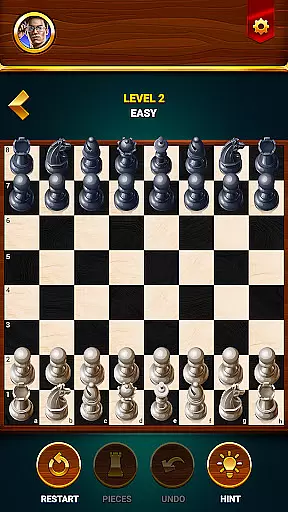
Chess - Offline Board Game is a premier chess application designed for players of all skill levels, from beginners to seasoned experts. The app offers unlimited free games in both 2D and 3D formats, allowing users to challenge various computer opponents or engage with friends in two-player mode. With features like daily puzzles, interactive lessons, and strategic tips, it helps users develop their skills while sharpening their minds. Whether you're honing your strategies against AI opponents or competing in events to win rewards, this app provides an immersive chess experience that enhances logical thinking and problem-solving abilities.
One standout feature is its offline functionality, enabling gameplay anytime, anywhere without requiring an internet connection. Additionally, tools such as hints, undo options, and restart capabilities ensure a user-friendly environment where players can refine their tactics at their own pace. Suitable for casual players and aspiring grandmasters alike, Chess - Offline Board Game combines accessibility with depth, making it the perfect companion for anyone looking to elevate their chess expertise while enjoying the timeless appeal of the game.
Chess - Offline Board Game stands out through its diverse range of features tailored to enhance every aspect of chess play. Users can select from multiple difficulty levels when playing against AI opponents, ranging from beginner-friendly matches to challenging grandmaster simulations. This flexibility ensures that players can continually test and improve their skills. The inclusion of both 2D and 3D board views caters to different preferences, providing a personalized visual experience that suits individual tastes.
Beyond standard gameplay, the app offers specialized training modules such as daily puzzles and interactive lessons. These resources guide users through essential strategies, special moves, and advanced tactics, fostering steady improvement over time. Additional functionalities like hint systems, move analysis, and statistical tracking further enrich the experience by offering insights into performance trends and areas for growth. With support for multiple languages and seamless offline access, this app delivers a comprehensive chess platform adaptable to various learning styles and global audiences.
Authenticity and flexibility in chess rules are crucial for both casual players and serious strategists. Chess - Offline Board Game ensures that every move, from castling to en passant, adheres strictly to official chess regulations while offering customizable rule options.
The app provides traditional gameplay with the option to modify certain parameters, allowing users to tailor their experience. Whether it's adjusting timer settings for blitz games or enabling handicap modes for uneven matches, the app caters to a variety of preferences.
Players benefit from learning standardized chess rules while having the freedom to experiment with variations. This dual approach not only preserves the integrity of the game but also encourages creative strategies and unconventional play styles.
By maintaining rule authenticity alongside flexible options, Chess Club creates an environment where beginners can learn proper gameplay while experienced players can explore new tactical possibilities within a controlled setting.
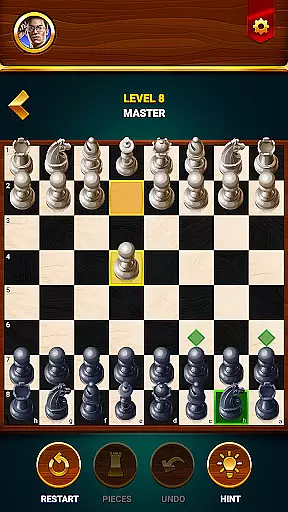
The quality of AI opponents in chess applications directly impacts the user's learning curve and engagement level. Chess - Offline Board Game features advanced artificial intelligence with multiple difficulty levels, ranging from beginner-friendly to grandmaster-level challenges.
Each AI level is carefully calibrated using sophisticated algorithms that mimic human playing styles. The beginner mode makes simple, predictable moves, while higher levels demonstrate increasingly complex strategies and defensive capabilities, providing realistic challenges for players of all skill levels.
This graduated difficulty system enables users to develop their skills progressively. As players improve, they can advance to more challenging AI opponents, ensuring continuous learning and preventing frustration from either too-easy or impossibly difficult matches.
The AI's ability to adapt its playing style while maintaining consistent challenge levels helps players refine their strategies effectively. This feature transforms practice sessions into meaningful learning experiences, making each game both educational and entertaining.
User-friendly interface
Offline gameplay available
Diverse difficulty levels
Interactive tutorials
Multi-language support
Limited social features
No live tournaments
Ads may interrupt
Premium content locked
Graphics could be better

by IRON Games
 2.60
2.60
Nostalgia Color: Relive Your Fondest Memories
4.40
Colorful Twist on Dice
4.70
Become a Conqueror, Explorer and Merchant! The race to settle Catan has begun!
2.30
Lords of Waterdeep is a strategy board game, set in the D&D world of Waterdeep.
3.80
Addictive, challenging and beautiful - test yourself in this ancient game!
4.30
The deck-building board game adventure !
4.70
The official award-winning domino building strategy game comes to life!
4.80
Play bingo, roll dice, and relax with a brain-boosting MONOPOLY board game!
4.70
Hit Play! Roll the dice! Play the classic Dice game you know and love!
4.90
A Digital Board Game of Woodland Warfare
4.90
Become a chess master
4.70
Trade stickers & Get dice
4.70
Enhance your brain with vibrant visuals, enjoy 20,000+ stunning pics & puzzles!
4.50
Companion app for Final Girl boardgame
4.50
The famous Ravensburger board game from star designer Stefan Feld.
4.30
Take command and turn your faction into the most powerful in all of Europa!
3.80
VENUS - the biggest DLC for Concorida has just been released!
3.80
A brilliant tile placement game: build territories & French medieval landscapes
2.20























User Reviews