
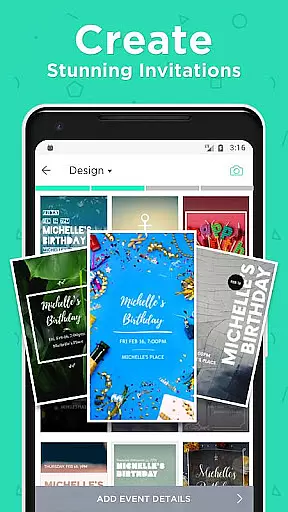
Hobnob is a premier invitation card maker that allows users to create stunning, personalized invitations in seconds for any event type. Whether you're planning a wedding, birthday party, baby shower, or corporate event, Hobnob offers professionally designed templates that are fully customizable with unique background images, videos, fonts, and colors.
One of the standout features of Hobnob is its ability to save users significant time by automatically adjusting design elements to fit event details. The app also simplifies the process of sending out invitations digitally, tracking RSVPs, and managing event attendance without requiring guests to download an app. This makes it an ideal solution for anyone looking to streamline event planning while maintaining a professional touch.
With recognition from Google and a variety of practical uses, Hobnob ensures that even users with no design skills can craft beautiful invitations that leave a lasting impression on their guests.
Hobnob stands out due to its comprehensive set of features tailored to simplify event management. First, the app provides a vast array of professionally crafted templates suitable for various events, including weddings, birthdays, showers, and holidays like Christmas and Thanksgiving. Each template is fully customizable, allowing users to add custom images, videos, fonts, and colors to match their event theme.
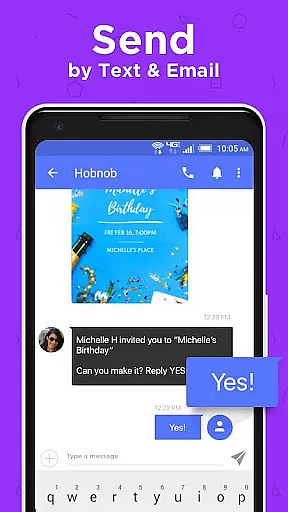
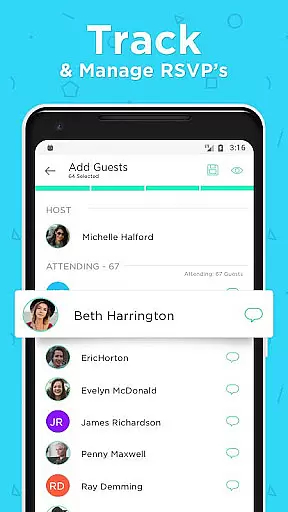
In addition to design capabilities, Hobnob excels in guest management. After creating an invitation, users can send it via text, email, or social media. The app tracks RSVP responses through a custom website created for each event, ensuring real-time updates. Automatic reminders help maximize attendance, and guests receive event directions a day before the occasion.
Hobnob's key advantage lies in its seamless integration of design and functionality, making it possible for users to handle all aspects of event planning within a single platform. Its user-friendly interface and time-saving features make it an invaluable tool for both casual planners and professional hosts.
Creating and customizing tasks within an event planning app like Hobnob is crucial for organizing successful events. This functionality allows users to define specific actions or steps needed to execute an event seamlessly.
Hobnob excels in this area by offering a comprehensive invitation creation tool. Users can choose from various professionally designed templates tailored to different types of events, such as weddings, birthdays, and corporate gatherings. The app enables customization of background images, videos, fonts, colors, and text positioning, ensuring each invitation is unique and matches the event's theme.
The benefit to users is significant time savings and enhanced creativity. By automating design adjustments based on the event details, Hobnob eliminates the need for manual tweaking, allowing users to focus on other aspects of event planning. This feature not only simplifies the process but also enhances the aesthetic appeal of invitations, making them look professionally crafted without requiring any design skills.
Ultimately, the ability to create and customize tasks in Hobnob empowers users to produce stunning, personalized invitations quickly and efficiently, elevating the overall event experience for both organizers and guests.
Reminder settings in event management apps play a vital role in ensuring that all participants are well-informed and prepared for upcoming events. These notifications help maintain engagement and prevent missed attendance by providing timely updates and prompts.
Hobnob incorporates advanced reminder functionalities that enhance event coordination. Once invitations are sent out via text, email, or social media, the app automatically tracks RSVP responses. It sends reminders to guests who haven't yet responded, ensuring maximum participation. Additionally, a day before the event, attendees receive a reminder containing essential details and directions, facilitating smooth logistics.
For users, these features translate into increased reliability and convenience. Automatic RSVP tracking and reminders reduce the administrative burden on event hosts, allowing them to concentrate on more critical tasks. Guests appreciate the timely updates, which keep them informed and engaged throughout the planning process.
In summary, Hobnob's reminder settings significantly improve event management efficiency, fostering better communication and organization between hosts and guests, ultimately leading to more successful and enjoyable events.
User-friendly interface
Customizable templates
Automatic RSVP tracking
No design skills required
Time-saving features
Limited free features
Premium subscription costs
Occasional glitches
Requires internet connection
Guest access limited to web

An App for Bhutanese
 4.0
4.0
Create Birthday Cards in Birthday Invitation Maker and Birthday Card Creator App
3.00
No invest, Easy way to earn USDT through crypto cloud mining
3.80
Beautiful invitation cards + easy RSVP tracking for any event. Design Invites.
4.80
Invitation Card Maker, Design & share wedding, birthday & party invites fast
4.40
Freebie Games for Epic Games, Steam, Amazon, Rockstar etc.
4.40
Plan your wedding for free on the go: vendors, budget, website and checklists!
4.80
Find Live Event Ticket Deals to Sports, Concerts, Festivals, & Comedy For Less!
4.80
Buy and sell tickets to sports, concerts, theater, festivals, and comedy events
4.10
Discover events, experiences, and things to do near you - Anytime, Anywhere!
4.70
The Ultimate Tournament Hub
4.70
For weddings, parties & events
4.60
Fast Scans. Happy Fans. For Every Hometown!
4.60
The world's largest selection of tickets is now at your fingertips
3.90
Local events, contests, and giveaways for local dads
3.70
Audio guide companion APP for SEE's Michelangelo's Sistine Chapel
3.50
The Official App
4.3
It is an Event Planning Application.
4.1
Thanksgiving Wishes, Thanksgiving Stickers & Animated GIF for Whatsapp Stickers
4.3





User Reviews