
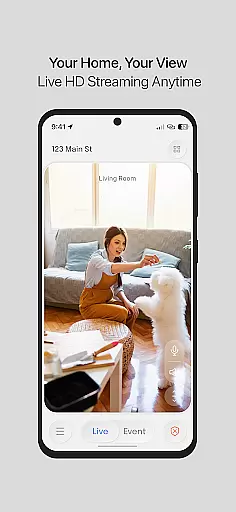
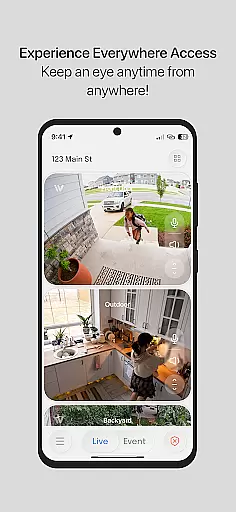
InstaVision is a comprehensive home security solution that goes beyond traditional monitoring systems. The app provides users with HD live video streaming, allowing them to keep an eye on their home and surroundings with high-definition clarity in real-time. With two-way audio functionality, users can communicate directly through the app, reinforcing their home's protective layer. For those seeking advanced features, InstaVision offers a Smart Security plan that includes AI-powered event tagging, enhanced user sharing with custom permissions, and secure cloud storage for event videos up to 30 days.
This application is designed specifically for American households by leading experts in the USA. It ensures top-notch security and privacy standards, making it an ideal choice for individuals looking to fortify their home security. Whether you need basic monitoring or advanced AI insights and alerts, InstaVision caters to all levels of security needs.
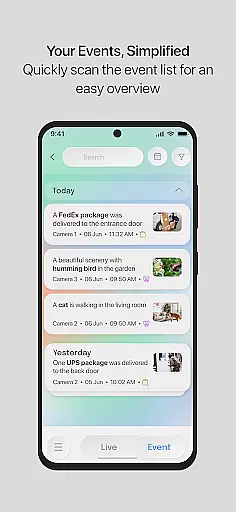
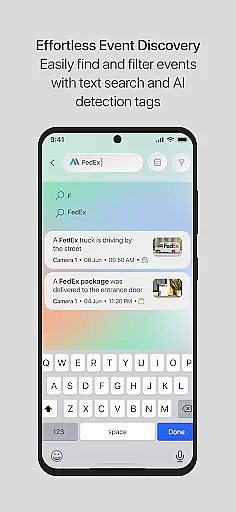
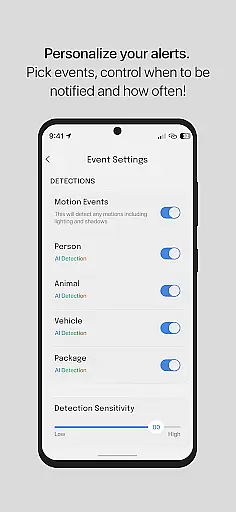
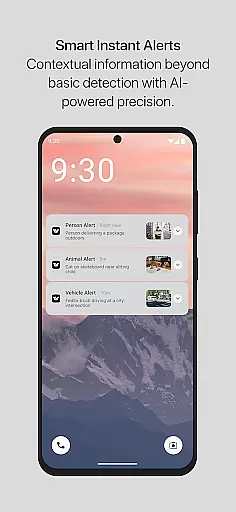
InstaVision stands out with its robust feature set tailored for home security. The live HD video streaming delivers crystal-clear images, ensuring every detail is captured in real-time. Two-way audio allows users to interact remotely, adding another layer of security. The Smart Security plan enhances this experience further with AI-driven event tagging, which categorizes movements such as people, vehicles, or animals, providing relevant alerts along with video clips.
Additional features include enhanced user sharing, enabling multiple users to access cameras with customized permissions, and secure cloud storage for event videos lasting up to 30 days. Developed by American experts, InstaVision prioritizes data security and privacy, storing information securely within the USA. These features collectively offer a complete suite of tools designed to provide peace of mind and superior home protection.
InstaVision provides a comprehensive suite of security tools that ensure the authenticity and reliability of your home monitoring. With features like HD live video streaming and two-way audio, users can trust the accuracy of the information they receive about their property.
The app's state-of-the-art AI technology detects and categorizes specific movements, such as people or vehicles, delivering real-time alerts with relevant video clips. This advanced event tagging system ensures that users are always informed about genuine activities around their home.
All data is securely managed and stored within the USA, reflecting InstaVision's dedication to safeguarding personal information with the highest standards of protection. This commitment to security ensures that property listings and updates provided through the app are both timely and trustworthy.
Beyond basic monitoring, InstaVision offers enhanced home management features that allow users to fortify their home security effectively. The Smart Security plan includes advanced AI-powered functionalities such as motion tagging and event snapshots, providing deeper insights into home activities.
Users can share camera access with multiple family members or friends, each with custom permissions, creating a collaborative approach to home safety. This feature enables teams to manage home security efficiently, offering peace of mind to homeowners.
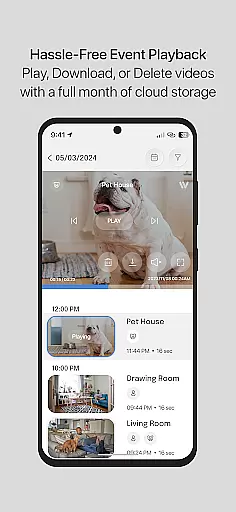
Additionally, secure cloud storage for event videos ensures that important footage is available for review and download for up to 30 days. These robust home management capabilities make InstaVision an invaluable tool for maintaining a safe and well-monitored living environment.
Advanced AI features
Secure cloud storage
Custom user permissions
HD live streaming
Two-way audio communication
Premium features require subscription
Limited free storage
High system requirements
Occasional connectivity issues
Complex setup process

Universal TV remote Control for Roku TV brands via WiFi remote
 4.5
4.5
Wobble Fix Tool
4.40
Design house plans in 2D & 3D, style furniture, and preview renovation layouts
3.70
Our app allows Sunrun customers to monitor systems, pay bills, and get support.
3.80
IP camera view and playback, for your WiFi cam or home security cctv system.
3.70
Floor Plan Creator Home Design with 2D interior design and 3d view.
3.90
AI Home Designer & Room Planner: Decorate your interior space with AI
4.40
View houses and apartments for rent, updated daily.
4.80
Universal Tv Remote Control for all Tv. Cast for chromecast & all Tv Controller
4.20
Real estate app to find homes for sale or rent in the right neighborhood for you
4.70
B-hyve Pro App for landscape irrigation professionals
4.70
Search for Homes, Rentals, Agents & Schools
4.70
Tailored Care Guides For Houseplants, Indoor Plants, Garden Plants & Flowers.
4.60
Innovative and budget-friendly housing options
4.60
AI-powered home design, interior design, home decor, and room design solutions
4.50
Book your local plumber 24/7, track your service order & get exclusive coupons
4.00
Find the perfect paint color with advanced tools to explore and visualize color.
3.80
This Fire TV Remote control's your Fire TV Device and Insignia Fire TV Remote
3.70
Use Home by ShowingTime to easily manage showings, tours, feedback and more
3.60




User Reviews