
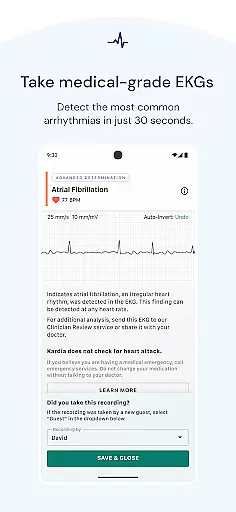
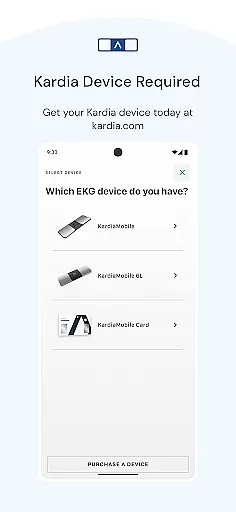
Kardia is a medical-grade mobile application designed to work seamlessly with FDA-cleared personal EKG devices such as KardiaMobile, KardiaMobile 6L, and KardiaBand. This app allows users to capture EKG recordings in just 30 seconds without the need for patches, wires, or gels. The primary function of Kardia is to provide an immediate analysis of heart rhythms, detecting conditions like atrial fibrillation, bradycardia, or tachycardia.
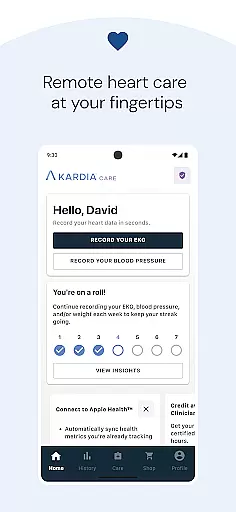
One of the standout features of Kardia is its ability to facilitate remote healthcare management. Users can easily record their EKGs at home, share the data directly with their doctors, and keep track of their heart health history over time. This makes it an invaluable tool for individuals who require regular monitoring of their cardiac conditions. With recommendations from leading cardiologists worldwide, Kardia ensures that your heart data is both accurate and reliable.
Kardia offers a range of sophisticated features tailored for comprehensive heart care management. One of its core functionalities is the Instant Analysis feature, which provides immediate results categorizing heart rhythms as normal or indicative of possible atrial fibrillation, bradycardia, or tachycardia. This instant feedback empowers users to take timely action based on their heart health readings.
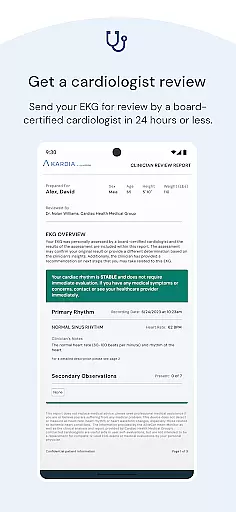
In addition to capturing EKGs, Kardia allows users to send their recordings to physicians for further evaluation. For those seeking expert opinions, the app facilitates Clinician Reviews by certified cardiologists in the US and Australia, and cardiac care physiologists in the UK and Ireland. These features ensure that users receive professional insights into their heart health without needing to visit a clinic physically.
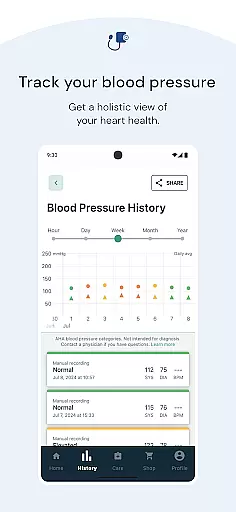
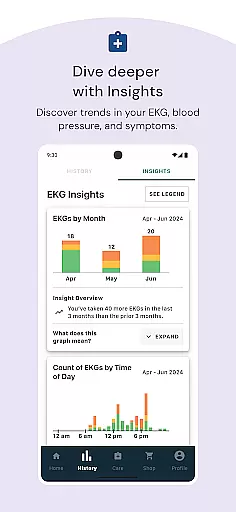
The app also includes tools for tracking health history, making it easier for users to monitor changes in their heart condition over time. By integrating these advanced capabilities, Kardia delivers a seamless and reliable solution for managing cardiovascular health from the comfort of one's home.
When it comes to heart health, the accuracy and reliability of medical information are paramount. Kardia app, paired with FDA-cleared personal EKG devices like KardiaMobile and KardiaBand, ensures that users receive credible data about their heart condition. The app's Instant Analysis feature provides immediate results on normal heart rhythms or potential arrhythmias such as atrial fibrillation, bradycardia, or tachycardia.
The collaboration with leading cardiologists worldwide adds another layer of trust to the Kardia system. Users can send their EKG recordings to a physician or opt for a Clinician Review by a cardiologist in the US and Australia or a cardiac care physiologist in the UK and Ireland. This service bridges the gap between home monitoring and professional medical advice, ensuring expert oversight on your heart data.
By tracking heart health from home, patients gain a tool that not only empowers them with knowledge but also aligns with the trusted standards of healthcare professionals. The Kardia app exemplifies how expert-reviewed medical content can be integrated into a user-friendly mobile application, making it an essential part of personal health management.
Kardia app revolutionizes the way patients interact with their healthcare providers by offering seamless teleconsultation services. With the ability to remotely share EKG data and other heart health information with doctors, the app facilitates high-quality virtual consultations. This is particularly beneficial for individuals who require regular monitoring but may face challenges in visiting their healthcare provider frequently.
The app's compatibility with Kardia devices ensures that the shared data is of medical-grade quality, which is crucial for accurate diagnosis and treatment planning during teleconsultations. By providing clear and reliable heart data, Kardia enhances the communication between patients and physicians, allowing for informed discussions about the user's cardiac status and necessary interventions.
Moreover, the option to have EKG recordings reviewed by certified professionals adds significant value to the teleconsultation experience. Whether seeking a second opinion or professional analysis, users can rely on Kardiau2019s network of experts to deliver quality feedback, thus supporting better health outcomes through improved remote healthcare interactions.
User-friendly interface
Accurate EKG readings
Instant heart analysis
Remote doctor sharing
Health history tracking
Requires separate hardware
Limited clinician review regions
Premium features cost extra
No automatic health alerts
Dependent on device quality

World's largest contact lens store
 4.60
4.60
Control your hearing aids discreetly with the touch of a finger
4.30
Manage your prescriptions and pharmacy care anytime, anywhere.
4.80
Manage your prescriptions anytime, anywhere with the Publix Pharmacy mobile app.
4.80
Pelvic Floor Muscle Exercises
4.80
Your pocket guide to following The Monash University Low FODMAP diet.
4.20
Donating plasma just got easier with the BioLife Plasma Services mobile app.
3.90
Update medical records, view upcoming appointments, message your provider & more
3.80
Manage your healthcare through the FollowMyHealth® Universal Health Record.
4.80
CPR Timer for High Performance AHA BLS / ACLS
5.00
myVCA is your tailor-made guide to raising a healthy and happy pet.
4.90
Search by insurance, see real-time openings & verified reviews, get care fast.
4.80
Amplify surrounding sounds, conversations, TV or lectures for louder hearing.
4.70
Adaptive-learning flashcards and quizzes for the Top 250 Drugs
4.60
Radiographic Positioning Guide for Medical Imaging Professionals and Students
4.50
The official DSM-5-TR® app
4.50
Manage your health care in one easy place
4.40
Over 1,200 review questions and 5 exams—pass the NREMT with EMT Review Plus!
4.10
Good for You. Great for Life.
4.00




User Reviews