
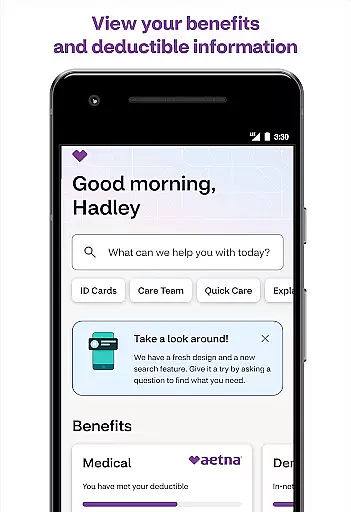
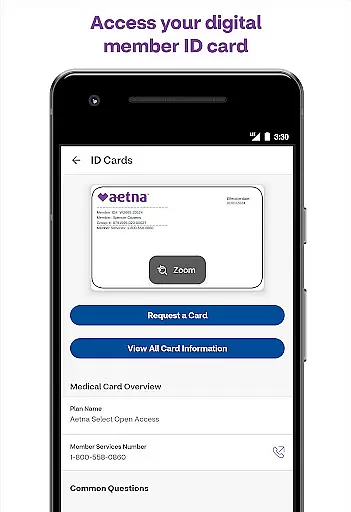
Aetna Health is a comprehensive medical application designed to help users manage their healthcare benefits effectively. With this app, you can access your ID card, track spending, and monitor progress towards meeting your deductible. It also allows you to check on various health accounts such as Health Savings Account (HSA), Health Reimbursement Account (HRA), and Flexible Spending Account (FSA).
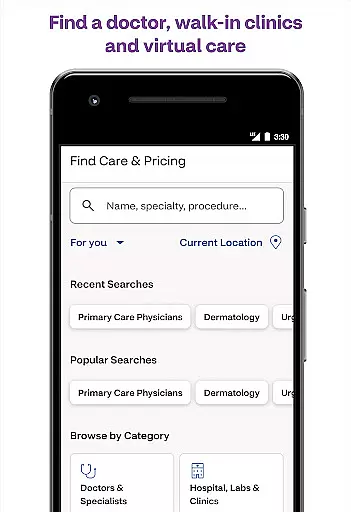
Additionally, the app provides features for connecting to care. You can easily find in-network doctors, facilities, and other providers. The app also supports scheduling appointments at MinuteClinic locations inside select CVS Pharmacy and Target stores. Furthermore, it offers telemedicine services, enabling you to talk with a doctor anytime by phone or video.
This app is particularly useful for Aetna members who want to take charge of their health and benefits conveniently from their mobile devices. By consolidating all these functionalities into one platform, Aetna Health ensures that users have 24/7 access to their health information, making it easier to stay on top of their health needs.
Aetna Health stands out due to its rich array of features tailored to enhance user experience in managing healthcare benefits. One of the key features is the ability to access your digital ID card instantly, which eliminates the need to carry a physical card. This feature alone saves time and reduces hassle during doctor visits or pharmacy trips.
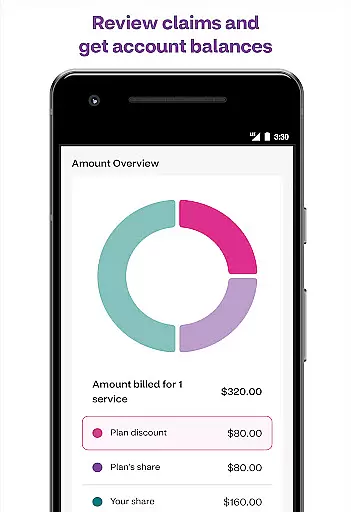
The app also excels in financial tracking capabilities. Users can track their spending and monitor how close they are to meeting their deductible. Moreover, checking balances and transactions related to HSAs, HRAs, and FSAs is straightforward, providing transparency and control over healthcare finances. Detailed plan summaries and coverage information further empower users to make informed decisions about their healthcare expenses.
Another significant aspect is the connectivity to care services. Finding in-network providers, scheduling appointments at MinuteClinics, and accessing telemedicine consultations via phone or video are seamlessly integrated. These features ensure that users receive timely medical attention without unnecessary delays, enhancing overall healthcare accessibility and convenience.
In the realm of digital health solutions, the credibility of medical content is paramount. The Aetna Health app excels in this area by providing users with accurate and reliable health information curated by healthcare professionals. This ensures that members can make informed decisions about their health and benefits.
The app offers access to a wide array of features designed to keep you informed about your healthcare options. For instance, it allows you to view your plan summary and get detailed coverage information. Additionally, you can easily check on your various healthcare accounts such as Health Savings Account, Health Reimbursement Account, and Flexible Spending Account, which are essential for managing out-of-pocket medical expenses.
Furthermore, the Aetna Health app provides comprehensive tools for tracking your healthcare spending and monitoring your progress toward meeting deductibles. With just a few taps, you can stay updated on your claims and Explanation of Benefits, ensuring transparency and clarity in your healthcare financials. This level of detail empowers users to take charge of their health finances confidently.
Teleconsultation has become an integral part of modern healthcare, offering convenience and accessibility. The Aetna Health app stands out by facilitating high-quality teleconsultations, allowing users to consult with doctors anytime via phone or video calls. This feature significantly enhances the user experience by providing timely medical advice without the need for physical visits.
Besides virtual consultations, the app also enables users to find in-network doctors, facilities, and other providers effortlessly. It includes a convenient search function for MinuteClinic locations and services within select CVS Pharmacy and Target stores, streamlining the process of accessing care when needed. Moreover, scheduling appointments at these clinics is straightforward, further enhancing the accessibility of healthcare services.
Overall, the Aetna Health app's robust teleconsultation capabilities ensure that users receive prompt and professional medical attention. By integrating these features seamlessly into the platform, the app not only meets but exceeds expectations for remote healthcare delivery, making it a valuable tool for managing personal and family health needs efficiently.
User-friendly interface
Comprehensive benefit management
24/7 access to health information
Integrated telemedicine services
Convenient appointment scheduling
Limited to Aetna members
Feature availability varies by plan
No offline functionality
Potential privacy concerns
Occasional technical issues

Spruce is the leading platform for HIPAA-compliant communication and care.
 4.90
4.90
A scientifically-proven method to help people with dementia or memory impairment
4.0
Secure video visits with your VA care team from anywhere
4.50
OKN Strips, OptoDrum, OKN
4.5
Good for You. Great for Life.
4.00
Assess and treat left neglect more effectively in stroke and brain injury rehab.
4.30
Voice pitch monitor for speech therapy, LSVT, Parkinson's, singing & trans
4.30
The doctor will see you now
4.70
Get Rx fast at the pharmacy, schedule health care, and shop ExtraCare savings.
3.30
Manage your prescriptions and pharmacy care anytime, anywhere.
4.80
Manage your prescriptions anytime, anywhere with the Publix Pharmacy mobile app.
4.80
Health Care at Your Fingertips
4.60
World's largest contact lens store
4.60
PPP provides quick offline access to over 350 field treatment protocols.
4.60
The Omada app enhances your program experience and helps you stay engaged.
4.50
Radiographic Positioning Guide for Medical Imaging Professionals and Students
4.50
Explore human anatomy with this rich learning experience.
4.00
Conveniently receive lab results, schedule lab appointment and pay your bills
3.70
Care Simplified by MyChart
3.40




User Reviews