
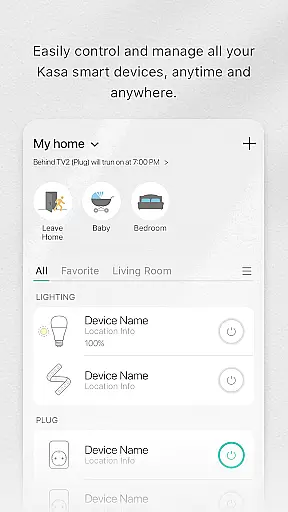
Kasa Smart is a comprehensive home automation application designed specifically for TP-LINK smart devices. This app allows users to remotely manage their smart home ecosystem, including smart plugs, switches, power strips, bulbs, cameras, routers, and range extenders. With its intuitive interface, Kasa Smart makes it easy to control connected devices from anywhere in the world.
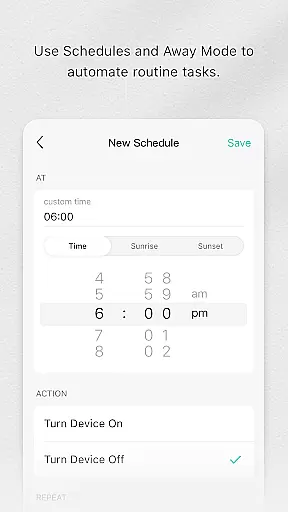
The core functionality of Kasa Smart revolves around remote device management, scheduling, and security features. Users can create customized schedules for their smart devices, ensuring optimal energy efficiency while maintaining convenience. The app's Away Mode feature provides an additional layer of home security by simulating occupancy through programmed device activation. These capabilities make Kasa Smart particularly valuable for homeowners looking to enhance their living space with smart technology.
Kasa Smart distinguishes itself through several key features that enhance the smart home experience. The app's primary strength lies in its seamless integration with a wide range of TP-LINK smart devices, offering users centralized control over their entire smart home ecosystem. Its scheduling capabilities allow for precise timing of device operations, enabling users to automate routine tasks and conserve energy.
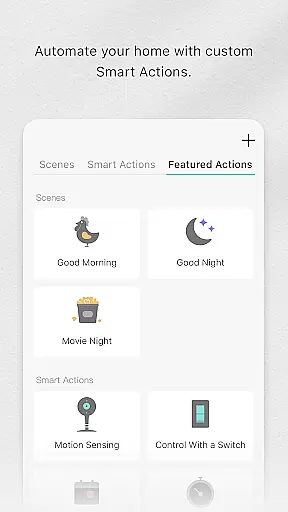
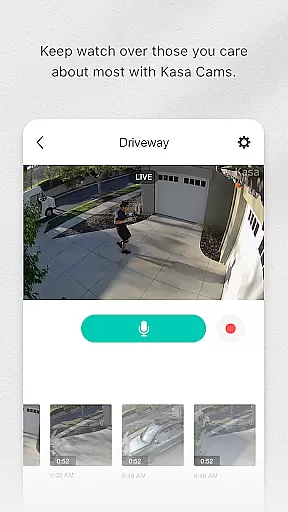
Security-conscious users will appreciate the advanced monitoring features, including real-time camera feeds and motion detection alerts. The app also supports detailed customization options, allowing users to create personalized scenes and automation rules. Additionally, Kasa Smart's energy monitoring feature provides valuable insights into power consumption patterns, helping users make informed decisions about their energy usage. These features collectively contribute to a more efficient, secure, and comfortable living environment.
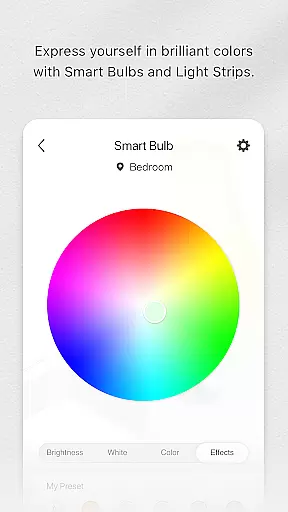
Kasa Smart by TP-LINK offers a comprehensive range of smart home devices that cater to various lifestyle needs. The app supports an extensive lineup including smart plugs, switches, power strips, bulbs, IP cameras, routers, and range extenders.
With this wide selection, users can automate and control multiple aspects of their home environment. Whether it's managing lighting, securing the home with cameras, or optimizing network coverage, Kasa Smart ensures all essential areas are covered.
The ability to schedule appliances and set them to Away Mode adds an extra layer of convenience and security. This feature-rich ecosystem allows users to create a personalized smart home experience tailored to their daily routines.
The Kasa Smart app provides authentic and reliable content through its integration with TP-LINK's official smart home devices. Each connected device is verified to ensure it meets the brand's quality standards.
Users can trust the accuracy of the information displayed within the app, as it comes directly from TP-LINK's certified product lineup. This includes real-time status updates and control options for each connected device.
Furthermore, the app's functionality is backed by TP-LINK's expertise in networking and smart home technology. This professional support gives users confidence in their smart home investments and ensures a seamless experience when managing their devices.
User-friendly interface
Comprehensive device compatibility
Advanced scheduling options
Remote access capabilities
Energy monitoring tools
Limited third-party integration
Requires stable internet connection
Occasional connectivity issues
No voice assistant support
Basic automation features

The all-new Cync app. The simple, connected app for Cync and C by GE.
 4.50
4.50
A watch face with transparency and fluid visuals inspired by liquid glass design
4.0
Paranormal EVP, Ghost Box, Spirit box, ITC, Haunted, Spirit communication device
3.70
Play. Earn. Repeat. Get rewarded for playing mobile games. Welcome to Mobius!
4.80
See wait times and check into a hair salon ahead of time with Online Check-In.
4.80
SmartHQ: Your Connected Home Command Center
4.10
Futuristic watchface inspired by Back to the Future: sleek, retro, timeless
4.5
Your store’s deals, where you are.
4.80
AAA Mobile provides on-the-go access to the services you know and trust.
4.60
My Diary - Daily Journal with lock: Diary journal app and secret diary with lock
4.80
Countdown to Christmas 2025 with festive games & activities in a virtual village
4.80
The Work of Byron Katie— the mobile app for inner peace.
4.40
Zodiac & Horoscope Launcher: Daily Sign Predictions & Astrology
4.40
Smart home security protection
3.20
The Miracle Box includes methods used by Steve Huff of Huff Paranormal.
3.20
Designed to delight, impress and energize your festive spirit every single day
4.5
Duo Watch Face (animated)
4.1
Bring the warm colors of fall directly to your wrist with Autumn Leaves!
4.0
Customize your Wear OS watch with festive Christmas figures and colors!
4.2




User Reviews