
Lithium Pro is an advanced upgrade package for the free Lithium app, designed specifically for book enthusiasts who want enhanced functionality and customization options. This app unlocks exclusive Pro features within the main Lithium application, offering users a more personalized reading experience.
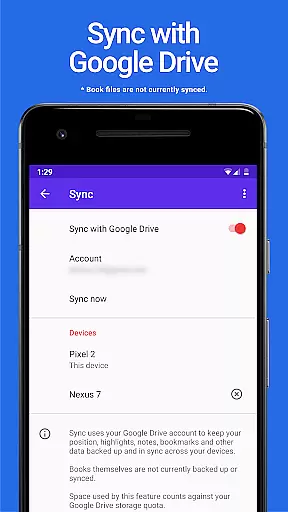
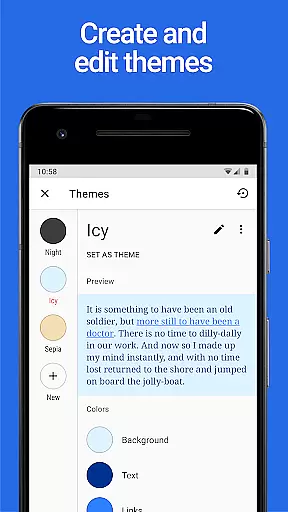
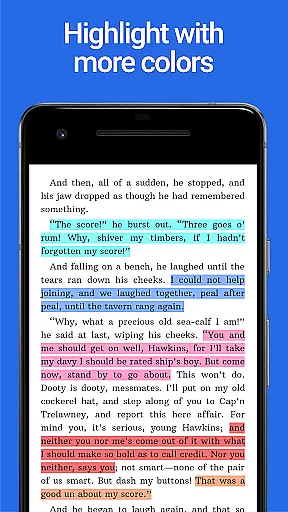
Key features include automatic data synchronization across devices through Google Drive, allowing seamless continuity in your reading experience. Additionally, users can create custom themes with personalized background and text colors, making reading more comfortable and visually appealing. The app also provides extended highlight color options, giving readers more ways to annotate and organize their content effectively.
Ideal for avid readers and students, Lithium Pro transforms the standard reading app into a powerful tool for better comprehension and organization. By upgrading to Pro, users gain access to premium features that enhance both productivity and enjoyment while reading digital content.
The Lithium Pro app offers several distinctive features that set it apart from standard reading applications. First and foremost is the Sync functionality, which uses Google Drive to keep all user data synchronized across multiple devices. This ensures that bookmarks, notes, and reading progress are always up-to-date regardless of which device you're using.
Another prominent feature is the custom themes capability. Users can personalize their reading interface by adjusting background colors, text colors, and link colors. This level of customization allows for a more comfortable reading experience, especially during extended sessions or in varying lighting conditions. The ability to create, delete, and edit these themes gives users complete control over their visual preferences.
Additionally, Lithium Pro expands the available highlight colors for annotations. This feature enables readers to use different colors for categorizing notes and highlights, making it easier to review and study complex materials. These enhanced annotation tools provide greater flexibility and efficiency when working with digital texts.
When it comes to digital reading, the size and authenticity of an e-book library are crucial factors for avid readers. Lithium Pro understands this need and offers a seamless solution through its Sync feature. By leveraging your Google Drive account, the app ensures that your entire e-book collection is securely backed up and kept in sync across all your devices.
This synchronization capability guarantees that you have access to your full library wherever you go. Whether you switch between your phone, tablet, or any other device, your books will always be there, ready for you to dive into. This not only enhances accessibility but also provides peace of mind knowing that your valuable e-books are safely stored in the cloud.
While the app currently does not support backing up or syncing the book files themselves, the convenience of having your reading progress and library metadata synchronized is a significant advantage. This feature allows you to pick up right where you left off, regardless of which device you're using.
The assurance of copyright authenticity is another vital aspect of Lithium Pro's offering. By maintaining a legitimate and well-organized e-book library, users can trust that their reading materials are obtained through proper channels, supporting authors and publishers while enjoying a wide selection of quality content.
For an optimal reading experience, format compatibility plays a pivotal role in ensuring that e-books display correctly across various devices. Lithium Pro excels in this area by supporting a wide range of e-book formats, allowing users to enjoy their favorite books without worrying about formatting issues.
In addition to basic format support, Lithium Pro offers advanced customization options through its Pro features. One standout feature is the ability to create custom themes, giving readers control over their page background color, text color, and link colors. This level of personalization enables users to tailor their reading environment to their specific preferences and needs.
The app goes beyond simple theming by providing more highlight colors, as showcased in the screenshots. This enhancement allows readers to annotate and organize their notes with greater precision and clarity. The additional highlight colors make it easier to categorize important information and quickly identify key passages during review sessions.
Looking forward, Lithium Pro promises even more features to further enhance format compatibility and reading customization. These ongoing developments demonstrate the app's commitment to providing a comprehensive and adaptable reading experience that caters to diverse user preferences and technological advancements in e-book formats.
Enhanced customization
Seamless cross-device sync
Extended highlight options
Premium reading experience
Google Drive integration
Requires separate app
No book backup
Higher cost
Limited free features
Complex setup

The Original Tropical Freshwater Aquarium Fish And Plant Care Guide
 4.80
4.80
The Bible Audio Guide
4.80
Powerful Bible study tools linked to every verse in an easy-to-use Bible reader!
4.60
Plan of Life that Saint Josemaría recommended
4.80
Words spoken by native English speakers and full definitions.
4.60
Discover Stars and Planets: Live Map Shows Current Constellations in Full Detail
4.70
Scan. Price. Grade.
4.60
"When tweetle beetles fight, it's called a tweetle beetle battle."
4.90
Read the Quran in Arabic alongside its translation, with color coded Tajweed.
4.50
King James Bible read offline, AI Priest, Bible Quiz, Guiding Prayers & Plans
4.80
"Do you like green eggs and ham?"
4.70
Daily Devotional Widgets & Hourly Verses. Listen to Bible & Watch Holy Stories
4.70
Mirror Bible - eye-opening paraphrase translation of the NT by Francois du Toit
4.30
Improve your vocabulary and grammar with the 15 biggest Oxford Dictionaries.
4.30
Zerobooks Light Novel Reader by GOLDENAGATO
4.20
A story reading app: Read stories, novels and books, or write your own.
3.90
All in one Calibre libraries on your phones and tablets.
3.80
Sea tide predictions for all coastal U.S. locations.
4.0
University of North Carolina Herbarium presents the flora of TN, AL, & MS.
4.3



User Reviews