
NES.emu is an advanced open-source NES emulator, also known as Famicom in Japan. It is based on FCEUX and features a minimalist UI with a focus on low audio/video latency. The app supports a wide variety of devices from the original Xperia Play to modern devices like the Nvidia Shield and Pixel phones.
With its powerful emulation capabilities, NES.emu allows users to enjoy classic NES games on their Android devices. The app supports various file formats including .nes and .unf, optionally compressed with ZIP, RAR, or 7Z. It also offers Famicom Disk System emulation using .fds files and VS UniSystem support. Users can customize their gaming experience with configurable on-screen controls and Bluetooth/USB gamepad & keyboard support.
Whether you are a nostalgic gamer or new to the world of NES, NES.emu provides an authentic and immersive gaming experience on your Android device.
NES.emu boasts a range of impressive features that enhance the gaming experience. Firstly, it supports multiple file formats such as .nes, .unf, and .fds, allowing users to play a wide variety of NES games. The app also offers Famicom Disk System emulation, providing access to exclusive Japanese games.
In addition, NES.emu includes VS UniSystem support, enabling users to insert coins and play arcade-style games. The app also supports Zapper/Gun functionality, allowing users to fire by touching the screen and simulate firing away from the TV by touch & hold outside of the display area.
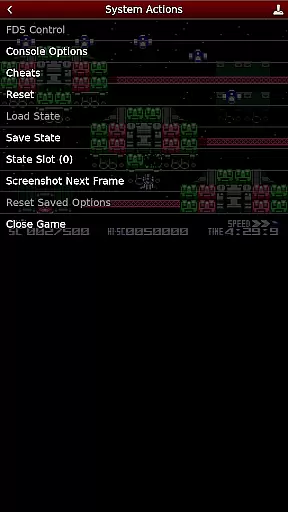
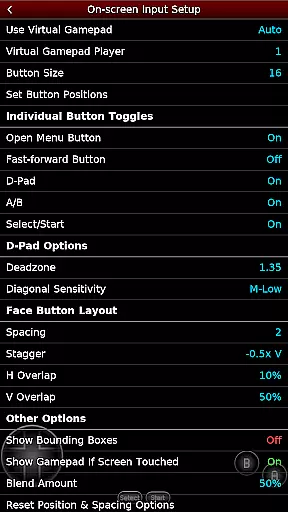
Furthermore, NES.emu offers customizable on-screen controls, giving users the freedom to adjust button placements according to their preferences. It also supports Bluetooth/USB gamepad & keyboard input, compatible with any HID device recognized by the OS, including Xbox and PS4 controllers.
Arcade authenticity and nostalgia are central to the NES.emu experience, offering users a genuine trip down memory lane. This emulator meticulously replicates the original NES console's hardware, ensuring that classic games run as they were intended, with all the quirks and characteristics of the era preserved.
The app supports a wide array of game formats including .nes, .unf, and Famicom Disk System files, allowing enthusiasts to relive their favorite moments from the golden age of arcade gaming. The inclusion of VS UniSystem support further enhances this nostalgic journey, providing an authentic coin-op experience right at your fingertips.
For those who remember the joy of gathering around a TV with friends, NES.emu brings back the essence of those times with its precise emulation capabilities. Users can enjoy not just the gameplay but also the original graphics and soundtracks, transporting them back to countless hours spent in arcades or at home.
Control responsiveness is a critical feature of NES.emu, ensuring that every action is accurately reflected in-game without delay. This precision is vital for maintaining the integrity of fast-paced arcade games where timing can be everything.
The emulator offers configurable on-screen controls that can be tailored to fit individual play styles, enhancing the overall user experience. Whether you prefer using touch controls or physical buttons, NES.emu provides seamless integration with Bluetooth and USB gamepads, including popular models like Xbox and PS4 controllers.
This adaptability extends to advanced features such as Zapper/Gun support, which allows users to interact with games through intuitive touch mechanics. By touching the screen to fire and holding outside the display area to simulate firing away from the TV, players can engage with light gun games as if they were using the original hardware.
Authentic NES gaming experience
Wide device compatibility
Customizable controls
Supports various file formats
Active development and issue reporting
No ROMs included
Requires user-supplied games
Complex setup for beginners
Limited touchscreen functionality
Occasional crashes reported

Three awesome new levels for The Impossible Game.
 4.30
4.30
Eat & evolve your shark in the ultimate shark survival game!
4.50
Mine & Craft Block Mini World! Survival Crafting and Building & Creative Online.
4.30
John GBC is GB/GBC emulator. This emulator is easy to use.
3.80
Absorb, or be absorbed...
4.70
Full featured version of Pizza Boy A (GBA emulator)
4.80
Outrun cops, ignite the thrill of a high-speed chase!
4.50
You control the ball! Dribble, shoot and score against eleven soccer players!
4.60
Thoughtful strategy and tactical thinking are required to win each battle!
4.30
*Try for free.* Survive alone in a Roguelike Reverse Bullet Hell.
4.80
Catch ghosts, shoot monsters and defeat bosses in this RPG idle shooting game.
4.70
R-TYPE game
4.60
Master the hills in this extreme downhill racing game!
4.60
Nostalgia.GBC is a high quality GBC emulator.
4.50
Enter Double Dragon Trilogy, a compilation of the beloved arcade series
4.10
Mine planets, upgrade your space ship, battle others, and dominate the galaxy!
3.90
It's quite possibly the world's hardest game!
3.90
Machine Gun Fire Rumbles in the Jungle
4.4
Infinite Arcade
4.5



User Reviews