
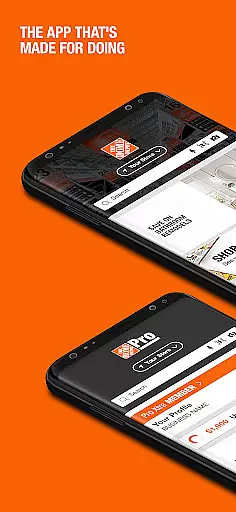
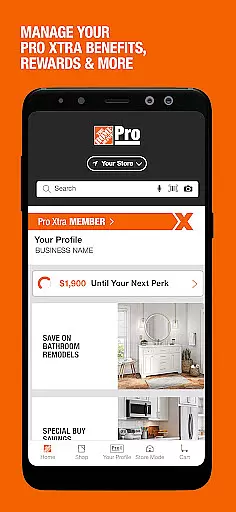
The Home Depot app is a comprehensive shopping tool designed for DIY enthusiasts and home improvement shoppers. With over one million products available, the app provides users with quick access to an extensive inventory while offering innovative features like Image Search and Product Locator.
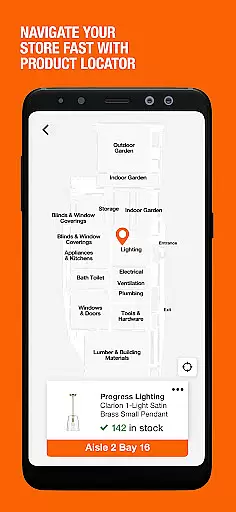
One of the standout capabilities is its ability to help users identify items through a simple photo snap, eliminating the guesswork when searching for specific products. Additionally, the built-in GPS-enabled Product Locator guides shoppers directly to the aisle and bay where their desired item is located, streamlining the in-store experience.
Whether you're looking to make informed buying decisions through Ratings & Reviews or seeking daily Special Buys, The Home Depot app serves as a valuable companion for both casual browsers and serious buyers alike.
The Home Depot app offers a variety of advanced features tailored to enhance the shopping experience. One of its key innovations is the Image Search functionality, which allows users to take a picture of any item and instantly find similar products within the app's catalog.
Another notable feature is the Product Locator, which uses GPS technology to guide users through the store by providing exact aisle and bay locations for desired products. This ensures that shoppers can efficiently navigate large stores without wasting time searching for items manually.
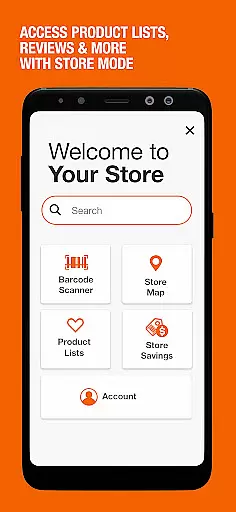
For those who value customer feedback, the app includes a barcode reader that lets users scan items and immediately view ratings and reviews from other customers. By combining these tools with real-time order tracking and instant checkout options via account registration, The Home Depot app delivers a seamless blend of convenience and practicality.
When it comes to shopping apps, product variety and clear categorization are essential for a seamless user experience. The Home Depot app excels in this area by offering over one million products that cater to various home improvement needs. Whether you're looking for tools, appliances, or gardening supplies, the app provides comprehensive categories that make browsing intuitive and efficient.
The app's structure allows users to easily navigate through different departments without feeling overwhelmed. Each category is thoughtfully organized, ensuring that similar items are grouped together. This logical arrangement helps customers quickly find what they need, saving valuable time during their shopping experience.
Beyond basic categorization, The Home Depot app incorporates innovative features like image search. This functionality enables users to snap a picture of an item they're interested in, even if they don't know its name. The app then identifies the product and directs them to similar items within the appropriate category.
This combination of extensive product selection and intelligent organization demonstrates The Home Depot's commitment to customer satisfaction. By providing such a well-structured shopping environment, the app ensures that both casual browsers and serious shoppers can efficiently locate and purchase the items they need for their home improvement projects.
Pricing transparency is crucial in building trust with customers, and The Home Depot app delivers exceptional clarity in this aspect. The app provides detailed pricing information for all products, including current prices, historical price trends, and any available discounts. This level of transparency empowers shoppers to make informed purchasing decisions without hidden surprises at checkout.
The Home Depot app goes beyond basic price display by incorporating several competitive pricing features. Users can access daily Special Buys directly from the home screen, offering significant savings on selected items. Additionally, the app allows customers to view their local store's weekly ad, ensuring they never miss out on nearby deals and promotions.
To further enhance price competitiveness, the app includes a barcode reader function. This feature enables shoppers to scan any product in-store and instantly compare its price with other retailers. The app also displays customer ratings and reviews alongside pricing information, providing valuable context for evaluating a product's value proposition.
By combining these pricing tools with real-time inventory data, The Home Depot app creates a powerful shopping platform. Customers can confidently purchase items knowing they're getting the best possible deal while having access to comprehensive product information and availability status.
User-friendly interface
Extensive product range
Innovative image search
Accurate product locator
Instant checkout option
Limited exclusive deals
Occasional bugs reported
Heavy app size
Account setup required
Some features are location-specific

World’s simplest mobile payment solution for machines.
 4.50
4.50
Trendy Athleisure Wear. Affordable Skirts, Leggings, Functional & All Sizes!
4.60
E-commerce Wholesale Marketplace: Shop and save on all your business supplies
4.40
Shop online premium refurbished electronics & trade in your old device for cash.
4.70
Scan receipts, earn gift cards & fetch rewards with the Receipt Pal scanner app.
4.00
Save up to 70% on the things you need every day
4.40
Earn Cashback and maximize your savings when you shop and book your travel plans
3.90
Get paid to shop groceries & more when you become an Instacart shopper.
4.20
Prescriptions, coupons, photos and shopping - it's all in the Walgreens app.
4.60
ALDI is your home for low prices on high-quality groceries and products.
4.70
Track all of your packages and online orders in one app - Amazon, FedEx, & USPS
4.70
The Live Shopping Marketplace
4.60
Healthy living for less just got easier with our updated Sprouts App.
4.50
Shopping easy, fresh, and affordable just got easier.
4.50
Earn and spend Shop Cash, boost balance & find top products from loved brands!
4.50
Shop. Earn. Redeem. Repeat!
4.30
Shop fashion, shoes, home, designer handbags, beauty & more on the Belk app.
4.00
Join a community of millions of members buying and selling second-hand items.
3.90
Grooming, Training & Shopping
3.80







User Reviews