
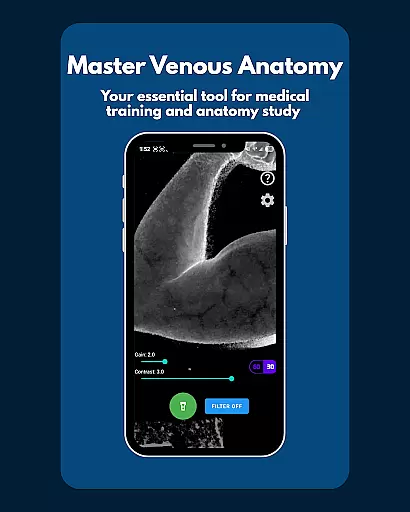
VeinFinder is an innovative educational tool designed to assist medical students and educators in mastering venous anatomy. Using advanced GPU-accelerated image processing, the app enhances vein visibility directly through your device's camera, eliminating the need for additional hardware. This makes it an invaluable resource for practical learning and teaching scenarios.
The app offers precise control over image settings such as gain and contrast, ensuring optimal vein visualization across different skin tones and lighting conditions. With its integrated flashlight feature, VeinFinder maintains consistent performance even in low-light environments. Whether preparing for exams or conducting classroom demonstrations, this app bridges the gap between theoretical knowledge and hands-on practice.
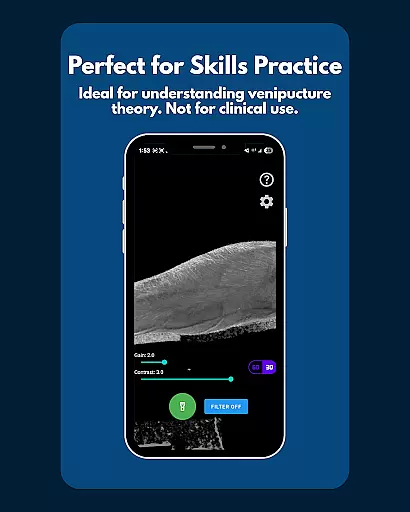
VeinFinder is particularly useful for students studying anatomy and physiology, as well as those learning venipuncture techniques. Its real-time imaging capabilities provide a clear understanding of IV access procedures, making it an essential companion for both academic and professional development.
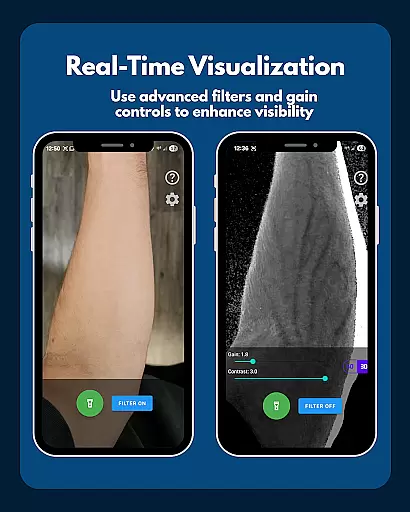
VeinFinder stands out with its array of specialized features tailored for medical education. The app's instant comparison function allows users to toggle between enhanced and raw camera views, facilitating a deeper understanding of venous structures. This feature is crucial for students who need to correlate textbook diagrams with real-life anatomy.
Precision control is another hallmark of VeinFinder, enabling users to fine-tune gain and contrast settings. This ensures that vein visualization remains accurate and clear, regardless of varying skin tones and environmental lighting. The app's built-in flashlight control further enhances usability by providing adequate illumination in any setting.
All image processing occurs locally on the device, guaranteeing user privacy and data security. VeinFinder is optimized for Samsung devices but remains compatible with most Android models. Regular updates continue to refine its performance, making it an indispensable tool for anyone involved in medical training or education.
VeinFinder stands out in the realm of educational tools by offering highly accurate and authoritative content for students and educators focused on anatomy and physiology. The app leverages advanced GPU-accelerated image processing to enhance the visibility of veins, providing a reliable resource for learning venous anatomy.
This technology ensures that users receive precise visual information directly through their device's camera without the need for additional hardware. Such precision is crucial for students preparing for exams or educators requiring a visual aid for classroom instruction. The app's ability to offer instant comparisons between enhanced views and raw camera feeds further solidifies its role as an essential study tool.
Moreover, VeinFinder allows users to fine-tune gain and contrast settings, optimizing visibility across diverse skin tones and lighting conditions. This level of control ensures that the educational content remains accurate and clear, regardless of external variables. By maintaining high standards of content accuracy, VeinFinder supports both theoretical understanding and practical application in medical training.
While VeinFinder does not offer traditional personalized learning paths like adaptive quizzes or tailored lesson plans, it provides unique features that cater to individual learning needs. Users can adjust the app's settings to suit their specific requirements, such as modifying gain and contrast to optimize vein visibility based on different skin tones and lighting conditions.
The app's integrated flashlight control is another feature that supports personalized learning experiences. This functionality ensures a consistent view in various environments, accommodating different study settings and preferences. Whether in a well-lit classroom or a dimly lit study room, learners can achieve optimal visualization of venous structures.
Furthermore, VeinFinder's focus on user privacy and data security enhances its value as a personalized learning tool. All image processing occurs locally on the device, ensuring that users' data never leaves their phone. This approach not only protects user privacy but also allows learners to use the app confidently in any setting, knowing their information remains secure.
User-friendly interface
Real-time vein enhancement
Customizable image settings
On-device data processing
Ideal for educational purposes
Performance varies by device
Not suitable for clinical use
Limited to educational context
Dependent on lighting conditions
Refund policy restrictions

Watch and Play Elmo's World!
 4.00
4.00
An aviator’s preparation, study and test tool for FAA Knowledge Exams.
3.90
Nighty Night Circus - Bedtime story for kids
4.10
Intuitive Transformer Lab - By a Lineman, For Linemen & Apprentices
4.50
Flashnote Derby is the fun way for kids to learn music notes and memorize them.
3.40
Your best partner for learning Japanese words. Based on a best-selling textbook.
2.80
Stack the Countries makes learning world geography fun!
4.50
Cool math games & learn to read activities- loved by kids, approved by teachers.
4.50
Plant identifier: Identify plants, trees, weeds, flowers. Disease diagnosis.
4.30
A realistic sky map to observe stars, planets, satellites and constellations!
4.80
AI Language tutor: Speak fluently with Lucy’s personalized coaching
4.70
Universe simulator: Find & explore planets system, outer space, astronomy events
4.60
2026 DVSA Driving Theory Test revision with Hazard Perception + Highway Code
4.60
Turn scrolling hours into improving your knowledge, communication, intelligence
4.50
The Only Official DVSA Theory Test Kit App
4.50
Astronomy Guide To Night Sky
4.30
The "Go To" app for Airmen studying for promotion to SSgt and TSgt
4.30
School Communication
4.30
AR planetarium app that brings the solar system to you via XREAL Glasses.
4.5



User Reviews