
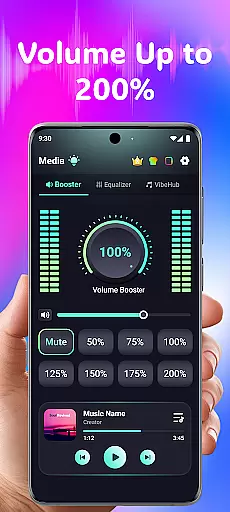
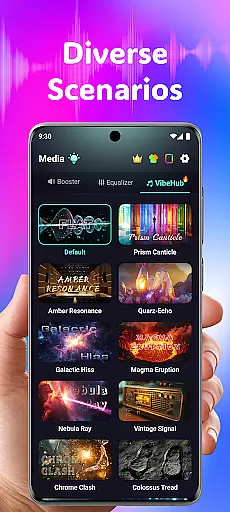
Volume Booster Bass Booster EQ is a powerful audio enhancement application designed to elevate your sound experience across various scenarios. The app's core functionality lies in its ability to amplify media volume up to 200%, making it an ideal solution for outdoor parties, movie watching, and gaming sessions where audio clarity is crucial.
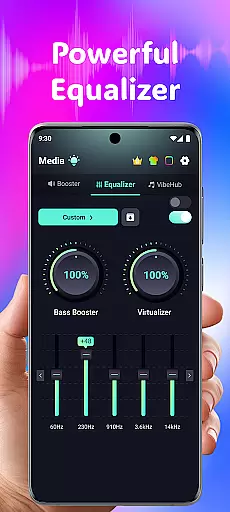
Beyond simple volume control, the application features an advanced 5-band equalizer that allows users to fine-tune their audio experience. With support for headphones, Bluetooth devices, and speakers, this medical-grade hearing assistance tool provides crystal-clear sound quality while offering specialized features like independent left and right ear adjustments and AI-powered noise reduction.
The app's versatility makes it particularly valuable for users with hearing difficulties or those who frequently find themselves in challenging listening environments. By combining entertainment-focused features with accessibility tools, Volume Booster creates a comprehensive audio solution that adapts to both recreational and medical needs.
The application boasts an impressive array of features that cater to diverse audio requirements. Its most notable capability is the Powerful Volume Boost function, which enables precise control over sound levels through Super Loud Volume Booster technology. This feature is complemented by Phone Volume Amplifier controls that ensure optimal audio output without distortion.
For audiophiles and casual listeners alike, the Advanced Equalizer stands out with its sophisticated 5-band system (60Hz, 230Hz, 910Hz, 3.6kHz, 14kHz). Users can enhance bass, adjust virtualization settings, and customize sound profiles for different media types. The inclusion of Vehicular Bluetooth Equalizer and 3D Surround Sound Effect further expands its utility across various devices and environments.
Accessibility features are equally impressive, with Independent Left & Right Ear Control providing asymmetrical hearing support. The Advanced Frequency Amplification spans six ranges from 125Hz to 8kHz, while Real-Time Noise Reduction employs AI technology to filter out unwanted background sounds. These medical-grade capabilities make the app particularly valuable for users requiring hearing assistance in public spaces.
In the realm of medical applications, content credibility is paramount. Volume Booster Bass Booster EQ addresses this by integrating advanced audio features that are not only innovative but also grounded in sound engineering principles. The app's equalizer settings and volume amplification controls have been designed with precision to ensure users can safely adjust their listening experience without compromising audio quality or safety.
The app includes an Advanced Hearing Mode, which offers independent left and right ear control, as well as frequency amplification across six distinct ranges. These features have been carefully calibrated to support users with varying hearing needs, ensuring that each individual can tailor their audio experience to their specific requirements. This level of customization reflects a deep understanding of auditory health and user-centric design.
Furthermore, Volume Booster Bass Booster EQ employs AI-powered real-time noise reduction, enhancing clarity without introducing artifacts or distortion. This feature has clear benefits for users who require enhanced speech intelligibility in noisy environments. By prioritizing both functionality and safety, the app demonstrates its commitment to delivering a credible and expert-reviewed solution for personal audio enhancement.
While Volume Booster Bass Booster EQ is primarily focused on audio enhancement, it indirectly supports teleconsultation quality through its robust feature set. Clear audio transmission is essential during teleconsultations, and the app's ability to amplify sound and reduce background noise ensures that every word is heard with precision. This creates a more reliable communication channel between healthcare providers and patients, improving overall consultation effectiveness.
The app's equalizer allows users to fine-tune audio frequencies, which can be particularly beneficial during teleconsultations where voice clarity is crucial. By emphasizing specific frequency ranges, such as those associated with human speech, the app helps ensure that important medical information is conveyed accurately and without distortion. This attention to detail enhances the quality of remote medical interactions.
Additionally, the inclusion of a Live Sound Recorder & Playback feature provides users with the ability to document consultations or important auditory information. This functionality serves as a valuable tool for both patients and healthcare professionals, allowing them to review discussions or capture critical auditory data. While not a traditional telemedicine platform, Volume Booster Bass Booster EQ contributes to better communication in digital healthcare settings through its thoughtful audio optimization features.
Powerful volume boost
Advanced equalizer options
Wide device compatibility
User-friendly interface
AI noise reduction
Potential hearing risk
Speaker damage possible
Complex for beginners
Battery consumption high
Requires careful adjustment

Check and Track your Blood Pressure & Heart Rate.
 4.50
4.50
Easy telehealth appointments + urgent care
4.70
The Omada app enhances your program experience and helps you stay engaged.
4.50
Manage your prescriptions anytime, anywhere with the Publix Pharmacy mobile app.
4.80
Remote, medical-grade heart care at your fingertips
4.70
A comprehensive 3D atlas of the human body
4.80
Discover the source of pain with Muscle Trigger Point Anatomy.
4.70
Get your lab results on your smartphone with MyQuest.
4.40
Get Rx fast at the pharmacy, schedule health care, and shop ExtraCare savings.
3.30
CPR Timer for High Performance AHA BLS / ACLS
5.00
Spruce is the leading platform for HIPAA-compliant communication and care.
4.90
Live vet support by text/video
4.80
Blue Cross and Blue Shield of Texas member information
4.60
PPP provides quick offline access to over 350 field treatment protocols.
4.60
Identify pills, search different drugs, get drug information and much more!
4.50
Radiographic Positioning Guide for Medical Imaging Professionals and Students
4.50
The OptumRx app empowers you to become an advocate of your pharmacy benefits.
4.40
HealtheLife lets you easily manage your health online.
3.20
ECG modules improve rhythm ID. ACLS is a simulator for cardiac arrest scenarios.
4.0



User Reviews