
850 OBD-II is a specialized diagnostic and programming application designed for Volvo vehicles from 1996-2000, with extended support for other models. Utilizing an ELM327 Bluetooth/WiFi/USB dongle, the app goes beyond standard OBD-II capabilities to directly read individual modules, aiding in precise problem diagnosis. It supports a wide range of Volvo series including 850/900, S40/V40, S70/V70/XC70, C70, and P2 platform models.
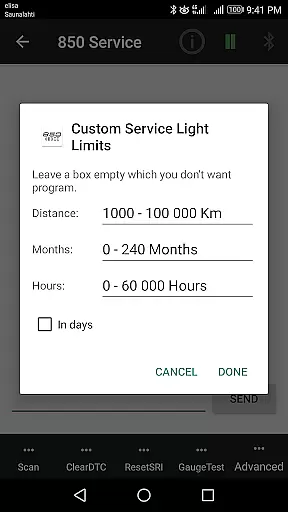
The app offers advanced functionalities such as Service Light reset, Fault Code reading and clearing, real-time sensor data monitoring, and system information retrieval. Additionally, it provides unique features like Injector testing, TDi Fuel pump Dynamic Timing, and VGLA Remote Programming. These tools are invaluable for both professional mechanics and car enthusiasts who require detailed insights into their vehicle's performance and health.
Whether you're diagnosing issues on a classic Volvo 850 or performing advanced programming tasks on newer models, 850 OBD-II delivers comprehensive solutions that enhance your vehicle maintenance experience.
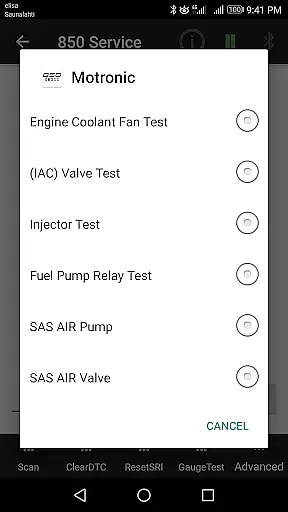
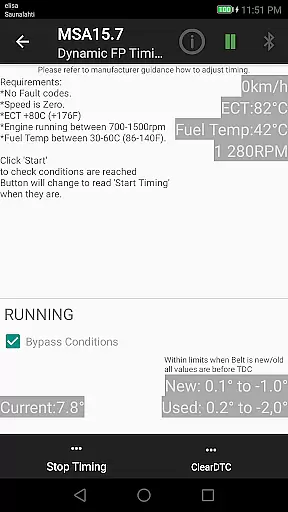
850 OBD-II stands out with its extensive feature set tailored for Volvo diagnostics. The app supports advanced commands such as Injector testing for Motronic M4.4 systems, TDi Fuel pump Dynamic Timing for MSA15.7 engines, and full VGLA Remote Programming without dealership intervention. These capabilities allow users to perform complex tasks that typically require professional equipment.
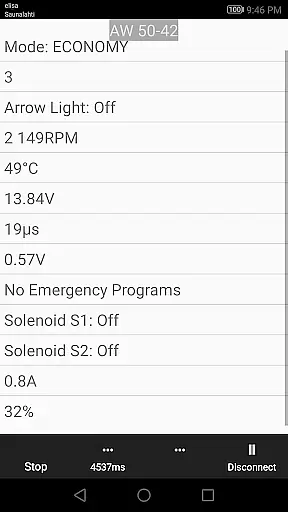
In addition to advanced commands, the app provides live data monitoring for various systems including ABS/BCM, SRS (airbag), Instrument Panel (COMBI), Automatic Gearbox, and more. This real-time data is crucial for understanding current vehicle conditions and making informed decisions during diagnostics. The ability to read and clear Volvo-specific DTCs across multiple systems further enhances its utility.
Another notable feature is the app's terminal functionality, which allows users to send custom handwritten commands via the ELM327 interface. This flexibility enables experienced users to execute specific diagnostic routines or troubleshoot unique issues, making 850 OBD-II an indispensable tool for comprehensive vehicle analysis.
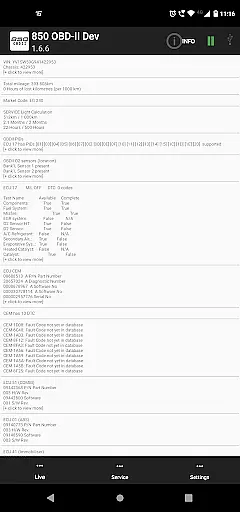
Accessing detailed vehicle information is crucial for effective diagnostics and maintenance. The 850 OBD-II app goes beyond standard OBDII capabilities to provide comprehensive data about individual modules within supported Volvo models. This includes reading part numbers of ECUs, configurations, and even advanced commands like Injector testing and TDi Fuel pump Dynamic Timing.
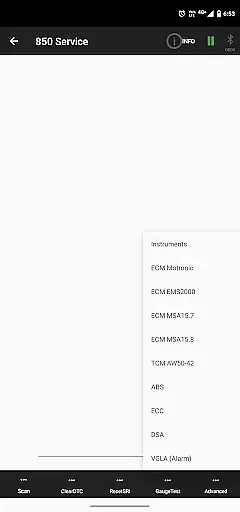
The app supports a wide range of Volvo models, including 850/900 series, S40/V40 up to 2004, S70/V70/XC70, P80 year models 1999-2000, C70 up to 2004, and P2 platform models from 2000 onwards. Each model type has specific module coverage, ensuring accurate and relevant information retrieval.
Users benefit from the ability to access real-time sensor data across various systems such as ABS/BCM, SRS (airbag), Instrument panel (COMBI), and more. This level of detail allows users to pinpoint issues accurately, making repairs and maintenance more efficient and cost-effective.
By providing such extensive vehicle information, the app empowers both professional mechanics and car enthusiasts to make informed decisions regarding their vehicle's health and performance.
Price transparency in automotive diagnostic tools ensures users understand the costs involved before committing to a purchase. The 850 OBD-II app offers clear information about its requirements and limitations, helping users avoid unexpected expenses related to incompatible hardware or unsupported features.
A key requirement for using the app is an ELM327 dongle with firmware version 1.4b or greater. The app actively notifies users if their device lacks necessary command sets, preventing frustration and additional costs associated with subpar equipment. This proactive approach enhances user experience by setting clear expectations.
While the app itself provides extensive functionality, it clearly states that certain systems like Yazaki dash, M4.3, MFI system, Fenix 5.2, Motronic M4.3, ECC(A/C), and Cruise Control are not reachable by ELM327. Such transparency helps users assess whether the app meets their specific needs without hidden surprises.
Overall, the 850 OBD-II app promotes price transparency by detailing its capabilities and prerequisites, enabling users to make well-informed decisions about their automotive diagnostic investments.
User-friendly interface
Comprehensive diagnostic tools
Real-time data monitoring
Advanced programming options
Wide model compatibility
Requires ELM327 dongle
Complex for beginners
Limited to supported models
No iOS version available
Firmware dependency

Ultimate OBD2 Car Scanner: Diagnostics, Service and Modification Tool
 4.30
4.30
Take Control of Your Car
4.80
Autolist - The Largest Selection of Local Used Cars and Trucks
4.50
Club Car Wash Mobile App—the fast lane to managing your wash membership.
3.30
Lexus app currently supports 2010 or newer vehicles (2018 or newer for Hawaii).
4.80
Automotive Electrical Wiring Diagrams
4.40
Instantly redesign your car with AI. From sporty to futuristic, try it all.
4.50
Available in select states.
4.00
Quick and easy car diagnostics to get you the right fix.
4.70
Play what you want through Android Auto
4.90
The Texaco App allows you to pay for fuel from the comfort of your car!
4.80
Marathon ARCO Rewards members earn rewards & apply the rewards for fuel savings!
4.80
OBD1 ECMs application. Data log or tune directly from your phone or tablet!
4.60
Find Fast EV Chargers | Charge Your Vehicle at 1,100+ Fast Car Charging Stations
4.60
Launcher for use in the car
4.40
myAudi offers users services and Audi connect services for Audi drivers
4.10
Control maps, media and messaging, with the Google Assistant while you drive
4.10
OBD diagnostics, Live Data, DPF regeneration for BMW
4.00
The Smarter Way Forward
3.30



User Reviews