
Hush is an innovative solution designed specifically for Android Auto users who encounter audio switching issues while driving. The app addresses a common problem where Android Auto resumes the last-used audio app when adjusting the volume, which can be distracting and potentially dangerous. By playing a silent audio track continuously in the background, Hush ensures that your preferred non-Android Auto audio apps remain active without interruption.
This functionality is particularly beneficial for drivers who enjoy content from platforms like YouTube that don't natively support Android Auto. With Hush running discreetly, you can safely adjust your vehicle's volume controls without worrying about sudden audio switches to apps like Spotify. Developed by someone who faced this exact issue in their Toyota Camry, Hush provides a practical workaround until manufacturers implement more permanent solutions.
The key feature of Hush is its ability to maintain consistent audio playback by acting as the primary audio source within Android Auto. This prevents other applications from taking over unexpectedly when using volume controls or interacting with the car's infotainment system. Users will appreciate how seamlessly it integrates into their existing setup without requiring any special configuration.
Another notable aspect of Hush is its simplicity; once launched, it operates quietly in the background without drawing attention to itself. It doesn't interfere with normal media operations but instead works behind the scenes to ensure smooth transitions between different types of audio content. Additionally, because it was created based on real-world frustrations experienced by its developer, Hush offers a targeted fix that directly addresses user pain points related to specific vehicle implementations of Android Auto technology.
Detailed vehicle information is crucial for drivers who want to understand their car's compatibility with applications like Android Auto. Hush addresses a specific issue found in certain vehicles, such as some Toyota Camry models, where the system resumes the last used Android Auto audio app after adjusting the volume.
This application provides an invisible yet effective solution by playing a silent audio track, ensuring that your preferred non-Android Auto audio apps can run without interruption. By doing so, it gives users peace of mind about their vehicle's audio settings and ensures a seamless experience while driving.
For those experiencing similar issues, Hush offers a practical workaround that doesn't require any updates or changes from the vehicle manufacturer. This means you can continue using your favorite audio sources without worrying about sudden, jarring switches between apps.
Price transparency is essential when considering solutions for vehicle-related issues. Hush is offered as a straightforward solution without any hidden costs or subscription fees, making it an accessible option for many drivers.
The app's pricing model is simple and user-friendly, providing a one-time download with no additional charges. This approach allows users to resolve their Android Auto audio problems without worrying about recurring expenses or unexpected fees.
By offering a cost-effective solution, Hush ensures that drivers can enjoy uninterrupted audio experiences in their vehicles without financial strain. The transparency in its pricing makes it easier for users to make informed decisions about adopting this tool.
User-friendly interface
Effective problem resolution
Seamless integration
Background operation
Free to use
Limited to Android Auto
No iOS version available
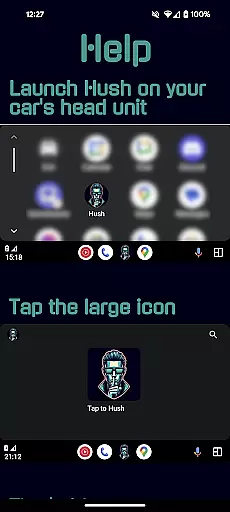
Requires manual launch
Consumes minimal battery
Single-purpose utility

Wonder how much horsepower and torque your car/truck makes? Look no further.
 3.40
3.40
Launcher for use in the car
4.40
DMV Test Pro offers all the updated FREE DMV tests online.
4.60
Digital Car Key/Launcher, Screen Mirror, Android Dashboard, Remote Wireless Link
4.40
Lexus app currently supports 2010 or newer vehicles (2018 or newer for Hawaii).
4.80
Car Sounds Engine Sounds app welcomes Auto Lovers to feel Car Simulator Sound
4.20
Your car is talking. Start listening.
4.30
MySubaru: Download. Connect. Love.
4.70
Find, search, and browse 40,000+ used cars, SUVs, and trucks.
4.50
Practice the drills within MotoJitsu Master Riding Program Volume 1 & 2!
4.80
Marathon ARCO Rewards members earn rewards & apply the rewards for fuel savings!
4.80
Buy and sell your boat
4.70
The ExtraMile App allows you to pay for fuel from the comfort of your car!
4.70
Find Your Local Store or Shop Online for the Car, Truck, or SUV Parts You Need
4.70
OBD1 ECMs application. Data log or tune directly from your phone or tablet!
4.60
Get your personalized financing options and shop for used cars today!
4.20
ODB2 based monitoring application for the Chevy Bolt (2017-2021)
4.00
BlueDriver® is a Premium Diagnostic OBD2 Scan Tool. www.BlueDriver.com
3.90
Discover new and used cars in Syria easily! Browse ads and connect with sellers.
3.70




User Reviews