
BlueDriver OBD2 Scan Tool is a leading automotive diagnostic application that turns your smartphone or tablet into a professional-grade scan tool. Designed for both professional mechanics and DIY enthusiasts, this app works seamlessly with the BlueDriver Bluetooth Sensor to provide comprehensive vehicle diagnostics. The core functionality includes reading and clearing diagnostic trouble codes, generating detailed Repair Reports, and accessing advanced data like Mode 6 test results.
What sets BlueDriver apart is its ability to deliver precise, real-world fixes tailored to your vehicle's make, model, and year. It supports an extensive range of vehicles, including GM, Ford, Toyota, and more, while offering features such as live data graphing, smog readiness checks, and wireless scanning via Bluetooth. Whether you're diagnosing a check engine light or performing pre-smog tests, BlueDriver ensures accurate information without requiring a subscription—making it a cost-effective solution for car owners worldwide.
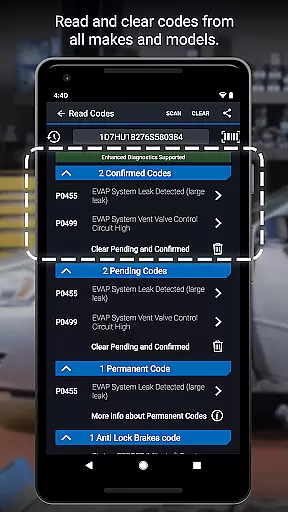
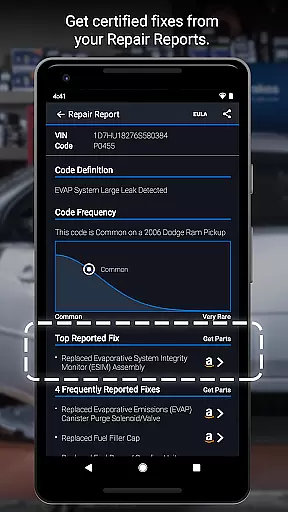
BlueDriver stands out with its robust feature set designed to simplify vehicle diagnostics. One key feature is its ability to read and clear a wide variety of trouble codes, including ABS, airbag, transmission, and check engine codes. This functionality empowers users to quickly identify issues and avoid costly repairs. Additionally, the app generates professional-grade Repair Reports specific to your vehicle’s VIN and trouble code, providing actionable solutions in plain language.
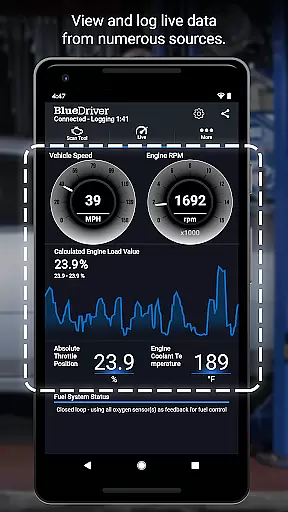
Another notable feature is the wireless scanning capability enabled by Bluetooth connectivity. Users can access live data streams with multi-PID interactive graphing, which allows for real-time monitoring of vehicle performance. Enhanced diagnostics are available for many brands, including Ford, GM, and Toyota, with coverage extending to specific regions for brands like BMW and Subaru. With metric and imperial settings, smog readiness checks, and freeze frame data, BlueDriver offers a complete diagnostic toolkit that caters to both casual users and professionals seeking reliable automotive insights.
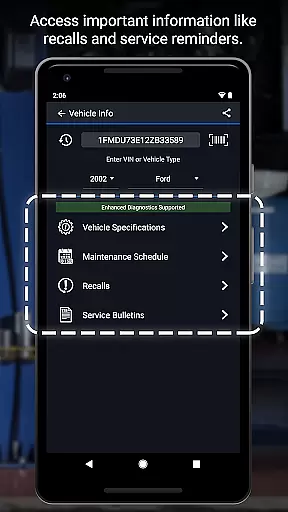
Accessing detailed vehicle information is crucial for effective diagnostics and maintenance. BlueDriver OBD2 Scan Tool provides comprehensive data specific to your vehicle's make, model, and year.
The app reads and clears trouble codes from various systems including engine, ABS, airbag, and transmission. It also generates professional-grade Repair Reports tailored to your exact vehicle specifications.
Users benefit from advanced features like Mode 6 on-board monitoring, smog readiness checks, and freeze frame data capture. These capabilities ensure mechanics and DIYers alike can make informed decisions about necessary repairs.
With support for enhanced diagnostics across multiple brands, BlueDriver offers an unparalleled level of detail that helps users understand their vehicle's condition thoroughly.
Price transparency in automotive tools ensures users understand the costs involved before making a purchase. BlueDriver OBD2 Scan Tool offers clear information about its pricing model, which includes a one-time sensor purchase with no recurring subscription fees.
The app itself is free to install, allowing users to explore its features without immediate financial commitment. When ready, customers can buy the required Bluetooth Sensor separately through the app or website.
This approach provides flexibility and control over expenses, enabling users to budget effectively for their diagnostic needs. Additionally, previewing Repair Reports using just VIN and trouble codes adds another layer of cost visibility.
By offering global compatibility and specific details on what each feature entails, BlueDriver maintains transparency while delivering exceptional value to both professional mechanics and hobbyists.
User-friendly interface
Comprehensive vehicle support
No subscription fees
Real-time data graphing
Actionable repair reports
Sensor sold separately
Limited free features
Device compatibility issues
Occasional Bluetooth glitches
Regional restrictions

ODB2 based monitoring application for the Chevy Bolt (2017-2021)
 4.00
4.00
* This app needs an adapter cable and a certain OBD2 adapter to work *
4.20
Autolist - The Largest Selection of Local Used Cars and Trucks
4.50
Oil change service & coupons for car maintenance at Valvoline Instant Oil Change
4.70
Your Path to Driving Licensing Success Begins Here! Develop your driving skills.
4.40
Find Your Local Store or Shop Online for the Car, Truck, or SUV Parts You Need
4.70
Marathon ARCO Rewards members earn rewards & apply the rewards for fuel savings!
4.80
PayByPhone: A quick and easy way to pay for parking.
3.80
Browse millions of cars, track vehicle listings or sell your car today
4.70
Get more out of your AAWireless adapter with this companion app | aawireless.io
4.80
Car Values, Research and More
4.80
DMV practice test 2025: Driver License permit test & written test for all states
4.70
Secure mobile payments & fuel savings at Phillips 66®, Conoco® and 76® stations
4.40
Discover new and used cars in Syria easily! Browse ads and connect with sellers.
3.70
Club Car Wash Mobile App—the fast lane to managing your wash membership.
3.30
Better fuel to help keep you on the road
3.20
Theme for Car Launcher
4.4
Ferrari inspired analog & digital watch face with quick access and premium style
4.4
DIY Vehicle Wheel Alignment
4.1




User Reviews