
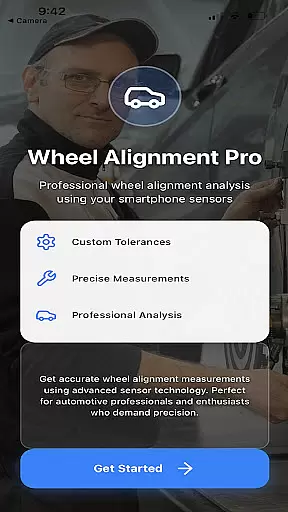
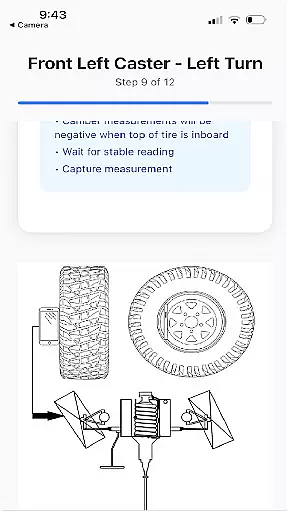
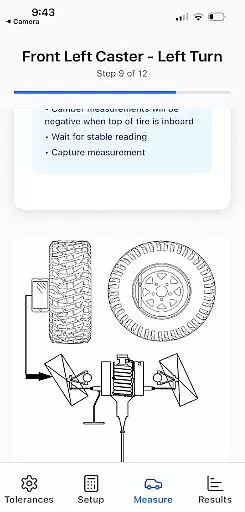
Alignment Pro is an innovative mobile application designed specifically for automotive professionals and enthusiasts who require precise wheel alignment solutions. The app utilizes your phone's internal sensors in combination with a simple tape measurement to accurately collect essential wheel alignment data. With intuitive on-screen instructions, users can effortlessly perform alignments according to industry standards or customize specifications for their specific vehicle model.
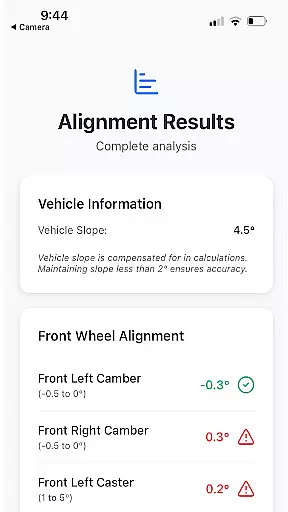
The application stands out through its advanced features such as vehicle slope compensation, which accounts for uneven surfaces like driveways, ensuring accurate readings regardless of terrain. Additionally, Alignment Pro provides a comprehensive alignment summary that highlights potential issues arising from out-of-tolerance conditions. This feature not only helps technicians identify problems but also enables them to effectively communicate these findings to customers, enhancing transparency and trust.
Whether you're running a professional auto shop or simply maintaining your personal vehicle, Alignment Pro offers a cost-effective and reliable solution for all your wheel alignment needs. By leveraging modern smartphone technology, this app delivers professional-grade results without the need for expensive equipment, making it an invaluable tool in the automotive industry.
Alignment Pro distinguishes itself through a range of sophisticated features tailored to meet the demands of both professional mechanics and DIY enthusiasts. One of its key capabilities is the utilization of your phone's internal sensors, which work in tandem with traditional tape measurements to deliver highly accurate wheel alignment data. This hybrid approach ensures that even those with minimal technical expertise can achieve professional-level results by following straightforward on-screen instructions.
A standout feature of the app is its vehicle slope compensation functionality. This innovative tool adjusts for uneven surfaces, such as inclined driveways or garage floors, guaranteeing precise alignment readings regardless of the working environment. Furthermore, Alignment Pro offers customizable vehicle specifications, allowing users to either rely on industry standards or input their vehicle's unique alignment parameters, readily available online. This flexibility makes the app suitable for a wide range of vehicles, from standard passenger cars to specialized commercial vehicles.
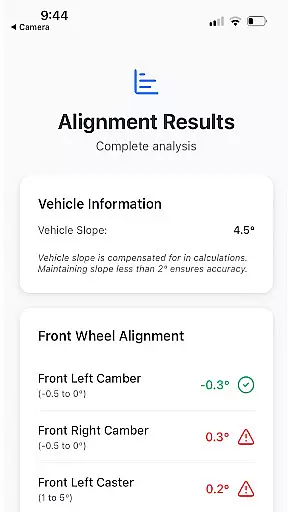
The app's detailed alignment summary represents another crucial advantage. This feature not only presents comprehensive data about the vehicle's current alignment status but also explains potential consequences of out-of-tolerance conditions. By providing clear explanations of how specific alignment issues can affect vehicle performance and safety, Alignment Pro empowers users to make informed decisions while also facilitating better communication with customers or vehicle owners. These features collectively establish Alignment Pro as an essential tool in modern automotive maintenance.
Alignment Pro offers comprehensive details about your vehicle's alignment specifications, ensuring accuracy and precision in the process. By utilizing your phone's internal sensors alongside a simple tape measurement, the app collects essential wheel alignment data.
The app allows users to input industry standards for their vehicle or manually adjust these specifications based on individual requirements. This feature ensures that each vehicle receives personalized attention tailored to its unique needs.
One of the standout functionalities is the vehicle slope compensation which accounts for uneven driveways. This ensures that measurements are not skewed by external factors, providing reliable data regardless of environmental conditions.
Ultimately, this detailed approach empowers users with accurate insights into their vehicleu2019s alignment status, helping them make informed decisions regarding necessary adjustments.
While Alignment Pro focuses primarily on delivering precise vehicle alignment data, it also excels in offering transparent pricing options. Users can access all features without hidden costs, making it an affordable solution for both personal and professional use.
The app provides clear information on any potential expenses related to vehicle maintenance stemming from alignment issues. Detailed alignment summaries highlight problems caused by out-of-tolerance conditions, enabling users to understand possible financial implications.
Moreover, the ability to find specific vehicle alignment specifications online further enhances cost-efficiency. Users can easily locate and update their vehicleu2019s requirements without needing expensive proprietary tools or services.
This commitment to openness ensures that customers know exactly what they are paying for, fostering trust and satisfaction as they navigate through maintaining optimal vehicle performance.
User-friendly interface
Cost-effective solution
Accurate sensor integration
Customizable specifications
Detailed alignment reports
Limited to Android devices
Requires manual measurements
Internet connection needed
Premium features locked
Learning curve for beginners

The Smarter Way Forward
 3.30
3.30
CVT diagnostics with ELM327 for Nissan-based vehicles
4.40
The Texaco App allows you to pay for fuel from the comfort of your car!
4.80
AI Powered - Automotive Mechanic Assistant
4.30
Car Values, Research and More
4.80
Your car is talking. Start listening.
4.30
Find, search, and browse 40,000+ used cars, SUVs, and trucks.
4.50
O'Reilly Pro will streamline your parts lookup and ordering process!
3.20
A smarter way to park and reserve your spot ahead of time.
4.40
DMV practice test 2025: Driver License permit test & written test for all states
4.70
Find Your Local Store or Shop Online for the Car, Truck, or SUV Parts You Need
4.70
On the CarShield app, you can view contracts, make payments, & request roadside.
4.40
Instant diesel savings. No credit checks or fees. Nationwide growing network.
4.40
OBD2 car scanner and diagnostics: read Check Engine, DTC, economy....
4.30
Realtime Charts is a plugin for the Torque Pro App (OBD 2 & Car)
4.20
* This app needs an adapter cable and a certain OBD2 adapter to work *
4.20
Simplify your drive
3.90
Monitor specific TOYOTA parameters by adding this plugin to Torque Pro.
2.00
Theme for Car Launcher
4.2




User Reviews