
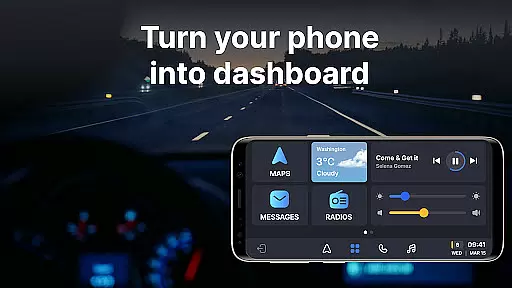
Auto Sync for Android/Car Play is a comprehensive vehicle management app that transforms your smartphone into an advanced car dashboard. The application provides real-time monitoring of essential vehicle statistics such as fuel level, battery status, engine oil life, and tire pressure through seamless integration with both Apple CarPlay and Android Auto systems. This ensures drivers can maintain safety and make informed decisions while on the road.
Beyond basic monitoring, the app features a wireless Driving Mode that optimizes the driving experience by enabling easy access to navigation maps, hands-free calling, and music controls. Its user-friendly interface delivers timely alerts and notifications about vehicle maintenance needs, low fuel warnings, and other critical information. Whether you're commuting daily or managing a fleet, Auto Sync for Android/Car Play offers practical tools to enhance convenience and safety.
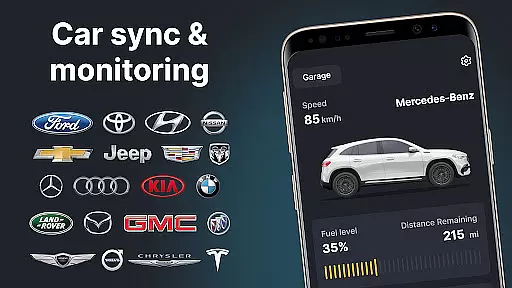
The Digital Garage functionality allows users to manage multiple vehicles within a single platform, making it ideal for owners of various car brands. With support for Tesla, BMW, Ford, and more, this app serves as a versatile digital car key and launcher. By combining innovative features like screen mirroring and wireless connectivity, Auto Sync ensures a fully synchronized driving experience tailored to modern vehicle owners.
Auto Sync for Android/Car Play stands out with its robust feature set designed to elevate the driving experience. One of its core functionalities is real-time vehicle monitoring, which provides updates on crucial metrics such as fuel levels, battery health, mileage, and tire pressure. These insights are delivered directly to the driver's smartphone via seamless integration with Apple CarPlay and Android Auto, ensuring immediate access to vital information without distractions.
The app also includes a wireless Driving Mode that enhances focus and safety during travel. By transforming the phone into a virtual car dashboard, users can navigate maps, take calls, and control entertainment systems effortlessly. Additionally, the Digital Garage feature simplifies multi-vehicle management by consolidating all cars under one platform, complete with brand compatibility ranging from Toyota to Porsche.
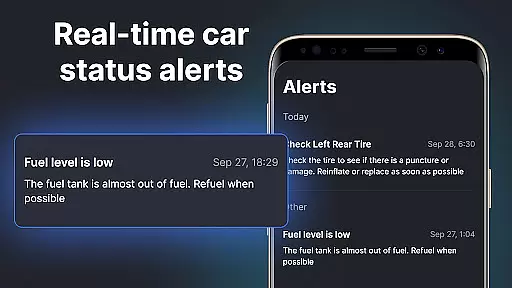
Other notable features include customizable alerts for maintenance reminders and low fuel warnings, along with screen mirroring capabilities for an immersive connected experience. Each function is crafted not only to improve convenience but also to prioritize road safety, making Auto Sync an indispensable tool for modern drivers seeking efficiency and peace of mind.
Auto Sync for Android/Car Play offers an extensive overview of your vehicle's status directly on a car dashboard interface. This feature is crucial for drivers who want to maintain optimal vehicle health and safety.
The app provides real-time updates on essential parameters such as fuel level, battery status, engine oil life, mileage, and tire pressure. These metrics are presented in an easily digestible format, allowing users to quickly assess their vehicle's condition at any given moment.
With the help of timely notifications and alerts, users can address potential issues before they become serious problems. This proactive approach to vehicle maintenance ensures that all safety requirements are consistently met, giving drivers peace of mind.
By delivering comprehensive vehicle statistics through a user-friendly interface, this app empowers users to make informed decisions about their car's upkeep, ultimately extending the lifespan of their vehicles while ensuring a safer driving experience.
While Auto Sync for Android/Car Play focuses primarily on vehicle information and connectivity, it also emphasizes the importance of price transparency when managing multiple vehicles. This feature is particularly valuable for owners looking to optimize their automotive expenses.
The app's wireless Digital Garage allows users to oversee all their vehicles within a single platform. Whether you own a Tesla, Toyota, BMW, or any other supported brand, the app provides clear insights into associated costs and maintenance schedules.
Through organized data presentation, users can easily track service histories and upcoming maintenance needs across their fleet. This visibility helps in budgeting and planning financial outlays for vehicle upkeep.
By offering transparent pricing information and maintenance reminders, Auto Sync ensures that users can manage their automotive investments wisely, avoiding unexpected expenses and maintaining complete control over their vehicle-related expenditures.
User-friendly interface
Real-time vehicle stats
Multi-brand compatibility
Wireless driving mode
Customizable alerts
Limited offline functionality
Premium feature costs
Device compatibility issues
Occasional sync delays
Subscription required

Monitor specific TOYOTA parameters by adding this plugin to Torque Pro.
 2.00
2.00
DIY Vehicle Wheel Alignment
4.5
Listings of Tesla's with FSD - Included package
4.60
Theme for Car Launcher
4.5
The Texaco App allows you to pay for fuel from the comfort of your car!
4.80
Read and delete OBD codes with any ELM327 OBD scanner. Coding functions included
3.40
Control maps, media and messaging, with the Google Assistant while you drive
4.10
BlueDriver® is a Premium Diagnostic OBD2 Scan Tool. www.BlueDriver.com
3.90
Your car is talking. Start listening.
4.30
Marathon ARCO Rewards members earn rewards & apply the rewards for fuel savings!
4.80
Oil change service & coupons for car maintenance at Valvoline Instant Oil Change
4.70
Your Path to Driving Licensing Success Begins Here! Develop your driving skills.
4.40
Taximeter; the professional's choice
4.30
OBD2 car scanner and diagnostics: read Check Engine, DTC, economy....
4.30
Get your personalized financing options and shop for used cars today!
4.20
Monitor your behind-the-wheel behavior to become a safer driver and save.
4.10
Boost profits and hit your goals faster with GigU's amazing tools for gigworkers
4.00
Available in select states.
4.00
Wonder how much horsepower and torque your car/truck makes? Look no further.
3.40



User Reviews