
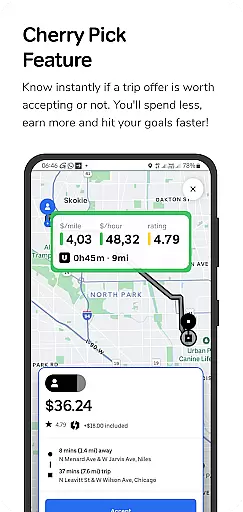
GigU is the ultimate smart assistant for rideshare drivers in the US, designed to maximize earnings on platforms like Uber and Lyft. The app's standout feature is Cherry Pick, which instantly evaluates trip offers, helping drivers make informed decisions that save time and increase income.
With live smart indicators, a colored grading system, and voice notifications, GigU provides essential trip details at a glance. Quick Maps shortcuts ensure safety by allowing drivers to preview pickup and drop-off locations. This app is an indispensable tool for any rideshare driver looking to optimize their performance and achieve financial goals faster.
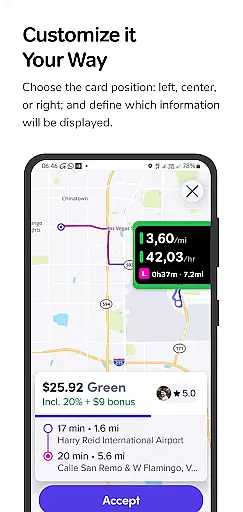
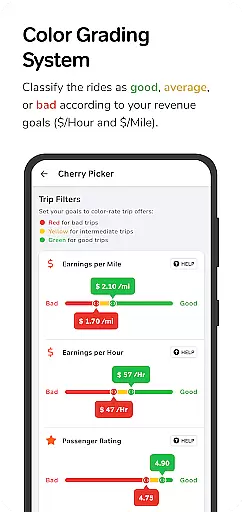
GigU offers a comprehensive suite of features tailored for rideshare drivers. The Live Smart Indicators display crucial metrics such as earnings per mile, hour, and minute, enabling data-driven decisions. The innovative Colored Grading System categorizes trips based on user-defined settings, making it easy to identify the most profitable rides.
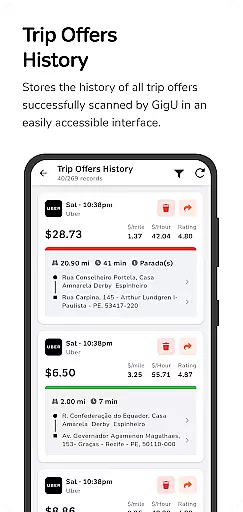
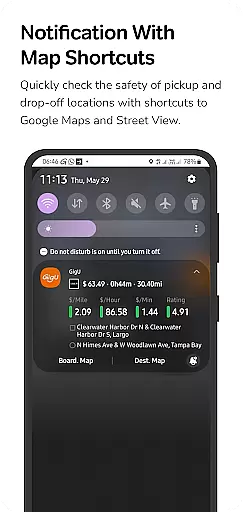
The app also includes Quick Maps Shortcut Notifications, providing instant access to Google Maps and Street View for location previews. With Trip Offers History, drivers can review all scanned ride offers, while Voice Notifications allow hands-free operation. These features work together seamlessly to enhance both efficiency and safety, setting a new standard in the ridesharing industry.
In the realm of ridesharing, having access to comprehensive trip details can significantly impact decision-making. GigU revolutionizes this aspect by providing live smart indicators that display crucial metrics such as earnings per mile, hour, and minute. This empowers drivers with the necessary data to evaluate the profitability of each ride offer instantly.
The app employs a colored grading system that categorizes trips based on user-defined settings. This intuitive color-coding ensures quick identification of worthwhile trips, streamlining the selection process for drivers. By prioritizing rides that meet personal earning goals, users can optimize their time and resources more effectively.
Additionally, GigU offers a historical overview of all scanned ride offers, allowing drivers to track patterns and make informed decisions about future trips. This feature not only enhances transparency but also aids in strategic planning, ensuring drivers can achieve their financial objectives with greater efficiency.
Price transparency is pivotal in the ridesharing industry, where drivers often face uncertainty about potential earnings from each trip. GigU addresses this concern head-on by offering detailed insights into the financial aspects of every ride offer. Through its innovative Cherry Pick feature, drivers receive instant notifications about whether a trip is financially viable.
This functionality extends to voice notifications, enabling drivers to assess ride profitability without needing to look at their phones. Such an approach not only promotes safer driving practices but also ensures that drivers remain fully informed at all times. The ability to quickly discern worthwhile trips contributes to increased overall earnings.
Furthermore, GigU provides shortcuts to Google Maps and Street View directly from notifications, allowing drivers to verify the safety and convenience of pickup and drop-off locations. This added layer of information supports better-informed decisions, ultimately leading to enhanced satisfaction and trust in the platform's offerings.
User-friendly interface
Increases earning potential
Enhances driving safety
Protects user privacy
Real-time decision support
Limited to rideshare platforms
Requires accessibility permissions
Premium features may cost extra
Dependent on internet connection
Learning curve for new users

Take Control of Your Car
 4.80
4.80
Theme for Car Launcher
4.2
* This app needs an adapter cable and a certain OBD2 adapter to work *
4.20
Oil change service & coupons for car maintenance at Valvoline Instant Oil Change
4.70
Available in select states.
4.00
Find, search, and browse 40,000+ used cars, SUVs, and trucks.
4.50
Autotrader is your online solution for buying and selling new and used cars.
4.40
Shop, finance, or sell today.
4.80
Get price alerts, vehicle history details and more for cars near you!
4.50
1M+ high-quality auto parts at your fingertips. Fitment guaranteed.
4.70
Your go-to app for car, truck & SUV parts, DIY tools, and expert repair help.
4.70
Easy connect & control your cars from afar. Remote Lock & unlock car and carplay
4.60
CVT diagnostics with ELM327 for Nissan-based vehicles
4.40
Automotive Electrical Wiring Diagrams
4.40
Your Path to Driving Licensing Success Begins Here! Develop your driving skills.
4.40
A smarter way to park and reserve your spot ahead of time.
4.40
Taximeter; the professional's choice
4.30
AI Powered - Automotive Mechanic Assistant
4.30
Car Sounds Engine Sounds app welcomes Auto Lovers to feel Car Simulator Sound
4.20




User Reviews