
ComicZoom is a premier comic reading application designed for comic enthusiasts who want instant access to an extensive library of stories and artwork. The app offers a seamless reading experience with smooth scrolling, easy navigation, and rapid chapter loading, ensuring minimal storage usage while maximizing user convenience.
One standout feature is its Favorites and Tracking system, which allows users to save their favorite comics, organize collections, and resume reading from where they left off. Whether commuting or relaxing at home, ComicZoom provides an immersive and uninterrupted comic experience tailored to both casual readers and dedicated fans.
ComicZoom stands out with its fast-loading chapters that ensure users can instantly access their desired content without delays. Its intuitive interface features smooth scrolling mechanics and effortless navigation, making it accessible even for those new to digital comics.
The Favorites and Tracking functionality adds another layer of personalization, enabling users to bookmark specific pages, categorize their favorite series, and manage their reading progress efficiently. This ensures that every session feels organized and engaging, whether you're revisiting old favorites or discovering new titles.
Additionally, the app's lightweight design minimizes device storage consumption, allowing users to download more comics without worrying about space limitations. With these innovative features, ComicZoom delivers a top-tier reading experience optimized for all types of comic lovers.
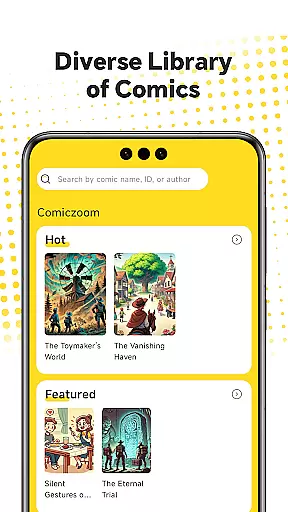
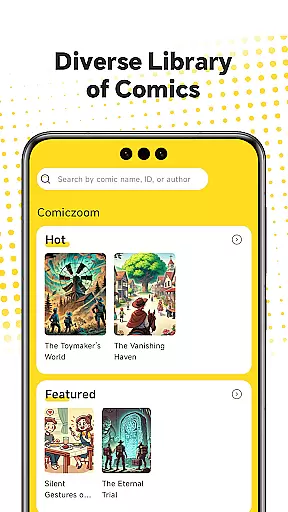
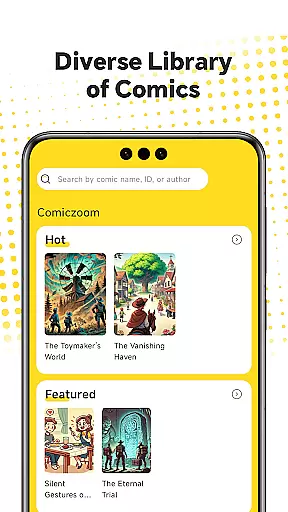
ComicZoom offers an extensive and diverse comic library that caters to a wide range of tastes and preferences. With thousands of titles available, users can explore various genres, from action-packed adventures to heartwarming romances.
The app ensures regular updates, providing readers with the latest chapters and issues from their favorite series. This commitment to freshness keeps the content engaging and up-to-date, encouraging users to return for new releases.
Additionally, ComicZoom's vast collection includes comics from both renowned publishers and independent creators, offering a platform for unique voices and stories. This inclusivity enriches the reading experience and supports the comic community.
Authenticity and proper licensing are at the core of ComicZoom's offerings. The app partners with official publishers and creators to ensure that all content is legitimate and respects copyright laws. This dedication to legality provides peace of mind for readers and creators alike.
By obtaining proper licenses, ComicZoom guarantees that artists and writers receive fair compensation for their work. This not only supports the creative industry but also motivates creators to continue producing high-quality content.
Furthermore, ComicZoom's rigorous verification process ensures that all comics are accurately represented and credited. Users can trust that they are accessing genuine works, enhancing their overall reading experience.
User-friendly interface
Fast chapter loading
Efficient storage use
Customizable favorites
Seamless navigation
Limited offline features
Fewer indie comics
No multi-language support
Ads in free version
Occasional bugs

Joke book collection with the funniest dad jokes and riddles for you to enjoy!
 4.60
4.60
Find free mangas in Spanish
4.70
Dive into the App for Premium Comics, Webtoons and Manga!
4.80
Catalog your collection. Just scan covers with your device camera. (US $20/yr)
4.80
Artists wanting to use decent hand reference on the go, this app is for you!
4.70
Comic Book Identifier Value - Scan comics & prices. Your comic book price guide!
4.50
100k comics, manga & webcomics, including Batman, Invincible, Hellboy & more
4.60
Instant access to over 30,000 Marvel comics with new issues added every week.
4.70
SQUARE ENIX's official Manga app!
4.40
Read comics & manga
4.70
A gathering place for a massive collection of genuine comics.
4.50
Scan comics instantly! Find comic value, price, and key collector details fast.
4.50
Crunchyroll Manga—unlimited, uninterrupted reading with offline access & more!
4.50
Read latest manga with this minimal reader with NO ADS.
4.30
Pose Tool 3D for the Artists, create any human figure pose quickly for your art.
4.00
MangaRise - Your Manga and Manhwa Companion
3.90
Comic Scanner - Book Value - Identify and sell your comic collection with AI.
3.80
Read official webcomics, webtoons, Korean manga & webnovels
3.70
Create your personalized cartoon comic strips & comic books.
3.20






User Reviews