
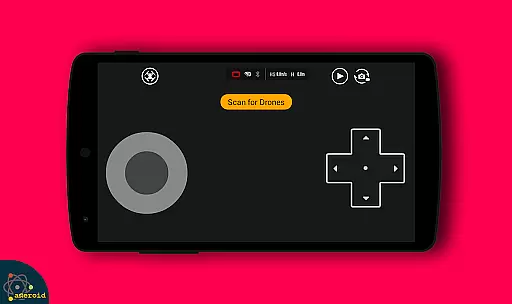
Drone Remote Control is an innovative application that transforms your Android smartphone into a versatile remote control for drones. This app allows users to seamlessly operate various drone models, replacing traditional physical remotes. With intuitive configuration and familiar RC Drone-like controls, it offers both convenience and functionality.
The app supports key drone operations such as flight planning, automated takeoff and landing, and live First Person View (FPV) streaming. It also enables camera control features like capturing images and recording videos. Whether you're managing your own drone or taking control of a friend's, this app provides a comprehensive solution for all your drone piloting needs.
Ideal for drone enthusiasts, this application is particularly useful for those who want to streamline their drone operations using a modern smart device. The ability to disable auto-flight and resume manual control ensures maximum flexibility during operation, making it suitable for both recreational and semi-professional use.
Drone Remote Control stands out with its rich feature set tailored for drone enthusiasts. One of its core capabilities is the ability to create detailed flight plans on any compatible device, allowing precise control over drone movements. The app automates essential functions like takeoff, flight navigation, image capture, and landing, significantly reducing manual intervention.
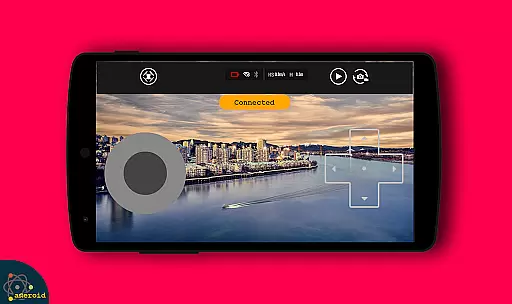
Another notable feature is the live FPV streaming, which provides real-time video feed directly to your device. This enhances situational awareness and allows for more accurate piloting. Additionally, the app supports WiFi camera connectivity, enabling users to receive live camera views, capture photos, and record videos effortlessly.
The app's single-tap functionality to disable auto-flight and resume manual control ensures quick response in critical situations. Its compatibility with the latest drone models and continuous non-interrupted flights make it an invaluable tool for mapping large areas efficiently. These features collectively offer a superior drone piloting experience.
Functionality completeness in a drone remote control app refers to the range of features that allow users to fully operate and manage their drones. Drone Remote Control offers an extensive set of tools that cover various aspects of drone operation.
The application allows users to create flight plans on any device, automate the stages of flight from takeoff to landing, and even control drone cameras for capturing photos and videos. This comprehensive feature set ensures that users have all the necessary controls at their fingertips.
With the ability to live stream First Person View (FPV) and disable auto-flight modes with a single tap, users can enjoy a seamless experience that keeps them engaged with their drone activities without interruption.
This level of functionality coverage provides drone enthusiasts with the confidence that they can manage their devices effectively, making Drone Remote Control a reliable tool for both amateur and professional drone pilots.
Usability in drone applications is crucial for ensuring that users can operate their devices without frustration. Drone Remote Control excels in providing an intuitive interface that makes the complex task of piloting a drone straightforward and stress-free.
The app's design focuses on operational smoothness, allowing users to easily configure settings and use the appu2019s features without a steep learning curve. Its similarity to traditional RC drone controls means that users can transition smoothly from physical remotes to their smartphone.
Drone Remote Control also supports video and capture functions, enhancing the user experience by integrating these commonly used features directly within the app. This contributes to a fluid operational process where users can focus on enjoying their drone activities.
By prioritizing usability and operational smoothness, this app ensures that users of all skill levels can enjoy a frustration-free drone flying experience, thus broadening the appeal and accessibility of drone technology.
User-friendly interface
Wide drone compatibility
Automated flight features
Live FPV streaming
Free to use
Limited old hardware support
Requires stable WiFi connection
Device compatibility issues
No advanced flight modes
Occasional connection drops

SmartCast mirrors Android phone to TV screen With Cast Screen, Chromecast.
 4.80
4.80
Use your Phone as Drone Controller.
3.70
Read Quran pak offline & listen online mp3 Quran in Al Quran Majeed app
4.1
Connect and Find your smart tag via our app.our app is compatible with smarttag.
3.30
Study Bible King James Version: the correct way to learn the Bible with audio
4.80
Looking to connect your phone to your car screen? Mirror Link is the solution.
3.20
Al QURAN-القرأن الكريم app to read Quran offline just like an actual Quran book
4.30
An impressive collection of tools, characters, weapons, skins and more!
4.30
Unlock the hidden menus of your phone with our mobile secret codes app.
4.20
Barcode scanning made simple!
4.40
Test DPC is a sample device policy controller for use with Android Enterprise.
4.20
Game Booster GFX for smoother gaming experience. Enjoy 120 FPS and 4x Game Space
4.20
Connect and find your Smarttag devices through our app.
4.00
charging your phone by other phone easly
4.00
Connect and find your Smart Tag 2 devices through our app.
3.60
Collection of Maps and Mods for Dmod
3.30
Endoscope camera an app to connect with endoscope cam or any device
3.30
Identify securely online
3.10
Record with Double Camera Video Recording using Dual Camera Front and Back Video
3.00



User Reviews