
eero WiFi System is a comprehensive home networking solution that blankets your entire living space with fast and reliable internet connectivity. Designed for effortless setup and management, the eero app allows users to easily configure their network in minutes, ensuring optimal performance across all connected devices.
The system's automatic updates bring new features, enhanced security protocols, and improved performance over time. With remote management capabilities, users can control their network from anywhere, including managing guest access, scheduling internet usage, and blocking specific devices when needed.
Whether you're streaming content, working remotely, or gaming online, eero ensures seamless connectivity throughout your home, even extending to outdoor spaces like your backyard. For added protection, eero Plus offers advanced security features and parental controls, making it an ideal choice for tech-savvy households seeking both convenience and peace of mind.
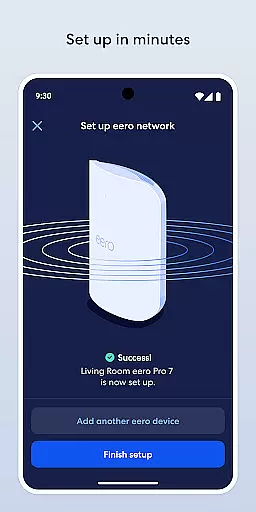
The eero WiFi System stands out with its user-friendly interface and robust feature set. Setting up the system is remarkably straightforward, typically taking only a few minutes through the intuitive eero app. Once configured, users benefit from automatic software updates that continuously enhance performance and introduce valuable new functionalities.
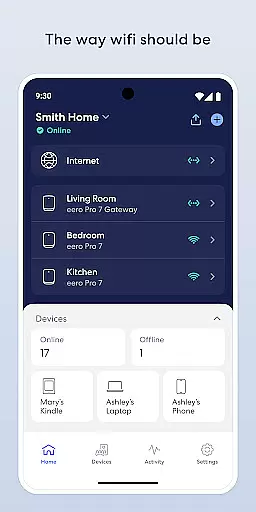
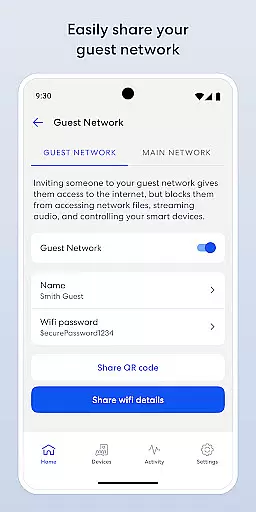
One of the standout features is the ability to manage your network remotely. From any location, you can view network status, add or remove devices, and adjust settings as needed. The app also enables secure guest sharing, allowing visitors to connect without compromising your primary network credentials.
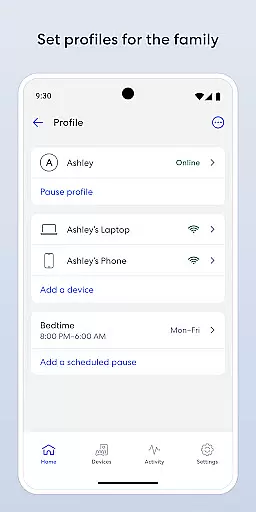
For families, eero offers practical tools such as internet access scheduling and pause functionality, helping parents manage screen time effectively. Additionally, the optional eero Plus subscription provides advanced security measures, including a password manager, antivirus protection, and a Guardian-powered VPN service, ensuring comprehensive digital safety for all household members.
In today's fast-paced digital world, having a comprehensive lifestyle app is essential for managing various aspects of your daily routine. The eero WiFi system app excels in this area by offering extensive lifestyle category coverage that caters to the modern homeowner's needs.
From ensuring your home is blanketed with fast and reliable WiFi to enabling you to easily set up and manage your network, the eero app provides a seamless experience. It incorporates automatic updates that not only enhance performance but also introduce new features and bolster security measures, keeping your system robust against potential threats.
Users can enjoy the convenience of controlling their home network from anywhere, which includes sharing your network securely with guests, scheduling or pausing internet access to manage screen time, and even blocking devices from using your network. This level of control and customization allows users to tailor their WiFi experience according to their lifestyle preferences.
Additionally, with optional services like eero Plus, users gain access to advanced security features, parental controls, and expert support, further enriching the lifestyle offerings of the app. Whether it's for work, entertainment, or staying connected with loved ones, the eero app ensures you're covered in every aspect of your digital life.
When it comes to managing your home's WiFi system, content authenticity and expert credibility are paramount. The eero app stands out by providing genuine content that has been crafted and vetted by WiFi experts, ensuring that users receive accurate and trustworthy information.
The app offers a suite of features designed to keep your network secure and performing optimally. With automatic updates, users benefit from the latest advancements in WiFi technology, including enhanced security protocols and performance improvements. These updates are pushed directly from the developers who have an in-depth understanding of the intricacies involved in maintaining a top-tier home network.
eero's dedication to expert credibility is evident through its subscription service, eero Plus, which includes a range of online security solutions. From password managers to antivirus software and a VPN powered by Guardian, these tools are developed in collaboration with cybersecurity professionals to offer peace of mind to users.
Furthermore, the company encourages user feedback and engagement, allowing for continuous refinement of their offerings. By reaching out to support@eero.com, customers can voice their thoughts and contribute to the ongoing development of the app, reinforcing the trust between the brand and its users. With eero, you're not just getting an app; you're gaining a partner committed to authentic and credible home networking solutions.
Easy setup process
Automatic security updates
Remote network management
Guest network sharing
Advanced parental controls
Premium features require subscription
Occasional connectivity issues
Limited customization options
Higher price point
Dependent on cloud services

Healthy eating timer app to track meal pace, improve habits, and eat slowly.
 4.2
4.2
Fly your Solo like a boss.
4.10
Tap to the beat with interactive videos — warm up your reflexes & have fun
4.70
Do you want to communicate with spirits?
3.80
Good magnifier app to see tiny things bigger and more clearly!
4.80
Mixing Colors for Menswear
4.20
Retro animated weather with hourly forecast Watch Face for Wear OS
4.60
Subwoofer school’s in session! You’ve now enrolled into KICKER U.
3.80
Share opinions, get paid cash
4.30
Get the news, events and savings that matter to you with AARP Now.
4.80
Smart controls for your Ember Smart Mugs
4.10
Spiritus Ghost Box is an Audio and Visual ITC tool for paranormal research.
4.00
Going above and beyond known spirit communication
3.60
Creativity and savings for kids, beginners and experts in arts and crafts
3.50
An Eerie Musical Trigger Toy for Spirits to Play with!
3.50
LineLearner, the quick way to learn lines.
2.90
Unique Dark Analog style for Wear OS watches.
4.2
A daily quote for success
4.3
Futuristic watchface inspired by Back to the Future: sleek, retro, timeless
4.3




User Reviews