
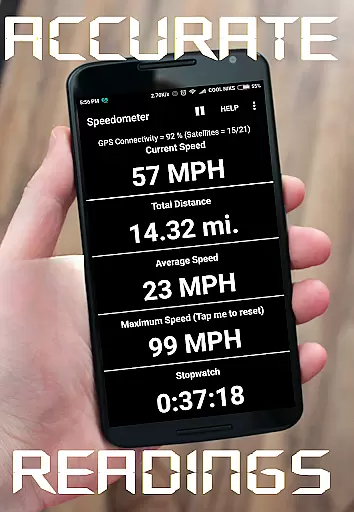
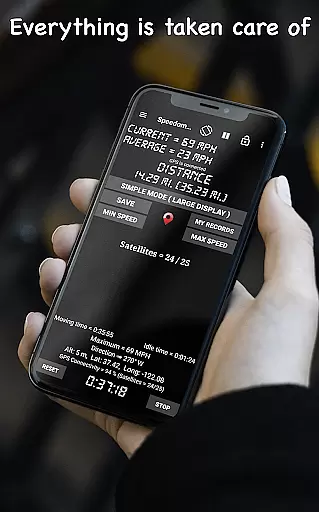
GPS Speedometer is a feature-rich navigation app designed to provide real-time speed tracking with GPS accuracy. Whether you're driving, cycling, or commuting, this app delivers precise speed and distance data through its intuitive interface. The app supports multiple units of measurement including mph, km/h, m/s, and knots, making it versatile for various users worldwide.
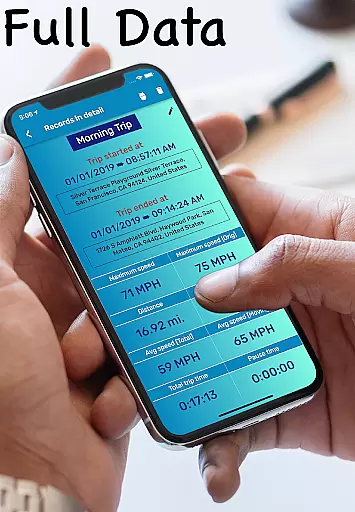
One standout feature is the Heads-Up Display (HUD) mode, which projects your speed onto your windshield for easy viewing during night drives. Additionally, the app offers customizable speed alerts, trip history with detailed statistics, and a floating window option that allows speed monitoring over other apps like Google Maps. These capabilities make it an essential tool for drivers, cyclists, and logistics professionals who need reliable travel data at their fingertips.
The app's offline functionality ensures you can track your speed without an internet connection, while its battery-efficient design helps conserve device power. With millions of users globally, GPS Speedometer has proven itself as a trusted solution for accurate speed and distance tracking in diverse scenarios, from daily commutes to off-road adventures.
GPS Speedometer stands out with its comprehensive set of features tailored for accurate speed and distance tracking. The app provides real-time GPS speed tracking with remarkable precision, ensuring users always have access to their current speed. Its digital odometer function records trip distances for any type of vehicle, whether you're driving a car, riding a bike, or operating a truck.
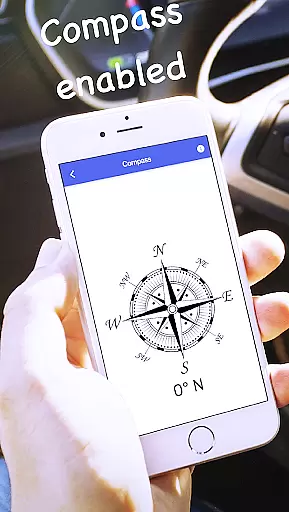
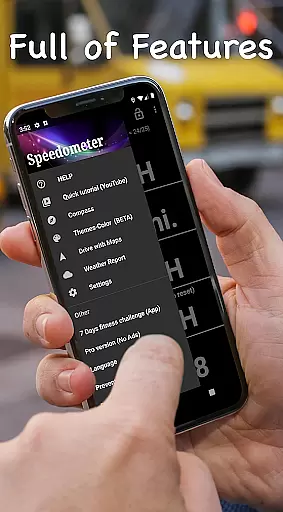
A key innovation is the HUD mode, which displays mirrored speed readings on your windshield for enhanced visibility during nighttime travel. The app also includes customizable speed alerts that notify users when they exceed preset limits, promoting safer driving habits. Furthermore, the built-in compass and live weather features help users stay informed about their direction and environmental conditions while traveling.
Additional notable features include trip history with detailed statistics, a floating window for multitasking with other apps, and support for multiple measurement units. The app's compact size and battery-efficient optimization ensure smooth performance without draining your device's resources. These robust features collectively create a powerful yet lightweight navigation tool suitable for various transportation needs.
Map accuracy is a critical feature for any navigation app, and GPS Speedometer excels in this area. The application uses advanced GPS technology to ensure precise location tracking, providing users with reliable speed and distance measurements.
The app's high-accuracy GPS speed tracking works seamlessly, whether you're driving a car, riding a bike, or operating a truck. This ensures that the distances and speeds recorded are reflective of your actual movements, delivering trustworthy data every time you use the app.
With its offline functionality, GPS Speedometer guarantees that you have access to accurate mapping data without requiring an internet connection. This feature is particularly beneficial when traveling through areas with poor connectivity, ensuring consistent performance regardless of external conditions.
Ultimately, the precision offered by GPS Speedometer's map accuracy provides peace of mind for users who rely on exact measurements for their professional or personal activities, making it an indispensable tool for drivers, cyclists, and logistics experts alike.
Route planning is simplified and enhanced with GPS Speedometer, which offers more than just basic directions. By integrating real-time speed tracking and trip history, the app allows users to plan their routes effectively while monitoring important metrics like distance and speed.
One of the standout features is the ability to save and review past routes with detailed statistics. This empowers users to analyze their previous journeys, helping them make informed decisions about future trips and optimize their travel plans accordingly.
In addition to traditional route planning, GPS Speedometer includes a compass mode and live weather updates. These tools ensure that users are not only aware of their direction but also prepared for any weather-related changes along their path, contributing to safer and more efficient travels.
Whether you need to track mileage for work or measure travel during commutes, GPS Speedometer's comprehensive route planning capabilities provide both novice and experienced navigators with the information needed to reach their destinations confidently and efficiently.
Accurate GPS tracking
User-friendly interface
Customizable speed alerts
Offline functionality
Battery-efficient design
Limited advanced analytics
No voice guidance
Basic UI design
Few customization options
Occasional GPS lag

Start your next adventure confidently using our Accurate Compass App
 3.70
3.70
Navigate with your watch and keep the phone in your pocket!
4.60
Instant diesel discounts - save big with each fill up!
4.40
Find EV & Tesla charging stations with PlugShare
4.70
Ride CTA, Metra & Pace: Manage your fares, buy Metra tickets, get arrivals.
3.00
Gas Station & Fuel Rewards Points
3.70
Get route, find shortest path, near by places and weather update
3.90
Neshan: map & navigation app with 20M+ monthly active users
4.50
Get there with the Waymo Driver — The World’s Most Experienced Driver™
4.90
Airport parking, with airport shuttle (TPS shuttle), reservations, and Spot Club
4.80
Offline maps & GPS for hiking, travel, fieldwork & outdoor adventures
4.70
Park in Chicago, NYC, Boston, SF, Houston & more!
4.70
Affordable rides and food delivery with incredible discounts in just one app.
4.50
Rideshare, taxi cabs, and more for your airport travels and everyday trips.
4.50
"Balad" is a map and navigator with a Persian voice assistant and a complete city guide
4.40
Simple & easy to use a compass app. Get accurate directions.
4.20
Avoid delays. Get real-time GPS navigation, safety alerts and live traffic.
4.10
NJ TRANSIT information and ticketing at your fingertips
3.70
Your guide to the recreational opportunities of the Bureau of Land Management!
3.40





User Reviews