
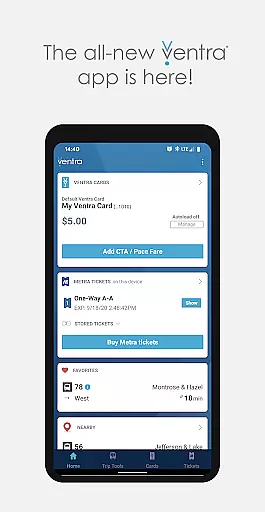
Ventra is a comprehensive transit management app designed specifically for the Chicago metropolitan area. This innovative application allows users to effortlessly manage and pay fares across all major transit systems including CTA, Metra, and Pace buses and trains. With its user-friendly interface, Ventra makes navigating the complexities of urban transit simpler than ever.
One of the standout features of Ventra is its ability to provide real-time account notifications and arrival/departure information from multiple transit services within a single platform. Whether you're commuting to work or exploring the city, Ventra ensures that you have all the necessary tools at your fingertips to make your journey as smooth as possible.
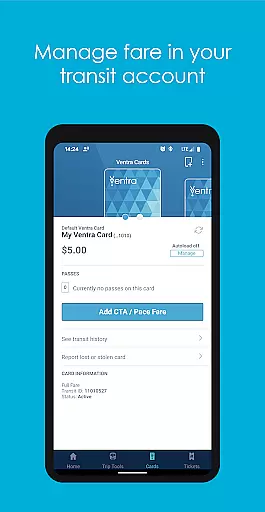
The Ventra app boasts an impressive array of features tailored to enhance the transit experience. Users can check their balance and available passes directly from their Ventra Card's transit account. The app also enables instant loading of value or passes to your Ventra Card, providing unparalleled convenience.
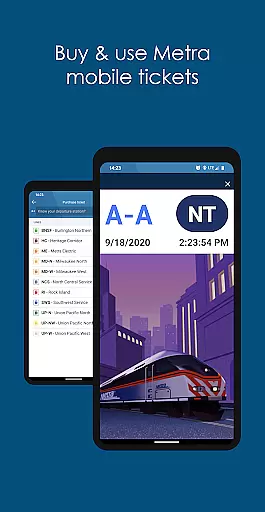
For Metra train riders, Ventra offers mobile ticketing capabilities, allowing passengers to purchase and use tickets directly from their smartphones. Additionally, the app provides real-time arrival and departure information for CTA, Metra, and Pace services, ensuring that commuters are always informed about their transit options.
Another notable feature is the ability to switch autoload for transit value or passes on and off, giving users greater control over their transit expenses. With these robust functionalities, Ventra stands out as an essential tool for anyone relying on public transportation in Chicago.
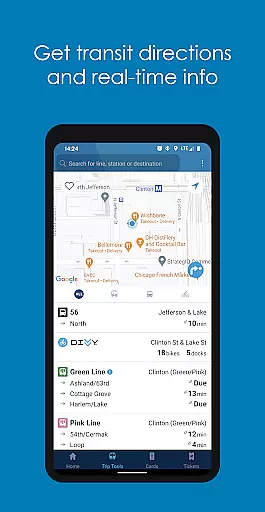
Map accuracy is crucial for any navigation app, and Ventra excels in this area by providing precise location data for transit users in Chicago. The app integrates real-time information from CTA, Metra, and Pace, ensuring that users have access to the most up-to-date transit routes and stops.
Ventra's mapping feature allows users to pick specific stops, save favorites, or explore services near their current location. This functionality not only enhances user experience but also simplifies trip planning by offering accurate spatial data that reflects actual transit operations.
The importance of map accuracy lies in its ability to reduce travel anxiety by giving commuters confidence in their planned journeys. With reliable maps, passengers can easily locate nearby stations, track arrival times, and make informed decisions about transfers or alternative routes when needed.
Effective route planning is essential for efficient urban commuting, and Ventra offers robust tools to help users navigate Chicago's complex transit system. By aggregating live data from multiple transit providers, the app enables riders to plan trips seamlessly across buses and trains using a single interface.
Users benefit from detailed route options that include estimated travel times, transfer points, and service alerts. These features empower commuters to choose optimal paths based on current conditions, thereby avoiding delays and optimizing their daily commutes.
Beyond basic directions, Ventrau2019s route planning tool provides contextual insights such as real-time notifications regarding fare balances and ticket purchases. This comprehensive approach ensures that travelers are always prepared with necessary passes or funds before embarking on their journeys.
User-friendly interface
Comprehensive transit coverage
Real-time notifications
Mobile ticketing for Metra
Instant balance updates
Limited to Chicago area
Occasional bugs reported
Requires stable internet
No offline functionality
Initial setup can be complex

Discover over 800 points of interest along the canal.
 3.70
3.70
All of NHSA's trail information at your fingertips for the 2025-2026 season
4.3
Turn your tablet or Android powered unit into a full blow Android Auto headunit.
2.30
Instant diesel discounts - save big with each fill up!
4.40
Navigate confidently with our precise Digital Compass app & Direction Compass!
4.70
Get directions, Maps, GPS navigation & GPS Maps using GPS App
4.10
Truck Safe GPS Navigation & Maps: Parking, Fuel, Diesel, Weight Station
4.80
Live Satellite view app for find GPS navigation Direction and live location map
3.70
Simple & easy to use a compass app. Get accurate directions.
4.20
Order a cab online. An affordable taxi ride and driver in no time. What a bolt!
4.80
Find AI powered cameras, ALPRs, and other surveillance infrastructure near you
4.70
Parcel map, property lines, owner, acres, land use, zoning and more from Regrid.
4.60
Explore with GPS Navigation with GPS offline, voice GPS, speed camera radar
4.60
Plan routes, share locations, and set custom alert zones
4.40
Explore a light pollution map to find suitable dark sky locations for observing.
4.30
Avoid delays. Get real-time GPS navigation, safety alerts and live traffic.
4.10
Route Planner is travel map to get turn by turn navigation & driving directions
3.90
Play in the outdoors with Android as your Handheld GPS and offline topo maps!
3.50
Find 93 Octane Gas: Locate Gasoline Stations Selling Premium 93 Octane or Higher
4.1




User Reviews