
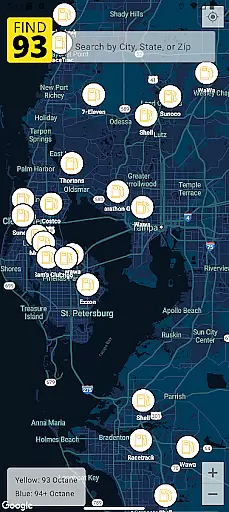
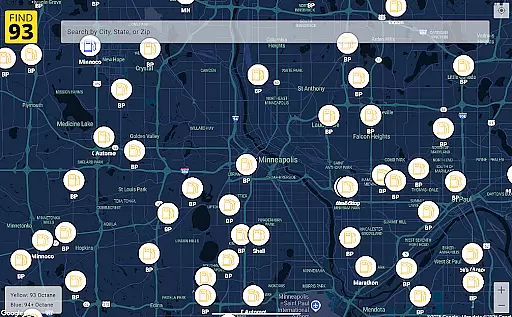
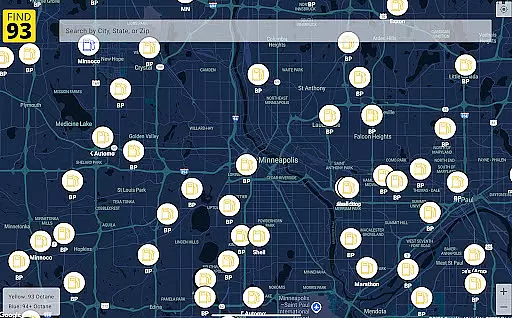
Find93 is a specialized navigation app designed to help drivers locate gas stations that offer 93 octane gasoline or higher. The app's core functionality revolves around its crowdsourced map system, which provides real-time information about premium fuel availability across the United States.
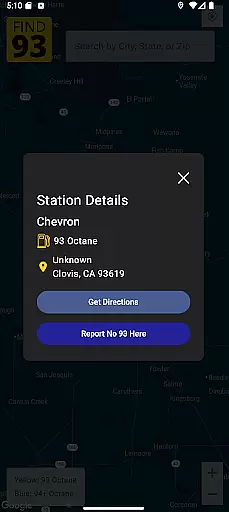
Beyond basic location services, Find93 offers detailed station information including precise addresses, fuel types, and additional descriptions. The app integrates seamlessly with major navigation platforms like Apple Maps, Google Maps, and Waze, providing users with multiple routing options to their chosen fueling station.
This application proves particularly valuable for owners of high-performance vehicles and luxury cars that require premium fuel, ensuring they can efficiently plan their journeys without worrying about fuel compatibility issues.
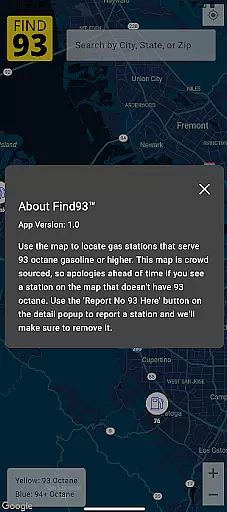
Find93 distinguishes itself through several innovative features that enhance the fuel-finding experience. The app's crowdsourced reporting system allows users to actively contribute to map accuracy by reporting stations that no longer carry 93 octane fuel, maintaining up-to-date information for the entire community.
The detailed station profiles provide comprehensive information beyond just location data. Users can access specifics about each station's amenities, fuel brands, and service offerings. The app's interface is designed for maximum usability, featuring intuitive controls and clear visual indicators for premium fuel availability.
Perhaps most significantly, Find93's multi-platform navigation integration sets it apart from standard mapping applications. This feature allows drivers to choose their preferred routing service while maintaining all the benefits of specialized fuel station data, creating a versatile tool for both everyday commutes and long-distance travel.
Map accuracy is essential for any navigation app, and Find93 excels in this area by providing users with the most up-to-date information on gas stations that serve 93 octane or higher. Powered by a crowdsourced map, the app ensures that every station's location is verified by the community, making it reliable for travelers.
The app's strength lies in its user-driven approach. With every user having the ability to report stations that no longer serve 93 octane fuel, the map data remains current. This collaborative effort helps maintain high standards of precision, ensuring that drivers can trust the locations displayed on the map.
For users, this means they can confidently plan their trips without worrying about outdated or incorrect station information. Whether you're on a long road trip or simply need to refuel nearby, Find93's accurate map data provides peace of mind, saving both time and fuel by guiding you directly to your desired destination.
Route planning is a critical feature for drivers who need to locate specific types of fuel, such as 93 octane gasoline. Find93 offers seamless integration with popular navigation apps like Apple Maps, Google Maps, and Waze, allowing users to get directions to their selected gas stations effortlessly.
Upon selecting a station, users can choose their preferred navigation app to receive turn-by-turn guidance. This flexibility ensures that drivers can select the best route based on real-time traffic conditions, road closures, or personal preferences, enhancing the overall driving experience.
By combining detailed station information with robust navigation options, Find93 empowers users to reach their destinations efficiently. The app's focus on integrating with trusted navigation tools not only simplifies route planning but also ensures that drivers have access to the most optimal paths available, making every trip smoother and more reliable.
User-friendly interface
Accurate crowdsourced data
Multi-platform navigation
Detailed station information
Real-time updates
Limited to premium fuel
Dependent on user reports
No offline functionality
US-focused coverage
Occasional data delays

Explore the world with Live Satellite View, 3D Maps, GPS Navigation & Earth Map.
 2.90
2.90
The fastest and most convenient way to pay for parking on our lots.
4.40
Easy, Moderate and difficult offroad adventures.
4.00
Find shortest way and save energy . Distance and area calculator.
4.70
"Balad" is a map and navigator with a Persian voice assistant and a complete city guide
4.40
Your real-time window to the world. Explore anywhere, anytime.
3.30
Get route, find shortest path, near by places and weather update
3.90
Find radar, speed camera, flight tracker. Use hud, location tracker, speedometer
4.20
Lets explore the world's famous places by using Live Cams, GPS & Satellite View.
4.20
Ride or drive at YOUR price
4.70
Parcel map, property lines, owner, acres, land use, zoning and more from Regrid.
4.60
CamSam PLUS - The speed and red light camera warning system!
4.40
Route schedules, maps, and real-time tracking of MTA buses in New York City.
4.20
Phone Tracker and GPS Location Sharing
4.20
Get real-time bus and train schedules for easy, hassle-free city transportation.
3.90
Start your next adventure confidently using our Accurate Compass App
3.70
Explore Earth with live GPS, satellite view & street navigation
3.60
Offline maps for phone and smart watch: topographic maps, satellite images...
3.30
Ride CTA, Metra & Pace: Manage your fares, buy Metra tickets, get arrivals.
3.00




User Reviews