
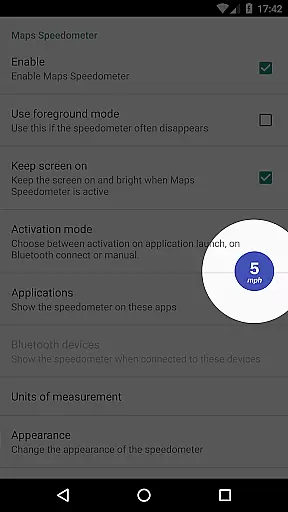
Maps Speedometer is a versatile travel companion that displays your current speed in real-time as an elegant overlay on your device. This innovative app automatically activates when your selected apps are in use or when connected to a Bluetooth device, ensuring you always have access to your speed information without interrupting your primary activities. Designed with flexibility in mind, it supports various units of measurement including mph, km/h, and knots, making it suitable for drivers, cyclists, and marine enthusiasts alike.
The app's customizable features allow users to adjust the transparency, size, position, and color of the speedometer overlay to suit their preferences. Whether navigating through unfamiliar roads or simply monitoring your speed during daily commutes, Maps Speedometer provides a seamless and unobtrusive experience. Its commitment to privacy and security is evident as it operates without advertisements, internet access requirements, or data-sharing backdoors, ensuring your information remains private and secure.
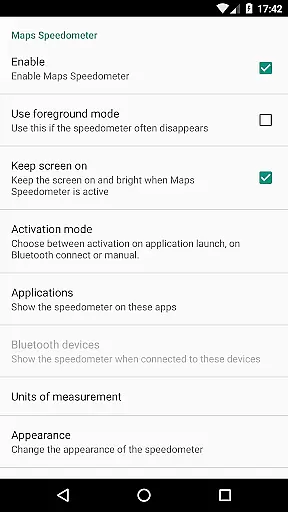
Maps Speedometer stands out with its array of practical features designed to enhance user experience. One of its key functionalities is the automatic display and hiding of the speedometer overlay based on the active status of chosen apps or Bluetooth connections. This ensures that the speedometer only appears when needed, maintaining an uncluttered screen during other activities. Additionally, users can choose their preferred unit of speed measurement from miles per hour, kilometers per hour, or knots, catering to diverse travel needs.
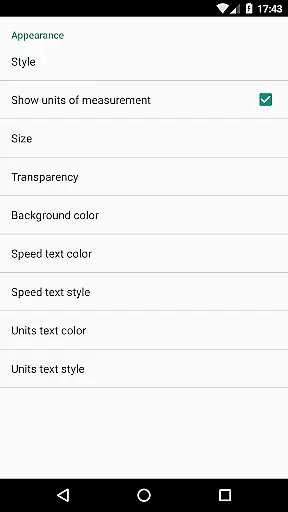
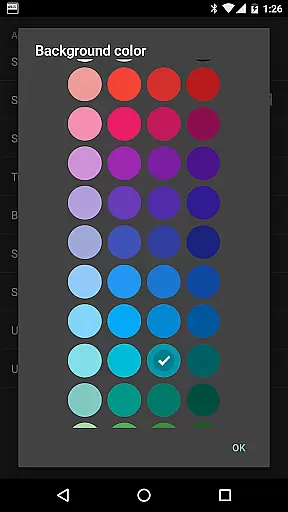
Customization is at the heart of Maps Speedometer's design. Users can personalize the overlay's appearance by adjusting its transparency, size, position, and even colors and styles. The ability to temporarily hide the overlay for 10 seconds by simply touching it adds to the convenience factor. Furthermore, the app's compatibility with any installed app on your device makes it a highly adaptable tool for various scenarios. Despite not supporting Android Auto currently, Maps Speedometer remains a powerful and flexible solution for travelers seeking reliable speed monitoring.
Booking authenticity is a crucial feature for travel applications, ensuring that all reservations and bookings made through the app are legitimate and trustworthy. Maps Speedometer, while not a booking app per se, enhances your travel experience by providing accurate speed information as you navigate.
This application automatically detects when a chosen navigation app is active and displays an elegant overlay with a speedometer, ensuring that the information presented is both relevant and reliable. The use of Accessibility services allows the app to detect the current active app, enabling it to show the overlay only when necessary.
Users can trust that the speed data displayed is authentic and corresponds to their real-time movement, thanks to the app's ability to connect to Bluetooth devices and adjust its settings based on user preferences. This ensures a seamless and dependable travel companion, enhancing both safety and convenience.
The transparency in how Maps Speedometer operates, without advertisements or unnecessary internet access, further reinforces the authenticity of the service provided. Users can be confident that their travel experience is augmented by genuine and precise speed information, allowing them to focus on their journey.
Price transparency is essential for travelers who want to understand the costs associated with their trips clearly. Although Maps Speedometer does not involve direct pricing, it offers a transparent experience by being upfront about its features and limitations, ensuring users know exactly what they are getting.
The app provides clear information about its functionalities, such as automatic display and hiding based on app activity or Bluetooth connections, adjustable settings for units, transparency, size, position, and colors. This openness helps users customize the app to their needs without hidden surprises.
Moreover, Maps Speedometer operates without advertisements or the need for internet access, which means users won't encounter hidden fees or data-sharing concerns. This straightforward approach allows travelers to use the app confidently, knowing there are no backdoors sharing private information.
By offering a product that is both reliable and transparent, Maps Speedometer ensures that users can enjoy their travels with peace of mind, focusing on their destinations rather than worrying about unforeseen expenses or privacy breaches.
User-friendly interface
Highly customizable
No ads or internet required
Automatic activation
Privacy-focused design
Limited Android Auto support
Requires Accessibility permissions
Bluetooth dependency for some features
Overlay may interfere with other apps
Device compatibility issues reported

Iowa 511 is the Iowa Department of Transportation's traveler information app.
 3.80
3.80
Tide Table Chart provides quick and easy access to high and low tide forecasts.
3.20
Learn about one of the most famous Victorian cemeteries in the world
2.80
Navigation on hikes is no longer a problem. Download the map, put notes and go!
4.60
Get faster fuel rewards, exclusive offers, and helpful tools!
4.70
Streamline your U.S. entry
4.90
Get exclusive travel deals and enjoy the award-winning customer service!
4.60
Find your perfect somewhere with last minute hotel & travel deals!
4.80
Managing your travel should be easy. With the Amtrak app, it is.
4.30
Travel and Book 8,000+ Hotels Worldwide with the Marriott Bonvoy™ app.
4.90
Save on gas and convenience with the earnify™ App
4.70
Book rooms at any of 4.2M properties worldwide. Find flight deals every day!
4.60
Easily rent a car at over 9,500 locations with the Enterprise car rental app.
4.60
The best way to book travel
4.60
Earn hotel and travel rewards, find hotel offers, and access your Digital Key.
4.50
Link & locate for real-time child & family safety: GPS tracker for families
4.40
The Official Freedom Trail Foundation app.
4.30
Examine the planet
3.80
Real-time flight tracking with live maps and flight status updates.
3.70



User Reviews