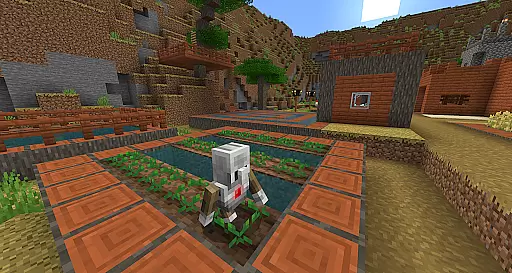
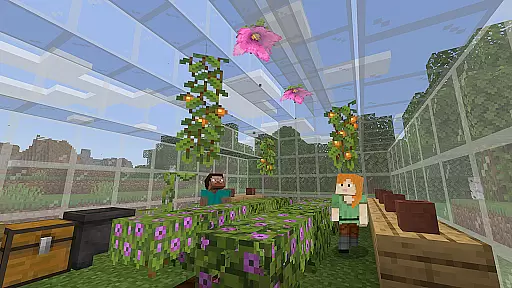
Minecraft Education is a game-based learning platform designed to inspire creative and inclusive education through interactive gameplay. This educational tool allows students and educators to explore various subjects such as reading, math, history, and coding in an engaging blocky world environment. The app provides ready-to-teach lessons, creative challenges, and open-world scenarios that cater to all types of learners, making it adaptable for different teaching styles and needs.
One of the key strengths of Minecraft Education is its ability to prepare students for the future by developing essential skills like problem-solving, collaboration, digital citizenship, and critical thinking. Through partnerships with organizations like BBC Earth, NASA, and the Nobel Peace Center, the platform offers culturally relevant lessons and immersive content that spark interest in STEM fields. Its multiplayer mode supports cross-platform collaboration, while features like Code Builder and Immersive Reader enhance accessibility and learning potential.
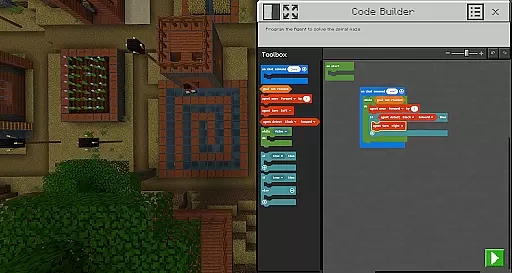
Minecraft Education boasts several distinctive features that set it apart as a powerful educational tool. One of its core functionalities is the multiplayer mode, which enables real-time collaboration among students across various platforms and devices, making it ideal for hybrid learning environments. The inclusion of Code Builder provides an intuitive interface for block-based coding, JavaScript, and Python, allowing students to practice programming within the game environment.
The app also integrates Microsoft's Immersive Reader, helping players read and translate in-game text, thus supporting language learners and those with reading difficulties. Additional features like the Camera and Book & Quill items allow users to document their creations and export them for further analysis or presentation. With seamless integration into Microsoft Teams and Flipgrid, educators can easily assess student progress and maintain control over the learning environment. These comprehensive features make Minecraft Education a versatile and innovative solution for modern classrooms.
Minecraft Education stands out in the realm of educational tools by offering content that is both accurate and authoritative. This platform collaborates with reputable organizations such as BBC Earth, NASA, and the Nobel Peace Center to create immersive learning experiences. These partnerships ensure that the educational material is not only engaging but also grounded in real-world knowledge and scientific research.
The app provides lessons and standardized curriculums across various subjects including reading, math, history, and coding. Each lesson is designed with all types of learners in mind, ensuring inclusivity and accessibility. The curriculum is carefully crafted to align with educational standards, making it a reliable resource for educators aiming to integrate digital tools into their teaching.
Moreover, Minecraft Education aids in preparing students for the future by instilling key skills such as problem-solving, collaboration, digital citizenship, and critical thinking. By tackling real-world topics through culturally relevant lessons, students are encouraged to apply their learning to practical scenarios, thus deepening their understanding and retention of complex concepts.
One of the core strengths of Minecraft Education is its ability to offer personalized learning paths tailored to individual student needs. With hundreds of ready-to-teach lessons, creative challenges, and open-world environments, educators can customize the learning experience to suit different learning styles and paces. This flexibility ensures that every student can engage with the material in a way that best suits them.
The platform supports game-based learning, which inherently allows for self-paced exploration. Students can dive into subjects at their own speed, revisiting complex topics or advancing through familiar ones. This autonomy fosters a sense of ownership over their learning process, enhancing motivation and engagement.
Additionally, features like Code Builder, which supports block-based coding, JavaScript, and Python, allow students to explore coding at varying levels of complexity. Coupled with Immersive Reader for text translation and reading assistance, Minecraft Education creates an adaptive learning environment where students can thrive academically while developing essential 21st-century skills.
Engaging learning environment
STEM-focused content
Multiplayer collaboration
Accessible coding tools
Strong institutional support
Requires Microsoft 365
Subscription-based pricing
Limited offline functionality
Steep learning curve
Resource-intensive

FAR/AIM, FAR for Flight Crew and FAR for Aviation Maintenance Technicians
 3.80
3.80
Bebefinn and Baby Shark educational, animated videos & games for kids
3.40
A magical world of fun, building, and learning with Mickey Mouse and more!
4.20
Deal Craps (Practice Craps Payouts)
3.80
Enrich the experience of your visit to the Pantheon with our audiotour.
1.60
Our most popular app series returns, better than ever!
3.90
Animals pop up and make sounds—learn names and noises in Peekaboo Barn!
4.3
The best way to study for your amateur radio license exam.
4.90
Learn Japanese in an immersive educational game set in Japan!
4.90
A realistic sky map to observe stars, planets, satellites and constellations!
4.80
Childcare Management App: Daily sheets, sign in-out, billing and learning tools
4.70
Astronomy Guide To Night Sky
4.30
Astronomy app ? Discover the universe scope, explore solar system model in 3D.
4.20
Build math skills in: addition, subtraction, multiplication and division.
4.10
Master note reading with StaffWars….
4.00
Your guide to thousands of satellites and spacecraft in orbit around Earth!
3.90
An animated storybook app to help ease your child through toilet training.
3.70
Flashnote Derby is the fun way for kids to learn music notes and memorize them.
3.40
Learn and joke with the Silly Turkey!
4.4




User Reviews