
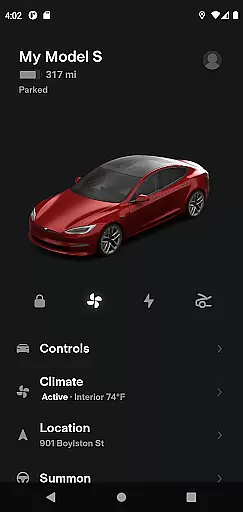
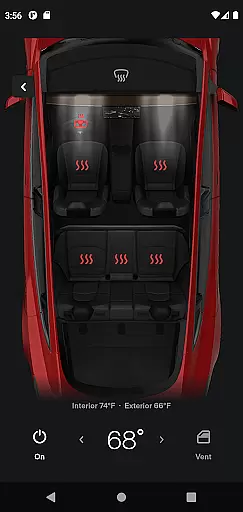
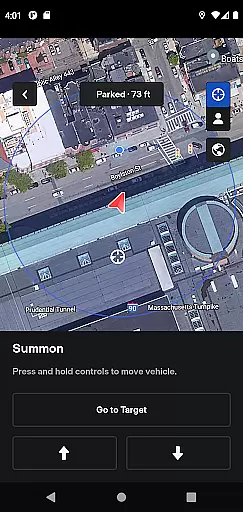
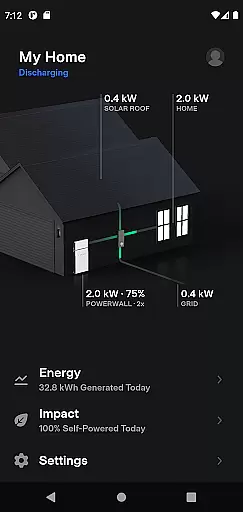
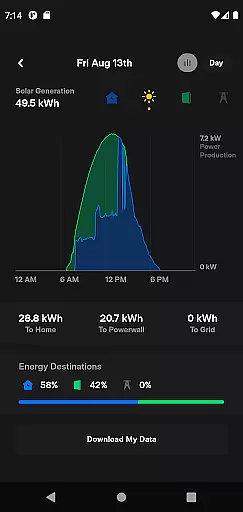
Tesla app serves as a comprehensive remote control and monitoring system for Tesla vehicle owners, enabling seamless interaction with their cars and Powerwalls from any location. The application provides real-time charging updates, climate control management, security features like locking and unlocking, and vehicle location services. Additionally, users can send navigation destinations directly to their vehicles, manage media playback, and even activate summon functionality for compatible models. For Powerwall 2 owners, the app offers detailed energy usage statistics and solar production data.
Designed specifically for Tesla owners, this lifestyle app transforms how drivers interact with their electric vehicles. Whether it's pre-conditioning the cabin temperature while the car is still plugged in or remotely updating the vehicle's software, the Tesla app ensures maximum convenience and efficiency. The ability to monitor solar energy storage and grid export makes it an invaluable tool for sustainable living.
The Tesla app stands out with its extensive feature set tailored specifically for Tesla vehicle owners. One of its key functionalities is the real-time charging monitor, which allows users to check the charging status and control the charging process remotely. This feature is complemented by advanced climate control options that enable pre-conditioning the vehicle's interior temperature, even when parked in enclosed spaces. The remote lock and unlock feature adds a layer of convenience and security.
Another standout feature is the vehicle locator, which provides GPS-based directions to the car's location or tracks its movement if someone else is driving. The app also supports seamless integration with popular navigation apps, allowing users to send destinations directly to their vehicles. Media management features let passengers control music and other entertainment systems easily. With the summon feature, available on Autopilot-equipped models, users can maneuver their vehicles out of tight parking spots with ease. Powerwall 2 owners benefit from detailed energy monitoring tools that display solar production, home energy consumption, and grid export data.
The Tesla app offers an extensive range of features that cater to various aspects of a user's lifestyle, ensuring comprehensive support for both vehicle and home energy management.
With functionalities ranging from real-time vehicle charging monitoring to climate control and Powerwall energy storage oversight, the app provides a holistic approach to modern living.
Users can seamlessly integrate their daily routines with the app's capabilities, such as remote locking and unlocking, navigation setup, and solar energy data tracking, all contributing to a more connected and sustainable lifestyle.
This broad spectrum of services ensures that Tesla not only enhances vehicle ownership but also supports an eco-friendly household energy solution.
Tesla's app content is developed based on authentic vehicle and energy product data, reflecting the company's expertise in electric vehicles and renewable energy solutions.
All features are designed in-house by Tesla's engineering teams, guaranteeing that the information and controls provided are accurate and reliable.
Regular software updates ensure that users have access to the latest functionalities and security enhancements, reinforcing the trustworthiness of the app's content.
By leveraging Tesla's deep knowledge base, the app establishes itself as a credible tool for managing both transportation and home energy needs effectively.
User-friendly interface
Comprehensive vehicle control
Real-time energy monitoring
Remote software updates
Advanced security features
Limited to Tesla owners
Requires stable internet
Powerwall 2 required for energy features
Some features need specific hardware
Occasional connectivity issues

Smart controls for your Ember Smart Mugs
 4.10
4.10
Daily lessons from A Course in Miracles with scheduled reminders
4.80
See wait times and check into a hair salon ahead of time with Online Check-In.
4.80
Your home in your hand
3.80
SmartHQ: Your Connected Home Command Center
4.10
My Diary - Daily Journal with lock: Diary journal app and secret diary with lock
4.80
Creativity and savings for kids, beginners and experts in arts and crafts
3.50
Subwoofer school’s in session! You’ve now enrolled into KICKER U.
3.80
Share opinions, get paid cash
4.30
Good magnifier app to see tiny things bigger and more clearly!
4.80
Get the news, events and savings that matter to you with AARP Now.
4.80
The all-new Cync app. The simple, connected app for Cync and C by GE.
4.50
Fly your Solo like a boss.
4.10
Unique BIG BOLD TIME with amazing colors and customisations.
3.70
BILT interactive 3D instructions help you get the job done right
3.50
Falling Fruit is a massive collaborative map of food in our cities.
3.20
Healthy eating timer app to track meal pace, improve habits, and eat slowly.
4.0
Cute animated Thanksgiving watchface for your WearOS smartwatch
4.5
Wear your favorite memories, loved ones, pets or travel photos on your watch
4.4




User Reviews