
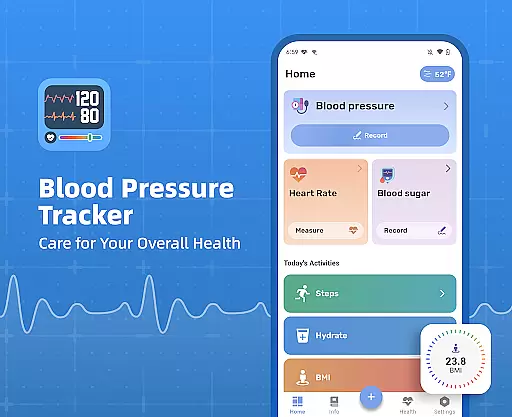
Blood Pressure Tracker is a comprehensive health monitoring app designed to help users manage their blood pressure, heart rate, and blood sugar levels effectively. The app provides a fast, simple, and safe way to record these vital metrics, making it easier for individuals to keep track of their health data.
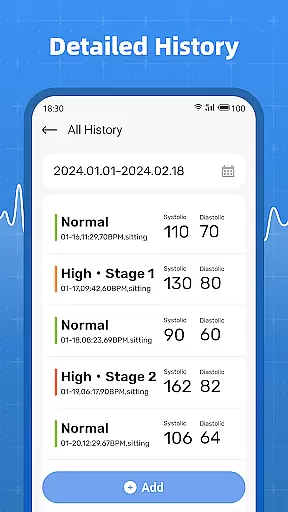
One of the standout features of Blood Pressure Tracker is its ability to provide clear analysis and history of all measurements. Users can easily access past records, allowing them to identify trends and subtle changes in their health metrics over time. This functionality is particularly beneficial for those who need to share detailed health reports with their healthcare providers.
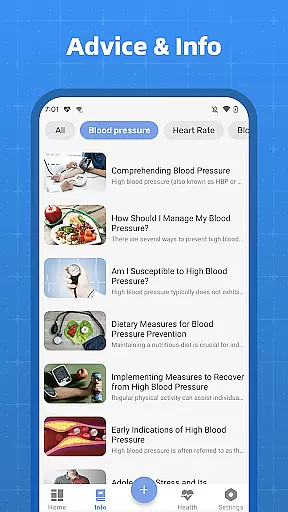
The app is ideal for individuals who wish to maintain regular checks on their blood pressure but occasionally forget, still rely on paper records, or are uncertain about what constitutes normal ranges. By offering scientific and accurate information, Blood Pressure Tracker empowers users to take control of their health and make informed lifestyle choices.
Blood Pressure Tracker offers a variety of features that cater to different health monitoring needs. Firstly, it allows users to record their blood pressure, blood sugar, and pulse effortlessly. This ease of recording ensures that users can maintain consistent tracking without hassle.
In addition to basic metrics, the app tracks a wide range of health data including water intake, steps, and BMI. This holistic approach to health monitoring enables users to get a complete picture of their overall well-being. The clear and organized presentation of this data helps users understand their health trends better.
Another significant feature is the accessible history of measurements. Users can quickly retrieve past data, which aids in recognizing patterns and making necessary lifestyle adjustments. Although the app does not measure blood pressure or blood sugar directly, its robust tracking and analytical capabilities make it an invaluable tool for proactive health management.
Personalized planning in health applications refers to the ability to tailor health tracking and management according to individual user needs. Blood Pressure Tracker excels in this area by offering customizable tracking options for blood pressure, heart rate, and blood sugar levels.
The app allows users to set specific goals and reminders for regular health check-ins, ensuring that they never miss an important measurement. By inputting personal data, users receive tailored insights into their health trends, empowering them with actionable information.
With personalized planning, users can easily identify patterns and make informed decisions about their health. This feature not only enhances user engagement but also promotes a proactive approach to health management.
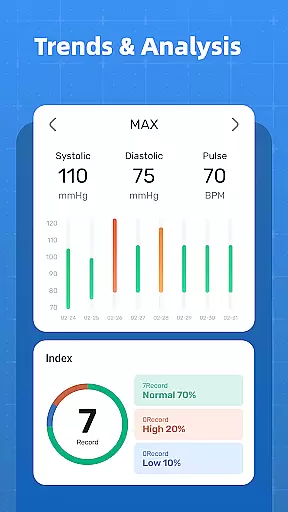
Progress visualization is a crucial component of any fitness app, providing users with clear and intuitive representations of their health data. Blood Pressure Tracker offers robust visualization tools that display historical data in easy-to-understand graphs and charts.
Users can view trends over time, compare results, and identify correlations between different health metrics such as blood pressure and heart rate. These visual aids help users grasp complex information quickly and make necessary lifestyle adjustments.
By presenting data visually, the app ensures that users can monitor their progress effectively and share these insights with healthcare providers. This transparency fosters better communication and more informed medical consultations.
User-friendly interface
Comprehensive health tracking
Easy data retrieval
Scientific insights provided
Health trend analysis
No direct measurement capability
Limited to manual input
Premium features may require subscription
Occasional syncing issues
Dependent on user discipline

For Absolute Novices to Strength Training. Simple. Effective.
 4.40
4.40
Pack of 66 calming lullabies for smooth fall asleep and relaxation
4.10
Get alert about getting out of desired heart rate zone.
4.10
A brain game that moves you
4.70
Load the bar with this barbell & plate calculator. It's leg day, not brain day!
4.70
Memory, mind & logic exercises. Puzzle games, IQ & brain test for kids & adults
4.50
Track heart rate & HRV in 30s! Get live health insights and anomaly alerts
4.40
Mood journal, habits, self-care tracker, self-love
4.90
Comprehensively record and manage your health
4.50
Easy access to health benefits
4.70
The Official Blood Type Diet® App - know your categorized foods anytime.
4.50
Relax to calm sounds, white noise, music, guided meditation and bedtime stories
4.40
Pupillary distance PD with camera quick and easy, checking glasses frames on you
3.70
The app helps you address digestive symptoms based on the Fast Tract Diet.
3.50
Measure real-time wrist & ambient temperature with your Galaxy Watch (Wear OS)
3.20
Your plan in your pocket 24/7
3.00
Text notifications, button control, heart monitor & more for your Amazfit.
2.40
The Wear OS BeechBand app is designed to alleviate anxiety and other conditions
4.0
Using Recognise™ has been shown to reduce pain, and improve performance.
4.4



User Reviews