
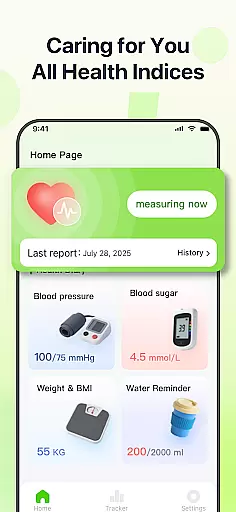
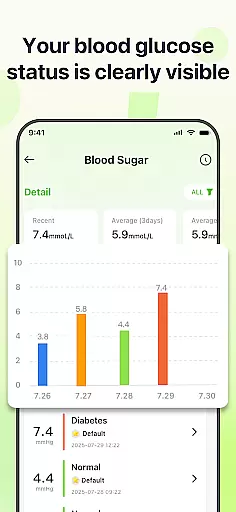
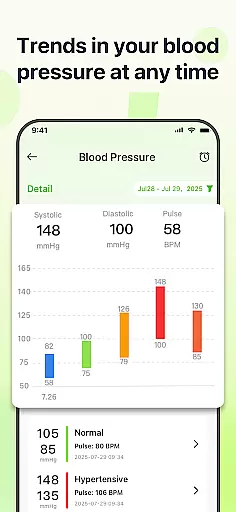
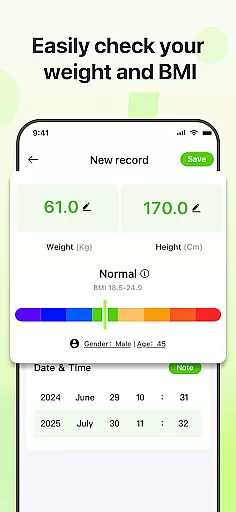
PulseSense is a comprehensive health tracking application designed to simplify wellness management. The app allows users to effortlessly log key metrics such as blood pressure, glucose levels, and heart rate while providing intelligent reports tailored to individual needs. Its sleek trend visualizations span days, weeks, months, and years, making it easy to uncover patterns and track progress over time.
Designed for individuals managing chronic conditions like hypertension or diabetes, PulseSense also caters to fitness enthusiasts and seniors seeking a straightforward health journal. With end-to-end encryption and no cloud storage, the app ensures complete privacy, keeping all data securely on the user's device.
PulseSense stands out with its effortless logging system, enabling users to input health metrics quickly and attach personal notes or tags for added context. The app’s intelligent reporting feature generates personalized lifestyle recommendations based on logged data, helping users make informed decisions about their health.
Another highlight is its advanced visualization tools, which present trends in an intuitive format. Users can view their progress across various timeframes, from daily logs to yearly summaries. Additionally, customizable reminders help reinforce healthy habits, ensuring consistency in tracking. These features consolidate all essential health metrics into one secure platform, eliminating the need for multiple tools.
Personalized planning in health applications refers to the ability to tailor health goals and tracking parameters to individual user needs. PulseSense excels in this area by offering intelligent health reports and personalized lifestyle recommendations based on your logged data.
The app allows users to effortlessly log various health metrics such as blood pressure, glucose levels, and heart rate. By analyzing these inputs, PulseSense generates tailored advice that helps users manage chronic conditions like hypertension or diabetes more effectively.
Users benefit from the app's sleek trend visuals spanning days, weeks, months, and years. These visuals not only make it easier to track progress but also assist in uncovering patterns that can lead to more informed health decisions.
Ultimately, PulseSense empowers individuals to take control of their wellness journey with actionable insights rather than just raw numbers, making personalized health planning both accessible and effective.
Progress visualization is a crucial feature in health apps, providing users with graphical representations of their health data over time. PulseSense offers sleek trend visuals that span days, weeks, months, and years, allowing users to monitor their health metrics with ease.
These visualizations are not just simple charts; they are designed to help users uncover patterns and track progress in their health journey. Whether you are managing high blood pressure, monitoring glucose levels, or prioritizing heart health, PulseSense provides intuitive graphs that make understanding your data straightforward.
By consolidating all health metrics in one place, the app eliminates the need to switch between different tools. This comprehensive view supports users in maintaining consistency in their health tracking efforts.
In summary, PulseSenseu2019s progress visualization tools offer an engaging way to stay informed and consistent, reinforcing healthy habits through clear and insightful graphical data representation.
User-friendly interface
Advanced trend analysis
Personalized insights
Strong privacy controls
Customizable reminders
No direct measurement tools
Limited social features
Premium-only exports
Device-specific encryption
Requires manual entry

Easy access to health benefits
 4.70
4.70
Your Health Has Met Its App (℠)
3.90
Home workouts for fitness & fast bodybuilding at home - no equipment needed.
4.90
Binaural Beats - Fully Customizable Waves - Pure Sound - No Loops
4.50
50 HD sounds to help you relax during the day and sleep great at night!
4.40
Turn your steps into cash, gift cards & rewards with our step counting pedometer
3.80
Blood Pressure Log, HRV & Heartbeat Tracker. Pulse Checker.
4.40
Focus on BP & Health
3.80
Mood journal, habits, self-care tracker, self-love
4.90
When the night comes, we prepare your eyes for deep, sweet dreams
4.70
Step Counter, track steps when you walk or run
4.70
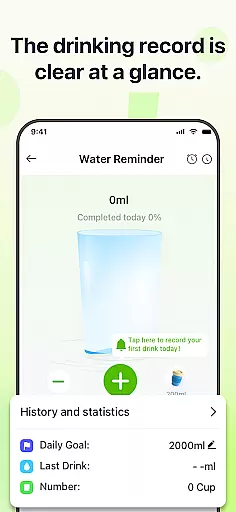
Drink water reminder app. Track water intake. Smart simple hydration tracker.
4.70
Get lasting results with Chair Yoga, Wall Pilates, and Walking workouts!
4.60
Relax. Sleep Better. Feel Better.
4.50
Relax to calm sounds, white noise, music, guided meditation and bedtime stories
4.40
Download MadMuscles to start your positive body transformation!
4.30
Your Health Assistant
3.90
Make sense of your health data.
3.80
Using Recognise™ has been shown to reduce pain and improve performance.
4.3



User Reviews