
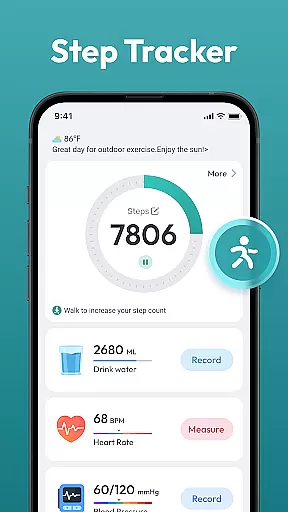
Step Counter - Pedometer App is a comprehensive health and fitness tool designed to help users track their daily physical activity. This app automatically counts steps, measures walking or running distance, and supports various tracking features without requiring any wearable devices.
The application offers multiple tracking options including daily, weekly, and monthly charts that provide detailed insights into user progress. With training courses and plans available, it helps users set and achieve fitness goals such as reaching 10,000 steps per day. Its user-friendly interface makes it accessible for all ages, promoting an active lifestyle while maintaining simplicity in use.
Whether you are aiming to lose weight, stay healthy, or simply monitor your daily activities, Step Counter - Pedometer App serves as a reliable companion on your journey towards better health.
Step Counter - Pedometer App stands out with its automatic step counting feature which works seamlessly across most Android devices. Users can easily track their steps and distances covered during walks or runs without needing any additional hardware.
Beyond basic step counting, the app provides extensive data tracking capabilities including calories burned, time spent active, and more. The inclusion of training programs tailored to individual needs enhances personalization and effectiveness. Additionally, the app's compatibility with various Android devices ensures broad accessibility.
With intuitive design elements like clear charts and easy navigation, users can effortlessly monitor their progress over different time frames. These features collectively contribute to making Step Counter - Pedometer App not just a tool but a complete fitness solution.
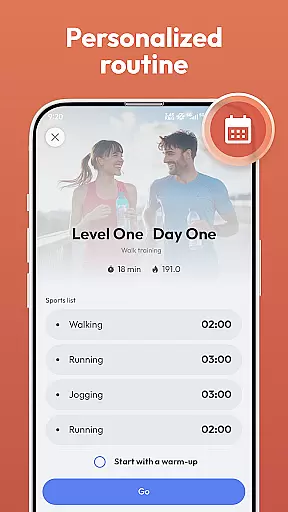
Personalized planning in a fitness app refers to the ability to create tailored workout and activity plans that align with individual goals and capabilities. This feature is crucial for users who seek customized guidance based on their unique health objectives.
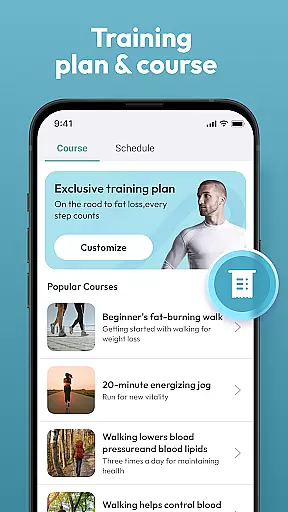
Step Counter - Pedometer App offers personalized planning by providing training courses and plans that cater to different user needs. Whether you aim to lose weight, maintain health, or reach a daily goal of 10,000 steps, this app adjusts its recommendations accordingly.
Users benefit from this feature as it helps them stay motivated and consistent with their fitness journey. The app's intelligent algorithms analyze daily activities and suggest modifications to optimize personal health outcomes.
The true value lies in empowering users to take control of their fitness routines. With personalized planning, individuals can set realistic goals, track progress, and achieve milestones, making their health journey more effective and enjoyable.
Progress visualization is an essential aspect of any fitness application, allowing users to see their achievements and improvements over time. This feature enhances motivation and provides a clear picture of one's fitness journey.
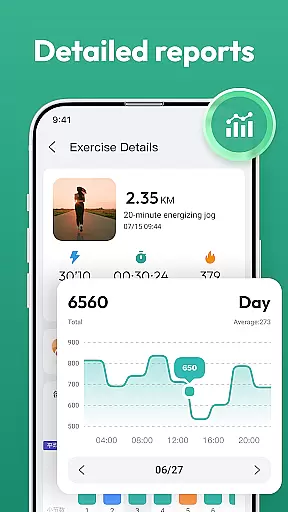
Step Counter - Pedometer App excels in progress visualization by offering daily, weekly, and monthly charts. These visual tools display step counts, distance covered, and other health data, giving users a comprehensive view of their activities.
By using this app, users can easily monitor their progress and make informed decisions about their health routines. Visual feedback helps in understanding patterns and trends in physical activity, which is vital for long-term success.
Ultimately, progress visualization not only tracks achievements but also encourages users to set new goals. Seeing tangible results fosters a sense of accomplishment and drives continued engagement with the app, promoting a healthier lifestyle.
User-friendly interface
Automatic step tracking
No wearables needed
Detailed progress charts
Free to use
Limited customization
Requires constant GPS
Battery consumption high
No live support
Ads present

Enjoy the Gluten Free living with the best app. SCAN the barcodes & SEARCH.
 3.60
3.60
Using Recognise™ has been shown to reduce pain and improve performance.
4.2
HRV4Training helps you optimize goals and improve performance. No sensors needed
3.30
Beauty Care, Makeup & Skin Care Scanner | Pregnancy App For A Mom | Healthy Baby
5.00
Measure your Pupil Distance for Eyeglasses and VR headsets in 3 quick steps.
4.70
Monitor, analyze, track, and convert blood sugar & help you control diabetes.
4.10
Make sense of your health data.
3.80
GloryFit is a companion app for the smart bracelet.
3.60
Comprehensively record and manage your health
4.50
Meditation app, head space app provides calm music to help you meditate & sleep
5.00
Protect your healthy sleep
4.80
Load the bar with this barbell & plate calculator. It's leg day, not brain day!
4.70
“Overcoming pain based on EMDR” helps you to alleviate chronic pain and stress.
4.10
Create powerful subliminal audio with custom affirmations and background music.
4.00
Histamine intolerance, low FODMAP diet and irritable bowel syndrome (IBS)
4.00
Understand your body’s most meaningful messages and transform your health.
3.90
Pupillary distance PD with camera quick and easy, checking glasses frames on you
3.70
Use your watch as a bike computer, heart rate monitor and cycling power meter
2.50
Transform your body and soul with DBFFitness, with a 40-day fitness journey.
4.0



User Reviews