
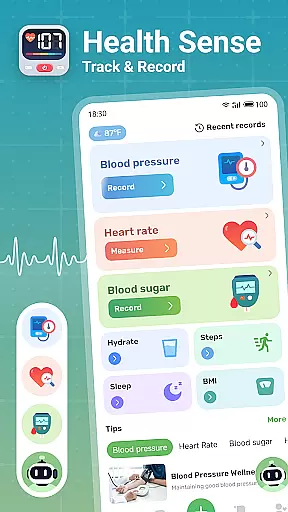
Health Sense is a comprehensive health tracking application designed to help users monitor essential health metrics. The app allows you to track blood sugar, blood pressure, heart rate, BMI, steps, and water intake through a simple input interface. With personalized health diaries and data visualization in clear graphs, it provides valuable insights into your health trends over time.
Beyond basic tracking, Health Sense offers scientifically-backed health knowledge and tips for managing various aspects of wellness. Whether you're looking to maintain healthy levels of vital signs or seeking helpful diet suggestions, this app serves as a reliable companion for short-term and long-term health improvement. While not intended for medical diagnosis or emergencies, it's an excellent tool for proactive health management.
Health Sense stands out with its diverse feature set tailored for health-conscious individuals. The app's primary feature is its ability to record various health metrics such as blood sugar, blood pressure, heart rate, BMI, daily steps, and water intake effortlessly. This functionality helps users maintain consistent monitoring without hassle.
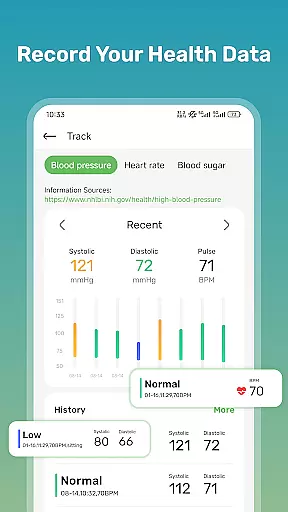
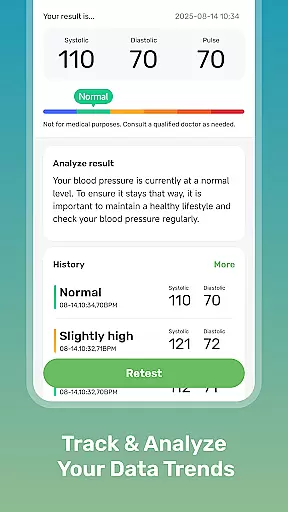
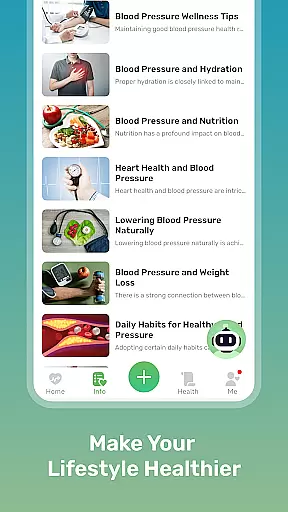
In addition to data recording, the app provides insightful visualizations through charts that display trends over time. These visual aids make it easier to understand fluctuations in your health metrics. Furthermore, Health Sense enriches user experience by offering a wealth of health insights and knowledge, including tips on managing blood sugar and pressure, heart health advice, and dietary recommendations, ensuring holistic well-being.
Personalized planning in health applications is crucial for tailoring individual health strategies. Health Sense offers a unique approach by allowing users to record various health metrics at their convenience. This includes blood sugar levels, blood pressure, heart rate, and even daily water intake.
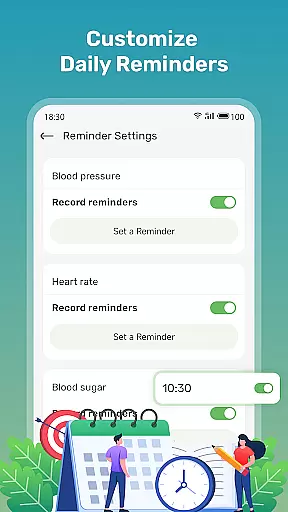
The app implements personalized planning through its adaptable input interface. Users can log their health data anytime and anywhere, creating a flexible health monitoring routine. This feature supports the development of a customized health diary, empowering users to observe and manage their health trends effectively.
By tracking these vital metrics, users gain insights into their health patterns without the need for medical expertise. The ability to personalize what you track, such as systolic and diastolic pressures or daily steps, ensures that each user's needs are met accurately.
This personalized method not only aids in maintaining a healthy lifestyle but also educates users on which factors are most impactful to their wellbeing. With Health Sense, personalized planning becomes an accessible reality for anyone looking to improve their health management.
Visual representation of progress is essential for understanding personal health trends over time. Health Sense excels in progress visualization by presenting user-inputted data through clear and informative charts.
Upon recording health metrics such as blood glucose, BMI, and heart rate, the application generates easy-to-understand graphs. These visual tools display fluctuations and trends within the user's health data, making it simpler to comprehend oneu2019s current health status.
With this visual feedback, users can identify correlations between their lifestyle choices and health outcomes. For instance, observing how increased water intake correlates with blood pressure levels can guide users towards healthier habits.
Health Senseu2019s focus on progress visualization not only motivates users by showing improvements over time but also serves as an early warning system. Sudden changes in tracked metrics can prompt timely consultations with healthcare professionals, ensuring ongoing health safety.
User-friendly interface
Comprehensive health tracking
Personalized health diary
Actionable health insights
Data visualization tools
No medical device replacement
Limited emergency support
Potential LED overheating
Cannot measure blood pressure
Dependent on manual input

App to stop smoking slowly or now with a motivational badges and helpful tips
 4.80
4.80
The app helps you address digestive symptoms based on the Fast Tract Diet.
3.50
Beauty Care, Makeup & Skin Care Scanner | Pregnancy App For A Mom | Healthy Baby
5.00
Show your support for the development of FitNotes - Gym Workout Log
4.90
Grow with self-tests and personal routine.
4.30
Walk, track, and burn calories with step counter & GPS walking tracker
4.20
Understand your body’s most meaningful messages and transform your health.
3.90
Focus on BP & Health
3.80
Comprehensively record and manage your health
4.50
Meditation app, head space app provides calm music to help you meditate & sleep
5.00
Easy access to health benefits
4.70
The simplest way to track your 21 Day Program containers, exercises, and water.
4.50
Chair Workout: Women's Edition for safe, flexible, and personalized fitness.
4.40
Pack of 66 calming lullabies for smooth fall asleep and relaxation
4.10
Your Health Assistant
3.90
FitCloudPro takes care of your health every minute.
3.70
Sync your activities of the most popular sports tracking services
2.70
The Wear OS BeechBand app is designed to alleviate anxiety and other conditions
4.5
Transform your body and soul with DBFFitness, with a 40-day fitness journey.
4.3



User Reviews