
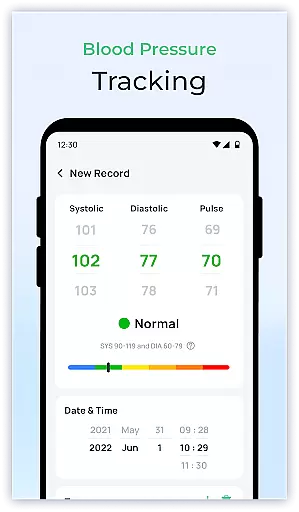
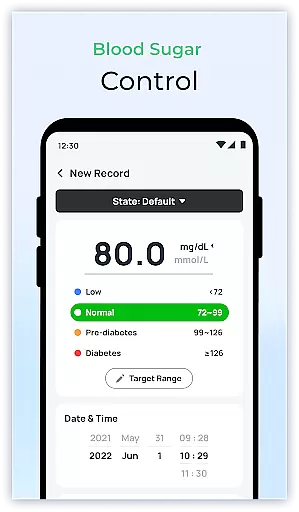
Blood Sugar & Diabetes Tracker is a comprehensive health management app designed specifically for individuals with diabetes. The app's core functionality revolves around accurate blood sugar tracking, allowing users to log their readings effortlessly and monitor trends over time. With its intuitive interface, the app provides personalized insights that help users understand how different factors affect their blood sugar levels.
One of the standout features is the detailed reporting system, which enables users to generate comprehensive reports for sharing with healthcare providers. This facilitates more informed discussions during medical appointments and supports better diabetes management. Additionally, the app offers educational resources that keep users informed about the latest developments in diabetes care, empowering them to make smarter health choices.
This app is particularly useful for those who need to maintain strict control over their blood sugar levels. Whether you're newly diagnosed or have been managing diabetes for years, Blood Sugar & Diabetes Tracker serves as a reliable companion in your journey towards better health and well-being.
Blood Sugar & Diabetes Tracker stands out with its robust feature set tailored specifically for diabetes management. The app allows users to log their blood sugar levels quickly and easily, providing instant feedback on how their numbers are trending. This real-time tracking capability is complemented by advanced analytics that identify patterns and offer personalized recommendations based on individual data.
A key innovation is the app's ability to generate detailed reports that can be shared directly with healthcare providers. These reports include visual graphs and summaries that make it easier for doctors to assess a patient's condition and adjust treatment plans accordingly. Another notable feature is the customizable reminder system, which helps users stay consistent with their monitoring schedule and medication regimen.
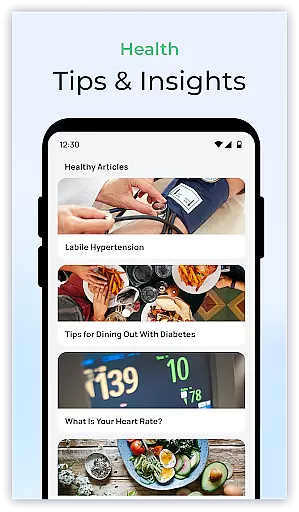
The app also includes an extensive library of educational resources covering various aspects of diabetes care. From dietary tips to exercise guidelines, these materials provide valuable information that empowers users to take proactive steps in managing their condition. The combination of practical tools and informative content makes Blood Sugar & Diabetes Tracker an indispensable resource for anyone looking to improve their diabetes management.
Personalized planning in diabetes management is crucial for maintaining stable blood sugar levels and ensuring overall well-being. Blood Sugar & Diabetes Tracker offers a comprehensive solution that goes beyond simple data logging.
The application allows users to log their blood sugar readings effortlessly, providing personalized insights based on individual trends and patterns. This feature helps users understand how different factors such as diet, exercise, and medication affect their blood sugar levels.
By analyzing these patterns, the app generates tailored recommendations aimed at helping users maintain optimal blood sugar levels. These recommendations are designed to fit seamlessly into users' daily routines, promoting better health outcomes.
Ultimately, this personalized approach empowers users to take proactive steps in managing their diabetes. By leveraging detailed reports and insights, users can work more effectively with healthcare providers to adjust treatment plans and improve their quality of life.
Visualizing progress is essential for individuals managing chronic conditions like diabetes. Blood Sugar & Diabetes Tracker excels in this area by offering robust tools for tracking and displaying health data.
Users can access intuitive graphs and charts that illustrate their blood sugar trends over time. These visual aids make it easier to identify patterns and fluctuations, which is critical for effective diabetes management.
In addition to graphical representations, the app provides milestone reminders and achievement trackers. These features celebrate small victories and keep users motivated on their health journey.
By transforming complex data into easy-to-understand visuals, Blood Sugar & Diabetes Tracker ensures that users remain engaged and informed. This ongoing engagement fosters better adherence to diabetes care plans and encourages users to maintain healthy habits.
User-friendly interface
Comprehensive tracking
Detailed reporting
Personalized insights
Educational resources
Premium features locked
Limited offline access
Occasional bugs
Subscription fees
Steep learning curve

The simplest way to track your 21 Day Program containers, exercises, and water.
 4.50
4.50
“Overcoming pain based on EMDR” helps you to alleviate chronic pain and stress.
4.10
Your Health Has Met Its App (℠)
3.90
Weight loss app: home workout for women to lose weight & burn calories.
4.80
Control your sleep in real-time wearing Garmin device
3.60
Enjoy the Gluten Free living with the best app. SCAN the barcodes & SEARCH.
3.60
Using Recognise™ has been shown to reduce pain, and improve performance.
4.5
Get lasting results with Chair Yoga, Wall Pilates, and Walking workouts!
4.60
You deserve easy access to important insurance information. Download for FREE.
4.70
Home workouts for fitness & fast bodybuilding at home - no equipment needed.
4.90
Memory, mind & logic exercises. Puzzle games, IQ & brain test for kids & adults
4.50
Personal step counter for you, private and accurate
4.50
Download MadMuscles to start your positive body transformation!
4.30
Interval timer for High Intensity Interval Training, Tabata and Circuit Training
4.20
This is an application that serves as a companion app for smart watch.
4.20
Monitor, analyze, track, and convert blood sugar & help you control diabetes.
4.10
Understand your body’s most meaningful messages and transform your health.
3.90
GloryFit is a companion app for the smart bracelet.
3.60
Transform your body and soul with DBFFitness, with a 40-day fitness journey.
4.0



User Reviews