
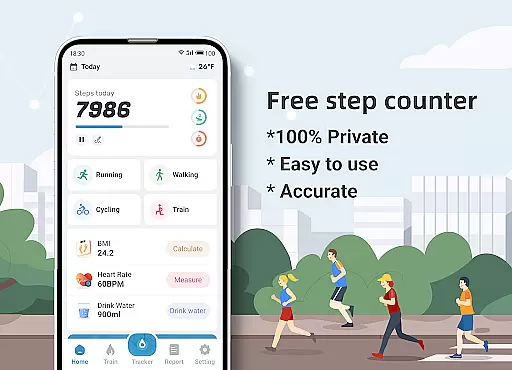
Step Counter - Pedometer & BMI is a comprehensive health and fitness application designed to track your daily steps, monitor your BMI, and provide detailed activity reports. The app offers accurate step counting through your mobile phone, eliminating the need for additional devices.
Beyond basic step tracking, the app provides advanced features such as GPS-based activity mapping, customizable training plans, and health metrics like BMI calculation. Whether you're walking or running, this app ensures you have all the necessary tools to monitor your fitness journey effectively.
Ideal for fitness enthusiasts who want to maintain an active lifestyle, Step Counter helps users set realistic goals and achieve them through data-driven insights. With its privacy-focused approach, your data remains secure and private, making it a reliable companion for your health and wellness needs.
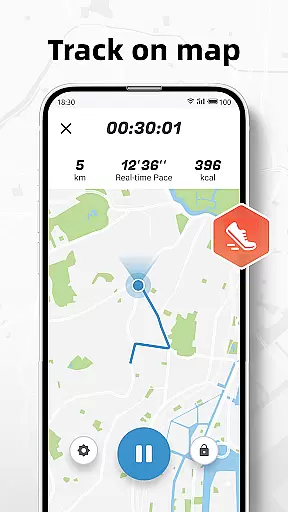
Step Counter stands out with its diverse feature set tailored for health-conscious individuals. The app's primary feature is its highly accurate pedometer functionality that works seamlessly with your phone's sensors. It also includes a map-tracking option that visually displays your walking or running routes.
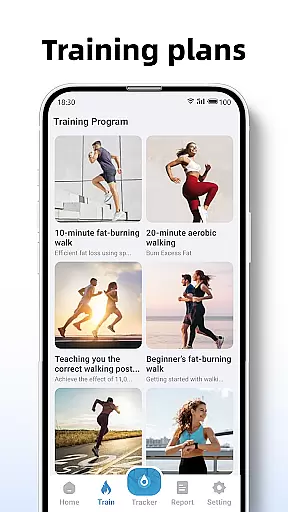
For those seeking structured workouts, the app offers personalized training plans ranging from short 10-minute sessions to more extended routines. These plans include metrics like active time, distance covered, and calories burned, providing a holistic view of your progress.
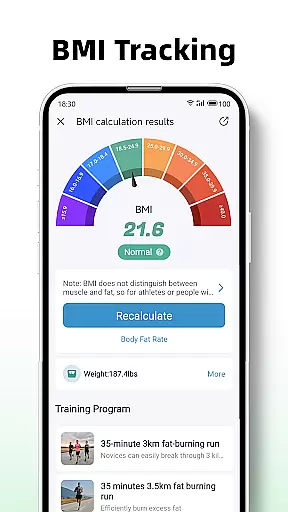
Additionally, the BMI tracking feature allows users to calculate and monitor their body mass index regularly. With its commitment to user privacy, Step Counter ensures that no personal data is collected or shared, giving users peace of mind while they focus on achieving their fitness goals.
Personalized planning in fitness applications refers to the ability to tailor workout routines and health goals according to individual user needs. Step Counter - Pedometer & BMI excels in this area by offering training plans that cater to different fitness levels and objectives.
The app provides structured plans, such as a 10-minute jogging session, which are designed to guide users through their fitness journey. These plans take into account active time, distance, and calories burned, ensuring a comprehensive approach to personal fitness management.
Users benefit from a customizable experience that adapts to their personal progress and adjusts expectations realistically. This personalized attention helps maintain motivation and enhances commitment to an active lifestyle.
By integrating BMI tracking, the application further refines personalized planning. Users can calculate and monitor their BMI, using this data to inform their training plans and maintain optimal health. This dual focus on activity and health metrics ensures a balanced and scientifically-backed approach to fitness.
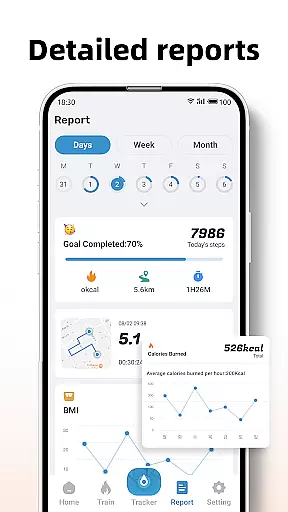
Progress visualization is a critical component of maintaining user engagement in fitness apps. It involves presenting user data in an easily digestible graphical format. Step Counter - Pedometer & BMI offers detailed reports and graphs for daily, weekly, and monthly data, providing clear visual feedback on user activity.
The app's reporting feature is thoughtfully designed, displaying step counts, active time, distance, and calories burned in various chart formats. This visualization allows users to quickly grasp their progress and understand their fitness trends over time.
With progress visualization, users gain a sense of accomplishment as they witness their own improvement. This visual encouragement is vital for sustaining long-term commitment to personal health goals.
Additionally, the ability to track actions on a map adds another layer of visualization. Users can see their walking or running routes, adding context to their data and making the experience more relatable and tangible. This multifaceted approach to progress visualization supports an informed and motivated user base.
User-friendly interface
Accurate step tracking
Comprehensive reports
Customizable training plans
Strong privacy protection
Limited device compatibility
No integration with wearables
Basic social features
Occasional accuracy issues
Ads in free version

Easy access to health benefits
 4.70
4.70
Your Health Has Met Its App (℠)
3.90
HRV4Training helps you optimize goals and improve performance. No sensors needed
3.30
Walk. Earn: Get rewarded for every step! Walk, move, and earn real rewards.
4.70
Grow with self-tests and personal routine.
4.30
Step Counter, track steps when you walk or run
4.70
Pilates, Calisthenics, Yoga
4.50
beat yesterday.
4.00
Point, scan, and unlock truth in every bite.
4.50
App to stop smoking slowly or now with a motivational badges and helpful tips
4.80
a fun app full of surprises :)
4.70
Get lasting results with Chair Yoga, Wall Pilates, and Walking workouts!
4.60
Relax to calm sounds, white noise, music, guided meditation and bedtime stories
4.40
Eat smarter with Eato, your personal calorie counter and nutrition tracker!
4.40
Pedometer that gives you sweatcoins for steps. It pays to walk!
4.10
Make sense of your health data.
3.80
Enjoy the Gluten Free living with the best app. SCAN the barcodes & SEARCH.
3.60
3D Body Measurement System
3.60
Text notifications, button control, heart monitor & more for your Amazfit.
2.40



User Reviews