
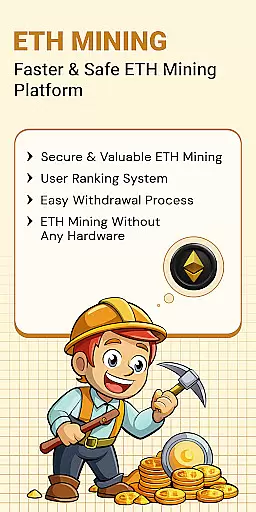
ETH Cloud Miner is an innovative app designed for users who want to monitor their Ethereum cloud mining activities conveniently. The core function of this app is to provide real-time tracking of your mining stats, including hashrate, uptime, and estimated rewards, all without using your device's CPU or GPU. This makes it a lightweight and efficient solution for both beginners and experienced crypto miners.
One standout feature is its ability to connect with third-party cloud mining providers, allowing you to view live data from remote servers directly on your mobile device. Whether you're checking your daily earnings or monitoring session performance, the app offers a seamless experience. It's particularly useful for those who want to stay updated on their mining operations while on the go, ensuring you never miss important updates about your Ethereum mining activity.
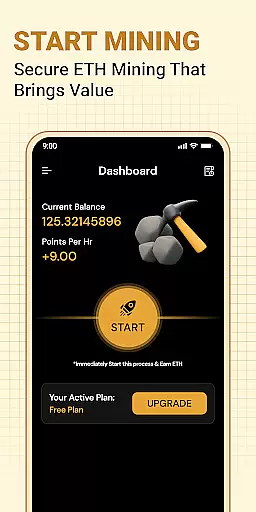
ETH Cloud Miner stands out due to its comprehensive set of features tailored for Ethereum miners. First, the app provides detailed mining statistics such as hashrate, uptime, and reward estimates, which are crucial for understanding your mining performance. These metrics are presented in an easy-to-read dashboard format, making it simple to track your progress at a glance.
Another key feature is its compatibility with various cloud mining providers. By linking your accounts, you can retrieve and display your mining data effortlessly. Additionally, the app ensures that no local resources are used, meaning your phone’s battery and processing power remain unaffected. This design choice enhances usability and ensures smooth performance even during extended use. Overall, these features make ETH Cloud Miner a reliable tool for managing your Ethereum mining investments efficiently.
Task creation and detail customization are essential features for users who need to manage their Ethereum mining activities effectively. The ETH Cloud Miner app allows users to create specific tasks related to their cloud mining operations, ensuring that every aspect of the mining process can be monitored and adjusted as needed.
The app provides a detailed dashboard where users can customize various parameters of their mining tasks. This includes setting up notifications for changes in hashrate, uptime alerts, or estimated daily rewards. By offering such granular control, the app empowers users to tailor their mining strategies according to their preferences and goals.
Users benefit from this feature by gaining the ability to optimize their mining performance. Customizable details enable miners to respond quickly to any fluctuations in their mining stats, ensuring maximum efficiency and profitability. This level of personalization ensures that each user's experience is aligned with their unique mining objectives.
Ultimately, task creation and detail customization in ETH Cloud Miner enhance user engagement by providing tools that allow for precise management of cloud mining activities. This functionality not only simplifies the monitoring process but also contributes to a more successful and rewarding mining experience.
Reminder settings play a crucial role in keeping Ethereum miners informed about their cloud mining activities. With ETH Cloud Miner, users can configure reminders to stay updated on important events such as significant changes in hashrate, server downtimes, or reward estimations. This proactive approach ensures that users never miss critical updates regarding their mining performance.
The app offers flexible reminder options, allowing users to set up notifications based on specific thresholds or time intervals. Whether itu2019s an alert for when the hashrate drops below a certain level or a periodic summary of mining session data, these reminders help maintain optimal mining conditions. Users can customize the frequency and type of notifications to suit their needs.
By leveraging reminder settings, users can enjoy peace of mind knowing they will be promptly alerted to any issues or opportunities within their mining operations. This feature enhances the overall user experience by reducing the need for constant manual checks and enabling timely interventions when necessary.
In summary, reminder settings in ETH Cloud Miner provide a valuable service by ensuring users remain connected to their mining activities. This functionality supports better decision-making and helps users achieve their mining goals with greater confidence and ease.
User-friendly interface
Real-time mining stats
No device resource usage
Compatible with multiple providers
Lightweight and efficient
Limited to cloud mining
Third-party dependency
No official Ethereum affiliation
Premium features may cost extra
Requires stable internet

Create Birthday Cards in Birthday Invitation Maker and Birthday Card Creator App
 3.00
3.00
Community for Mods, Addons, Melsaves, Melmods for Melon Playground
4.0
The KRUU app - plan, celebrate, remember
4.80
The official app of the Carmel Christkindlmarkt!
4.2
Microsoft Ignite is an event that showcases latest advancements in technology
4.00
Invitation Card Maker, Design & share wedding, birthday & party invites fast
4.40
Discover events, experiences, and things to do near you - Anytime, Anywhere!
4.70
Connect with an ecosystem of 5M+ eventgoers and organizers.
4.50
Find Live Event Ticket Deals to Sports, Concerts, Festivals, & Comedy For Less!
4.80
Find tickets to upcoming concerts, sports events, festivals, shows, attractions
4.70
Octrober 2025: We've updated the MyGenMobile App with a new look and feel!
4.40
Freebie Games for Epic Games, Steam, Amazon, Rockstar etc.
4.40
Get live football here
4.30
Rocket Monkey - Space rocket launch schedule for launch sites around the world
4.20
Buy tickets for any event!
3.90
TV.Garden is a video player to play your own TV streams from around the world!
3.40
RAISE-365 makes fundraising easy and fun!
3.20
The Official Football Ticketing App for Fans in Qatar
4.5
Thanksgiving Wishes, Thanksgiving Stickers & Animated GIF for Whatsapp Stickers
4.4





User Reviews