
Key Attestation Demo is a specialized application designed for developers and power users who require advanced security features. This app allows users to verify the authenticity of cryptographic keys on Android devices, ensuring that sensitive data remains protected.
The core functionality revolves around implementing and testing key attestation processes as outlined in official Android documentation. It serves as an essential tool for those working with secure transactions or developing security-focused applications.
By providing access to detailed key information and verification processes, this app ensures that developers can maintain high-security standards in their projects. Its value lies in enabling professionals to validate device integrity and enhance overall application security.
This app offers several distinctive features tailored for security-conscious developers. First, it provides comprehensive tools for verifying cryptographic keys through well-documented procedures, aligning with Android's official guidelines.
Users can explore detailed reports about key properties and device integrity. The app also includes direct links to essential documentation and source code repositories, facilitating easier integration into development workflows.
Another notable feature is its open-source nature, allowing developers to review, modify, and improve the underlying code. This transparency not only enhances trust but also encourages community contributions to further strengthen its capabilities.
Functionality completeness is a critical aspect of any development tool, and Key Attestation Demo excels in this area. This app provides developers with the necessary tools to verify the authenticity of hardware-backed keys on Android devices.
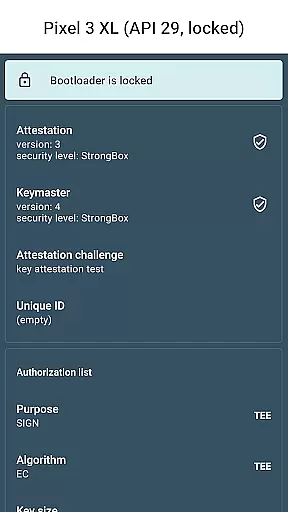
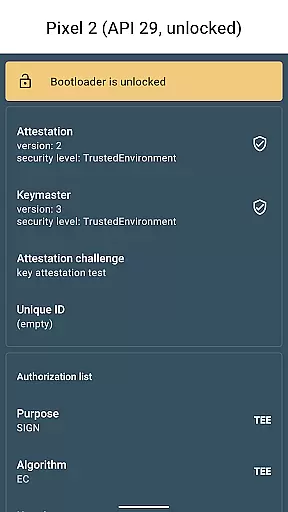
The coverage of the app spans across multiple use cases related to key attestation. It allows users to check the security level of the key storage and verify if the keys are stored in a Trusted Execution Environment or Secure Element.
Developers benefit from the comprehensive nature of the app's functionality. The ability to parse and display attestation certificates gives power users the transparency needed for advanced security implementations.
Moreover, the app maintains up-to-date compatibility with the latest Android security features. This ensures that developers working with key attestation can rely on the app for accurate and relevant information regarding their device's security capabilities.
While primarily targeting developers, Key Attestation Demo maintains a surprisingly accessible user experience. The interface presents complex security information in a clear, structured manner that doesn't overwhelm users.
Operational smoothness is evident through the app's responsive performance. Developers can quickly retrieve and analyze key attestation data without experiencing frustrating delays or crashes during operation.
The app's workflow follows logical steps, beginning from key verification to detailed certificate analysis. This intuitive flow helps both experienced developers and those new to key attestation understand the process better.
Additionally, the inclusion of direct links to official documentation and source code enhances the overall usability. Users can easily access reference materials and contribute to the project, creating a more engaging and productive developer experience.
Enhances security
Open-source
Comprehensive documentation
Developer-focused
Easy integration
Complex for beginners
Limited target audience
No user-friendly interface
Requires technical knowledge
Not for general users

Connect and find your Smart Tag 2 devices through our app.
 3.60
3.60
SmartCast mirrors Android phone to TV screen With Cast Screen, Chromecast.
4.80
Sad ringtones full of feeling, sad music ringtones
3.90
Connect your phone to any endoscope camera, USB camera, or borescope with ease.
3.70
Block, disable and secure phone camera from secretly taking photos by spyware.
4.50
Enjoy hours of entertainment with our Roblox mobile games app
4.2
Turn your phone into a wireless Xbox controller – play, stream & control anytime
4.4
An impressive collection of tools, characters, weapons, skins and more!
4.30
Now Available on Android ™
3.40
Read Holy Quran Feel Like Real Quran & Listen Al Quran Mp3 Audio Online Offline.
4.70
Recite Quran Majeed القران with special 16 line real Kuran page in hand
4.30
Manage apps & elevate your gaming experience with Game Launcher: Gaming Hub app.
4.30
View your cameras anywhere and anytime
4.20
You can remote control and play much easier.
4.10
With Endoscope Camera Connector you can connect your phone with endoscope cam
3.70
Mobs maker Minecraft help MCPE creators make their own mob by using Blockbench
3.50
Simulator of real black light
3.50
DamonSx2 is the open Source LGPL Emulator
3.20
Record with Double Camera Video Recording using Dual Camera Front and Back Video
3.00



User Reviews