
Kwikpic is an innovative photo management app designed specifically for event enthusiasts and professional photographers. The application's core functionality revolves around AI-powered face recognition technology, which enables users to effortlessly sort, tag, and share high-quality photos with relevant individuals. Whether you're capturing memories from a wedding, conference, or vacation, Kwikpic ensures that every image is preserved in its original quality while providing advanced features for easy distribution.
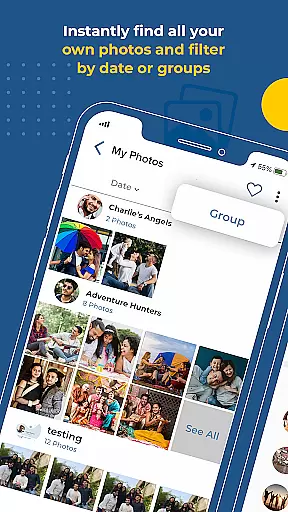
One of the standout capabilities of Kwikpic is its ability to instantly match faces, tag individuals, and notify them about new photos. This feature eliminates the tedious task of manually sorting through hundreds of images, making it ideal for group events where multiple people are involved. Additionally, users can track important analytics such as total impressions and downloads, gaining valuable insights into how their photos are being received.
Kwikpic offers a comprehensive suite of features tailored to enhance the photo-sharing experience at events. At the heart of the app lies its powerful AI-driven face recognition system, which automatically identifies individuals in photos and organizes them accordingly. This not only saves time but also ensures accuracy when delivering images to the right recipients. Furthermore, the app supports seamless uploads from various sources, including device galleries and cloud storage platforms like Google Drive.
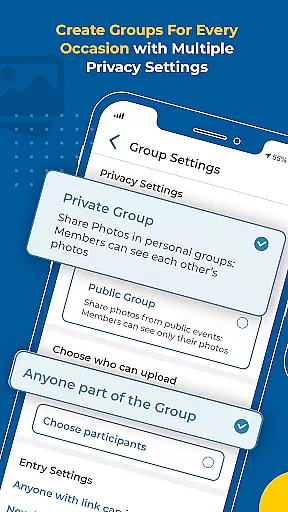
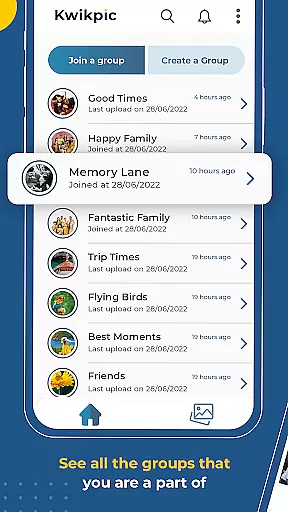
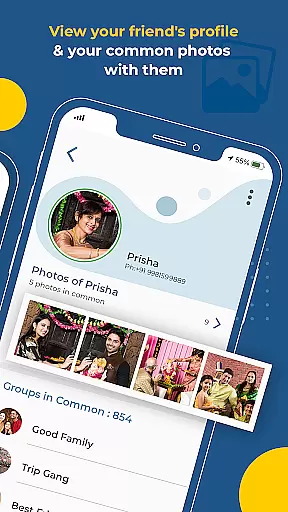
Another notable feature is the ability to collaborate with group members by finding common photos. This fosters a sense of community among event attendees, allowing everyone to contribute and access shared memories easily. Users can also monitor detailed analytics, providing metrics on photo engagement such as views and downloads. These insights help photographers and event organizers understand audience preferences and optimize future content strategies.
Task creation and detail customization are essential features for any event management application. Kwikpic excels in this area by providing users with the ability to effortlessly organize and manage their photo-sharing tasks. The app allows users to create specific tasks for uploading and sharing photos from various events such as weddings, conferences, or vacations.
Kwikpic's implementation of task creation is intuitive, allowing users to upload images directly from their device's gallery or cloud storage platforms like Google Drive. Once uploaded, users can customize details by tagging individuals through the app's advanced face recognition technology. This ensures that every photo is accurately sorted and delivered to the right person without any hassle.
The value to users is significant; they can easily navigate through hundreds of photographs, assigning each to respective group members or event attendees. This feature saves time and effort, making photo sharing after an event a seamless experience. Moreover, the ability to track analytics such as total impressions and downloads adds another layer of utility, giving users insights into how their shared photos are being received.
Reminder settings in an application ensure that users never miss an important update or task. In Kwikpic, reminder settings play a crucial role in keeping users engaged and informed about their photo-sharing activities. Users can set reminders to upload photos, tag individuals, or share albums with guests, ensuring timely updates and interactions.
The app implements reminder settings through its notification system, which alerts users when new photos are uploaded or when face matches are completed. These notifications serve as prompts for users to engage with the app and complete necessary actions, such as confirming tags or downloading shared images. Additionally, users can customize the frequency and type of reminders they receive, tailoring the experience to their preferences.
This functionality enhances user engagement by maintaining a constant connection between the user and their photo-sharing tasks. By receiving timely reminders, users can stay on top of their photo management duties, ensuring that all event attendees receive their photos promptly. Ultimately, Kwikpic's reminder settings contribute to a more organized and efficient photo-sharing process, enhancing the overall user experience.
User-friendly interface
High-quality photo uploads
AI-powered face recognition
Instant notifications
Comprehensive analytics
Limited free storage
Premium subscription required
Occasional processing delays
Privacy concerns
Learning curve

CUE Live utilizes ultrasonic sound waves to sync devices at CUE enabled events
 4.80
4.80
It is an Event Planning Application.
4.2
Here you can choose tickets for films, performances, concerts and other events
4.60
Local events, contests, and giveaways for local dads
3.70
Everything you need for the Best Thursday Ever.
4.40
Digital Income Wallet of the Final Libertadores 2025
4.5
The Official App
3.70
Buy and Sell Tickets for Concerts, Sports, and Theater.
4.70
Save money on concert, sport, and theater tickets, and discover upcoming events.
4.80
Beautiful invitation cards + easy RSVP tracking for any event. Design Invites.
4.80
Find tickets to upcoming concerts, sports events, festivals, shows, attractions
4.70
Create Wedding Invitation and Wedding Anniversary Cards using our app
4.60
Events, Meetings, Photo Shoots
4.50
Octrober 2025: We've updated the MyGenMobile App with a new look and feel!
4.40
The calendar app in this 2026 year see all dates.
4.20
The world's largest selection of tickets is now at your fingertips
3.90
TV.Garden is a video player to play your own TV streams from around the world!
3.40
RAISE-365 makes fundraising easy and fun!
3.20
Community for Mods, Addons, Melsaves, Melmods for Melon Playground
4.1






User Reviews