Listen Audiobook Player is a feature-rich audio player designed specifically for audiobook enthusiasts. This application allows users to play DRM-free audiobooks from various sources, including popular platforms like Librivox, Downpour, and Loyalbooks. The app supports multiple audio formats such as MP3, M4B, M4A, Opus, Ogg, AAC, FLAC, and more, ensuring compatibility with a wide range of audiobooks.
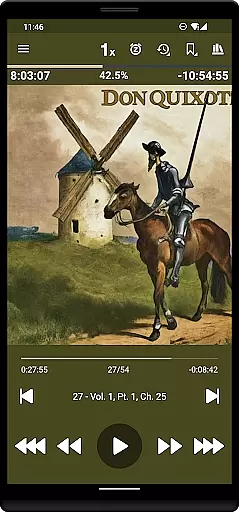
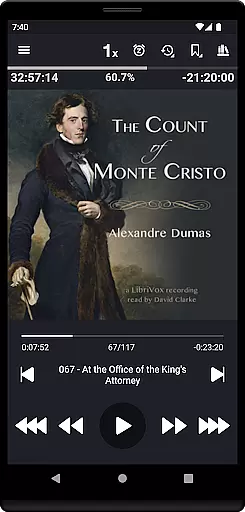
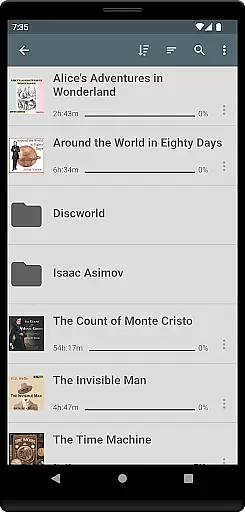
One of the standout features of Listen Audiobook Player is its folder-based library system that automatically syncs with your audiobook folder, allowing for easy organization and quick access to your entire collection. With support for embedded chapters, variable playback speed (0.5x to 4x), pitch control, volume boost, and an equalizer, users can customize their listening experience extensively. Additionally, the app offers seamless integration with Android Auto, Plex, and Audiobookshelf, enhancing accessibility and convenience.
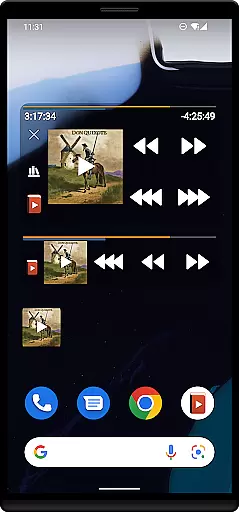
The app also includes advanced functionalities such as bookmarking, position history, Bluetooth controls, sleep timer, and widgets, making it a comprehensive tool for audiobook management. Whether you're commuting, traveling, or relaxing at home, Listen Audiobook Player provides a smooth and enjoyable listening experience tailored to individual preferences.
Listen Audiobook Player boasts an array of features that cater to audiobook listeners' needs. One of its primary strengths is the extensive format support, accommodating files like MP3, M4B, M4A, Opus, Ogg, AAC, FLAC, and others. This ensures that users can enjoy their audiobooks without worrying about compatibility issues. Furthermore, the app supports embedded chapters in most audio codecs, providing a structured listening experience.
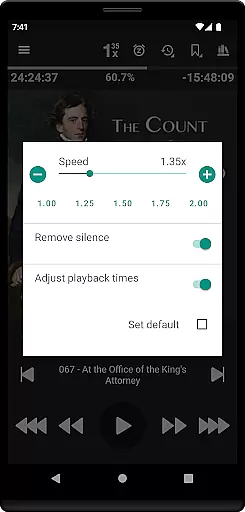
The app's customization options are impressive, offering variable playback speeds ranging from 0.5x to 4x, trim silence, pitch control, volume boost, and an equalizer. Users can set global defaults or adjust settings on a per-book basis, allowing for a personalized experience. Cover art can be added from embedded metadata, images within the book folder, or downloaded directly through the app, enhancing the visual appeal.
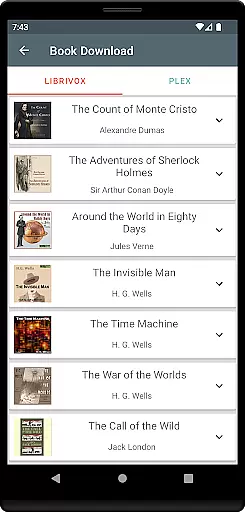
Integration capabilities are another highlight, with support for Android Auto, Plex, and Audiobookshelf. These integrations enable users to download books from hosted servers directly to their local library. Additional features include the ability to convert books to Opus format for reduced file size, synchronization of current positions and bookmarks across multiple devices, and advanced controls via Tasker or Llama. Overall, Listen Audiobook Player combines versatility, customization, and convenience to deliver a superior audiobook experience.
Listen Audiobook Player offers an extensive music library that includes a variety of curated books from Librivox, which users can download directly within the app. This feature ensures that listeners have access to a wide range of audiobooks, from classic literature like 'Pride and Prejudice' to philosophical works such as 'Meditations' by Marcus Aurelius.
The application is designed to play DRM-free content, allowing users to obtain books from various sources including websites like Librivox.org, Downpour.com, and Loyalbooks.com. By focusing on DRM-free audio, the app guarantees that all materials are legally accessible and the copyrights are respected, providing peace of mind for users who want authentic and legal content.
Furthermore, Listen Audiobook Player supports multiple audio formats such as mp3, m4b, m4a, opus, ogg, aac, flac, and more. This versatility in format support not only broadens the scope of the library but also reinforces the legitimacy of the content, as users can be confident they are accessing a diverse and lawful collection of audio resources.
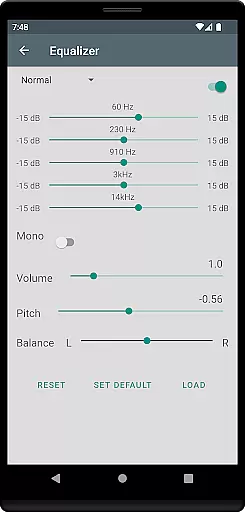
One of the standout features of Listen Audiobook Player is its variable playback speed, which ranges from 0.5x to 4x, allowing users to customize their listening experience according to their preference. Alongside this, the app provides pitch control, trim silence, and volume boost functionalities, ensuring high-quality audio output tailored to individual tastes.
The equalizer and balance settings further enhance the audio experience, enabling users to set global defaults or adjust parameters on a per-book basis. These meticulous controls ensure that every audiobook is enjoyed with optimal sound quality, making each listening session a delightful experience.
Additionally, the option to convert books to the Opus format is available, which typically results in smaller file sizes with minimal impact on sound quality. This feature not only saves storage space but also maintains the integrity of the audio, offering a practical solution without compromising the listening experience.
User-friendly interface
Wide format support
Customizable playback
Seamless integrations
Comprehensive bookmarking
No cloud storage
Limited language support
Complex setup
Occasional bugs
Heavy on resources

Remove ads permanently from Music Visualizer
 4.0
4.0
DJ Music Mixer - DJ Remix: remix songs, make beat music & record mix of DJ.
4.40
Save hundreds of dollars for a physical strobe tuner and instead use this app.
4.50
More downloads than any other metronome. Includes drum machine & tempo trainer.
4.80
Advanced 10-Band Audio Graphic Equalizer Sound Booster Pro
4.30
The best music and audio player, with beautiful UI, music search and equalizer.
4.60
A sleek, no-frills player designed for true music lovers.
4.20
Slow music down without changing pitch.
3.70
Turn your Android phone into a professional audio analyser with up to 120 bands.
4.00
JBL PartyBox APP works with 110/310/710/120/320/520/Encore/Encore 2/Encore Ess 2
4.80
Offline Music Player&MP3 Player with themes, equalizer, lyrics, music play mode
4.60
Reverse your voice & songs instantly! Fun singing challenge with cool effects.
4.60
DJ Music Mixer Pro is a real DJ controllers and DJ Music Studio to remix DJ.
4.40
Play KORG’s revolutionary touch-based instrument on a variety of devices.
4.40
Smart piano keyboard, Classical to Pop, Real-time multiplayer connection!
4.20
The original SP-1200 experience on your iPad
4.20
Offline and always ad-free - stream in the highest quality available.
4.10
Turn your phone into a musical instrument from the future!
3.90
Make music anywhere. Turn your device into an instrument.
4.4



User Reviews