
Strobe Tuner Pro is a professional-grade tuning application designed for musicians of all levels. This app offers an advanced stroboscopic tuner that provides exceptional accuracy for instruments like guitar, violin, bass, ukulele, viola, cello, banjo, and shamisen. The app's precision rivals that of physical strobe tuners costing hundreds of dollars. It also features a chromatic tuner for initial adjustments when the instrument is significantly out of tune.
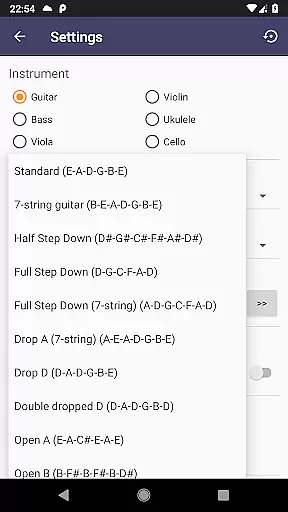
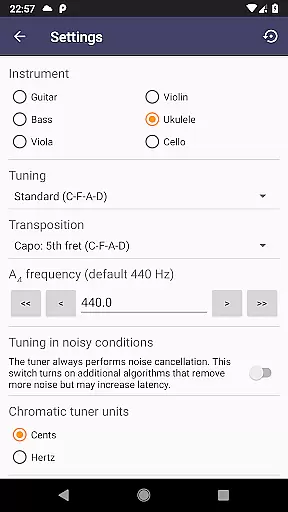
In addition to its primary tuning capabilities, Strobe Tuner Pro includes a built-in metronome, making it a versatile tool for practice sessions. Users can switch between different instrument tunings in the settings, catering to their specific needs. Whether you're a beginner learning to tune your instrument or a professional requiring exact tuning, this app delivers both functionality and ease of use.
The app's algorithms are optimized for performance, with the chromatic tuner utilizing Fast Fourier Transformation and the strobe tuner employing GPU-based computations. This ensures real-time responsiveness and accurate feedback. With additional features like reference tone playback, various note naming conventions, and support for equal temperament, Strobe Tuner Pro is a comprehensive solution for maintaining your instrument's optimal sound quality.
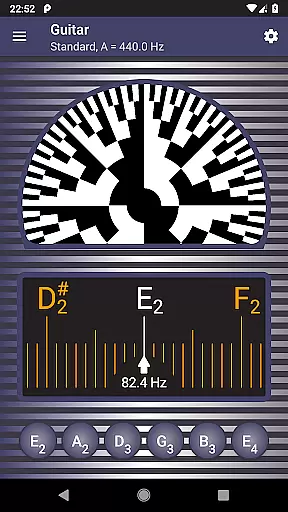
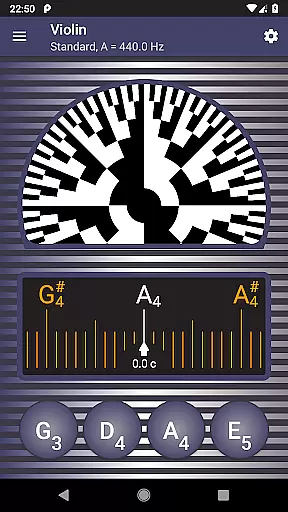
Strobe Tuner Pro stands out with its dual-tuner system, combining a chromatic tuner and a stroboscopic tuner. The chromatic tuner detects the frequency of the played note and displays it on a chromatic scale, highlighting target strings and indicating how far the tone is from being in tune. Once close to the correct pitch, users can switch to the strobe tuner for fine-tuning. The direction and speed of the strobe pattern indicate whether to adjust the pitch up or down, ensuring precise tuning.
This app also includes a metronome feature, allowing musicians to keep time while checking intonation. Advanced noise cancellation ensures reliable performance even in noisy environments or with a metronome running. The app supports multiple instruments and alternate tunings, making it adaptable to various musical contexts. Its user-friendly interface and first-start tutorial make it accessible for beginners, while professionals will appreciate the extreme accuracy and detailed built-in help.
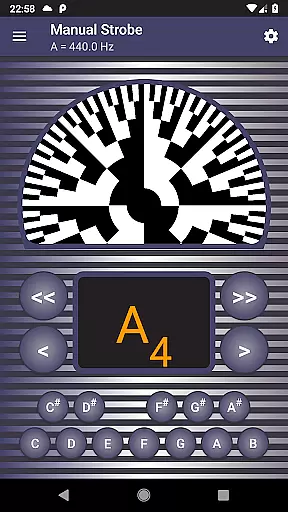
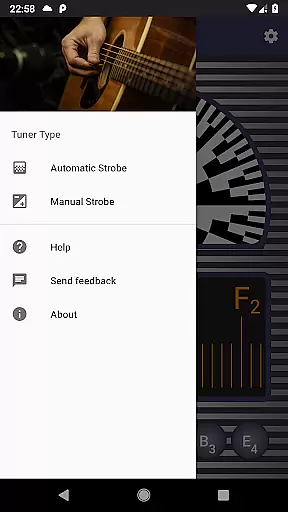
Additional features include manual mode for emulating a physical strobe tuner, concert pitch frequency setting, and options for English, European, and Solmization note naming conventions. The app is regularly tested with numerous instruments, ensuring consistent performance and reliability. These comprehensive features make Strobe Tuner Pro an indispensable tool for any musician seeking precision and versatility in their tuning process.
Strobe Tuner Pro offers an extensive music library that caters to a wide range of instruments including guitar, violin, bass, ukulele, viola, cello, banjo, and shamisen. This vast selection ensures that musicians of all kinds can find their instrument's tuning within the app.
The application is designed with copyright authenticity in mind, providing users with synthesized reference tones that respect the setting of the concert pitch. These tones are generated through advanced algorithms that emulate real instrument sounds without infringing on any copyrights.
Furthermore, Strobe Tuner Pro has been tested with numerous recordings from various instruments, ensuring accurate and reliable tunings for its users. The continuous expansion of this test coverage guarantees that the sound profiles remain up-to-date and authentic.
By using Strobe Tuner Pro, musicians gain access to a comprehensive suite of tuning options while being assured of the legitimacy and precision of the audio content provided by the app.
Audio quality is paramount when tuning musical instruments, and Strobe Tuner Pro excels in delivering top-notch audio processing capabilities. It features two independent tuning algorithms: a chromatic tuner utilizing Fast Fourier Transformation and a strobe tuner that emulates the stroboscopic effect, both running efficiently on your deviceu2019s GPU.
This dual approach allows for extreme accuracy in detecting frequencies, which translates into superior audio quality during the tuning process. Users benefit from quick, precise adjustments as they fine-tune their instruments to perfection.
In addition to its core functionalities, Strobe Tuner Pro includes advanced noise cancellation features. This ensures clear and uninterrupted tuning even in noisy environments or when a metronome is used concurrently, making it suitable for practice sessions anywhere.
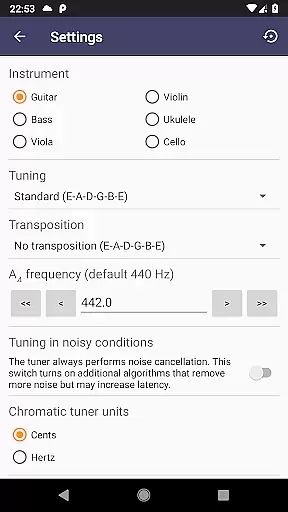
Musicians will appreciate the ability to customize their experience with settings such as concert pitch frequency adjustment and note naming conventions (English, European, Solmization), allowing them to tailor the audio output precisely to their needs.
Highly accurate tuning
User-friendly interface
Supports multiple instruments
Advanced noise cancellation
Includes metronome feature
Paid application
Requires good device microphone
No MIDI support
Complex for absolute beginners
Consumes device resources

 4.70
4.70
SqueezePlayer turns your Android phone or tablet into a SqueezeBox on its own!
4.60
A synth that really lets you shape your sounds!
4.50
The only true audiophile music player with Hi-Fi audio rendering and DSP engine
3.90
Bass Booster & Volume Equalizer Pro improves your music and video sound quality
4.60
Smart piano keyboard, Classical to Pop, Real-time multiplayer connection!
4.20
The original SP-1200 experience on your iPad
4.20
The Minimalistic Premium Music Player. Handmade with passion for music
2.20
Play your music offline without limits
4.80
Your song collections with lyrics and chords on Android smartphones and tablets.
4.80
Ultimate Sonos Controller
4.70
Visualize the guitar fretboard, master scales & play through changes like a pro!
4.50
Play KORG’s revolutionary touch-based instrument on a variety of devices.
4.40
Your HD audio recorder on the go for music, meetings, ambience, animal sounds…
4.30
Master Salsa Rhythm quickly and with a lot of fun!
4.30
Network/Cloud Streaming, Visualization, Graphic Equalizer and Sound Effects.
4.20
Turn your Android phone into a professional audio analyser with up to 120 bands.
4.00
Powerful beat maker & DJ mixer to remix tracks, make music, & perform DJ mix
3.70
Slow music down without changing pitch.
3.70



User Reviews