
BlackPlayer EX is a premium music player designed for audiophiles who appreciate both quality and customization. This advanced application removes ads while offering an extensive suite of features to enhance the listening experience.
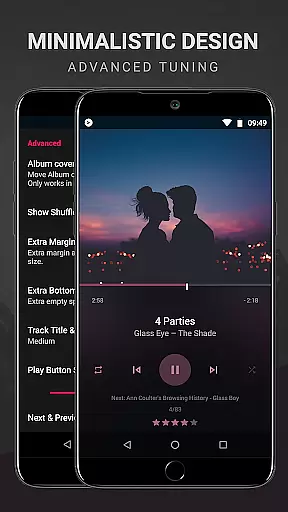
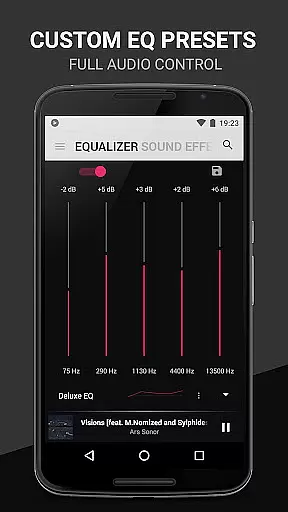
The app supports standard audio formats like MP3, FLAC, and WAV, providing gapless playback and an in-built equalizer for optimal sound tuning. With Chromecast support, users can stream music to compatible devices seamlessly. The ability to customize the interface with various themes, fonts, and colors ensures a personalized user experience tailored to individual preferences.
Ideal for music enthusiasts, BlackPlayer EX allows detailed library management including organizing tracks by year and composer, customizable crossfading, and artist image settings. Its unique 'Zap' feature lets users discover music rapidly by playing random tracks briefly. Overall, it delivers a comprehensive toolset for managing and enjoying a rich music library.
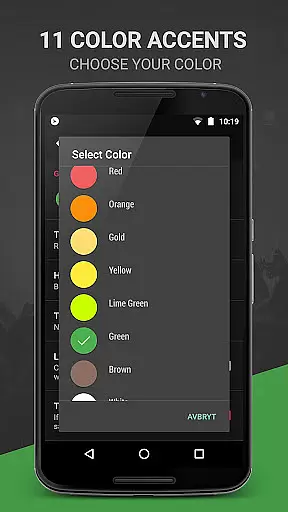
BlackPlayer EX stands out with its plethora of premium features that cater to every possible need of a music aficionado. The inclusion of a light theme, 6 extra fonts, and 11 color accents offers users the flexibility to tailor the appearance to their liking. Additionally, the availability of 8 extra Now Playing themes and a white widget theme enhances visual variety.
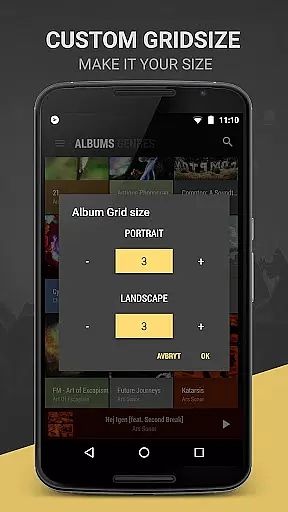
Functionality-wise, the app excels with options like Chromecast support, grouping music by year and composers, and customizable crossfading. Users can modify library pages entirely—adding, removing, or sorting them as needed. Practical features such as screen always-on, rotation lock, and custom grid sizes for artists and albums ensure usability aligns perfectly with personal workflow.
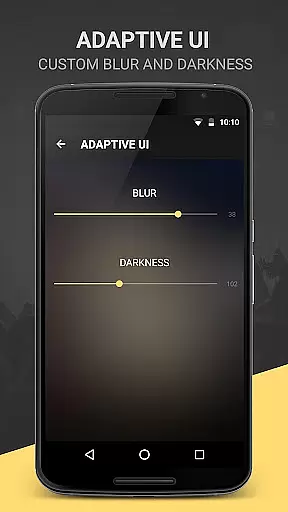
Advanced functionalities include tracking played tracks monthly, applying blur effects to the lockscreen or widget, and additional text animations and transition effects. Moreover, users can hide certain sliding pages and add a dedicated 'PLAYLISTS' page to their library. These robust capabilities make BlackPlayer EX not just a music player but a fully customizable entertainment hub.
BlackPlayer EX offers an extensive music library that supports various formats including MP3, FLAC, and WAV files, ensuring users can access a wide range of audio content. The application focuses on copyright authenticity by allowing users to play locally stored music files, thus respecting the legal rights of artists and creators.
The app's capability to manually search and set artist images further enhances the authenticity of the music library, providing users with accurate information about their music collection. This feature not only enriches the user experience but also ensures that the displayed content is legitimate and correctly attributed.
With options to customize the Library pages completely, users can add, remove, and sort their music collection according to personal preferences. This level of customization empowers users to manage their music library efficiently while maintaining the integrity of copyright information.
One of the standout features of BlackPlayer EX is its superior audio quality options, which include a built-in Equalizer, BassBoost, Virtualizer, and Left/Right sound balance. These tools allow users to fine-tune their listening experience, ensuring optimal sound quality tailored to individual preferences.
In addition to standard audio settings, the app provides 11 color accents and 8 extra Now Playing Themes, enhancing the visual aspect of audio playback. While these features are primarily aesthetic, they contribute to a more immersive audio experience by complementing high-quality sound with visually appealing themes.
Furthermore, the Chromecast support and customizable crossfading options enable seamless music streaming and transitions between tracks. These functionalities not only improve audio quality but also offer convenience and flexibility, making BlackPlayer EX a top choice for audiophiles seeking both performance and personalization in their music player.
Highly customizable
Gapless playback
Chromecast support
Extensive library management
Premium feature set
No cloud integration
Limited social features
Complex for beginners
Occasional bugs
Higher cost

Equalizer, Bass Booster and Volume Booster (Eq & Bass) improve sound quality
 4.30
4.30
Most Advanced AI Song Generator and Music Creator. Rap, Pop, Rock, Gospel & more
4.70
Bass Booster & Volume Equalizer Pro improves your music and video sound quality
4.60
Super Sound Editor, Song Maker & Mixer, Vocal Remover, Voice Recorder & Changer!
4.60
AI Music Maker: Generate And Compose AI Tunes & AI Songs & AI Music & AI Melody!
4.60
Voice recorder - Audio recorder. Best recorder for recording
4.90
Let your Android device with the sound effects you want
4.50
Full featured mp3 and audio player with Chromecast and Android Auto support.
4.40
Offline Tunes, Unlimited Vibes
3.90
Your song collections with lyrics and chords on Android smartphones and tablets.
4.80
Recording studio w/ 10k beats, pro vocal FX and a network of 20M rappers & fans!
4.60
Offline Music Player&MP3 Player with themes, equalizer, lyrics, music play mode
4.60
Visualize the guitar fretboard, master scales & play through changes like a pro!
4.50
10-Band Audio Equalizer, Sound / Bass Booster for Spotify Users & Music Players
4.40
Help you quickly get started with Shokz headphones
4.40
Network/Cloud Streaming, Visualization, Graphic Equalizer and Sound Effects.
4.20
Powerful beat maker & DJ mixer to remix tracks, make music, & perform DJ mix
3.70
Control your MIDI USB or Bluetooth devices in app and avoid some trampling
3.30
Remove ads permanently from Music Visualizer
4.2



User Reviews