
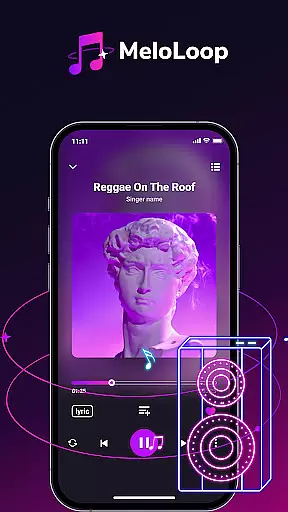
MeloLoop is a premium music player app designed for audiophiles who demand the best listening experience. This application offers an elegant interface combined with powerful features, making every audio moment exceptional. With instant access to your local music library, MeloLoop supports various formats including MP3, FLAC, and WAV, ensuring lossless playback even when offline.
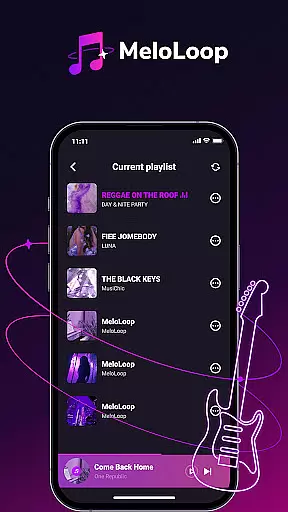
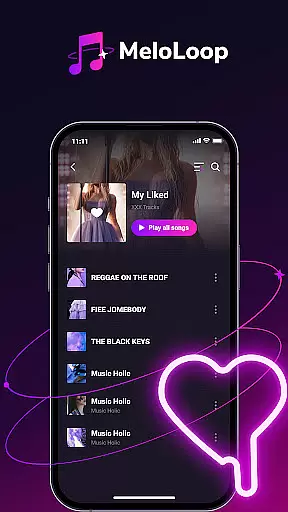
The app goes beyond basic playback by offering intelligent music curation. It automatically organizes your collection by album, artist, and mood while allowing custom tagging for personalized management. Users can create unlimited playlists and build exclusive collections, making it perfect for different scenarios like late-night relaxation or travel soundtracks.
MeloLoop stands out with its comprehensive feature set tailored for music enthusiasts. The app's smart scanning capability quickly detects all audio files on your device, creating an organized library that's easily accessible. Its support for multiple high-quality audio formats ensures you enjoy studio-grade sound quality at all times.
What makes MeloLoop truly unique is its intelligent organization system. The app automatically sorts your music collection using advanced algorithms while giving you the flexibility to create custom tags. This combination of smart features and user control allows for effortless navigation and discovery of your favorite tracks. Additionally, the app's theming capabilities let you personalize your music experience like never before.
When it comes to digital music players, the size and authenticity of the music library are crucial factors for discerning audiophiles. MeloLoop excels in this area by offering instant access to your entire local music collection.
The application employs a smart scanning system that meticulously combs through your device, detecting all audio files regardless of format. Whether you have MP3s or high-fidelity FLAC and WAV files, MeloLoop ensures every track is accounted for and ready for lossless playback.
Moreover, since MeloLoop focuses on your personal audio files, it inherently supports copyright authenticity. You can be confident that your music library consists of legally acquired tracks, preserving the rights and intentions of original artists while providing you with an uninterrupted listening experience.
MeloLoop stands out as a premier music player due to its commitment to delivering studio-quality audio experiences. The app provides users with multiple audio quality options, ensuring optimal playback settings tailored to individual preferences.
Whether you're relaxing late at night, traveling, or engaging in critical listening sessions, MeloLoop's support for various formats like MP3, FLAC, and WAV guarantees pristine sound output. This flexibility allows listeners to enjoy their music exactly as intended by the artists.
In addition to supporting numerous file types, MeloLoop also offers features such as custom tags and auto-sorting by album, artist, and mood. These functionalities not only enhance organization but also contribute to maintaining the integrity of audio quality across different devices and listening environments.
User-friendly interface
Lossless audio playback
Smart music organization
Unlimited playlist creation
Offline functionality
Limited social features
No cloud integration
Premium price point
Advanced settings complex
Heavy storage usage

Turn your phone into a musical instrument from the future!
 3.90
3.90
Control your MIDI USB or Bluetooth devices in app and avoid some trampling
3.30
The Cubase remote control app
3.60
Your song collections with lyrics and chords on Android smartphones and tablets.
4.80
The only true audiophile music player with Hi-Fi audio rendering and DSP engine
3.90
Music, News & Sports Radio Tuner App. Tune in Live FM & AM Radio Stations.
4.80
Simple mp3 and mp4 player with advanced features.
3.40
Turn your Android phone into a professional audio analyser with up to 120 bands.
4.00
Customize Your Favorite Songs and Videos with booster.
4.70
JBL PartyBox APP works with 110/310/710/120/320/520/Encore/Encore 2/Encore Ess 2
4.80
Responsive piano with great sounds, graphics, and songs
4.80 4.70
4.70
Walkout Song DJ is the most intuitive app to manage your sports music.
4.70
Listen radio AM / FM Stations. Live AM / FM Radio App Station. Radio Com.
4.70
Bass Booster & Volume Equalizer Pro improves your music and video sound quality
4.60
DJ Music Mixer - DJ Remix: remix songs, make beat music & record mix of DJ.
4.40
Help you quickly get started with Shokz headphones
4.40
The Music Journey in Your Hands
4.30
The original SP-1200 experience on your iPad
4.20



User Reviews