
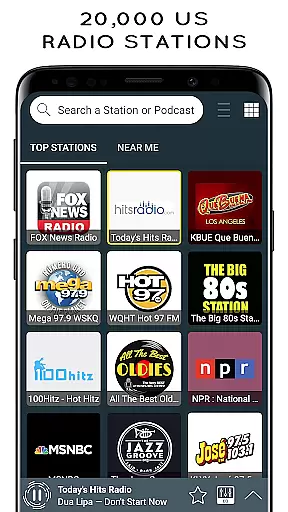
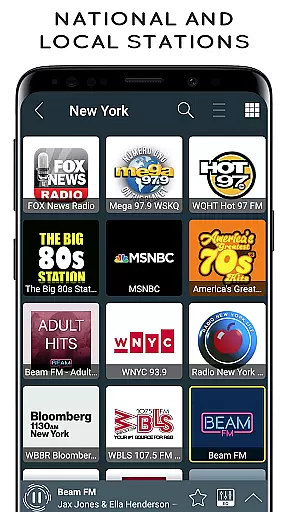
Radio USA is a premier music and audio application that offers users access to over 20,000 live AM/FM radio stations across the United States. Whether you're a fan of sports, news, music, comedy, or talk shows, this app provides an extensive range of options to suit every preference. The interface is modern, intuitive, and designed for ease of use, allowing listeners to effortlessly navigate through different stations and content categories.
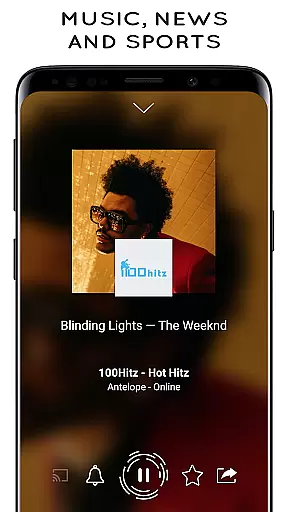
One of the standout features of Radio USA is its ability to function seamlessly in the background, enabling users to multitask while enjoying their favorite programs. Additionally, the app supports Chromecast and Bluetooth devices, enhancing the listening experience by offering flexibility in how and where you tune in. Whether at home, commuting, or traveling abroad, Radio USA ensures you stay connected to the content you love, making it an essential tool for any avid radio listener.
Radio USA boasts an impressive array of features that cater to diverse user needs. A key highlight is the app's capacity to run in the background, which means you can listen to live AM/FM radio stations while using other apps on your device. This feature is particularly useful for those who wish to enjoy uninterrupted audio during work, study, or leisure activities. Furthermore, the app allows international listening, so even if you're outside the US, you can still tune in to your favorite American radio stations.
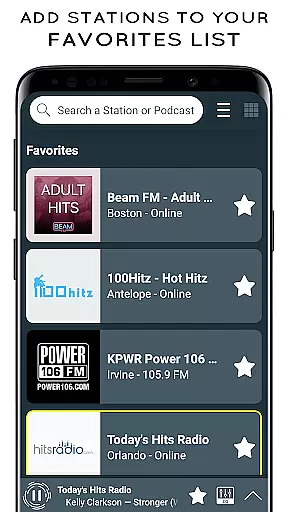
The app also includes practical functionalities such as identifying currently playing songs (depending on the station), setting alarms with your preferred FM station, and scheduling sleep timers to automatically turn off the app. With customizable light or dark mode interfaces, users can tailor their experience based on personal preferences. Sharing capabilities extend to social media platforms, SMS, and email, making it easy to recommend shows or podcasts to friends. These robust features collectively enhance user engagement and satisfaction.
Radio USA offers an extensive music library with over 20,000 US radio AM/FM live free stations. This vast selection ensures that users have access to a wide variety of music genres including sports, news, music, comedy and more.
The app guarantees the copyright authenticity of its content by partnering directly with radio stations, ensuring that all music streamed is properly licensed and legal for users to enjoy without any infringement issues.
With such a comprehensive collection, listeners can easily discover new songs or stay connected with their favorite tunes while being assured of the highest quality and legality of the streams.
One of the key features of Radio USA is its ability to deliver high-quality audio streaming. Users can expect clear and crisp sound when tuning into their preferred radio stations, enhancing the overall listening experience.
In addition to standard playback, the app supports various audio quality options which adapt based on the user's internet connection, ensuring optimal performance whether they're at home or streaming on-the-go via mobile data.
Furthermore, compatibility with Chromecast and Bluetooth devices allows for an even richer audio experience, giving users flexibility in how they choose to enjoy their favorite shows and podcasts through superior sound systems.
User-friendly interface
Extensive station variety
Background playability
Chromecast compatibility
Global accessibility
Requires constant internet
Some stations offline
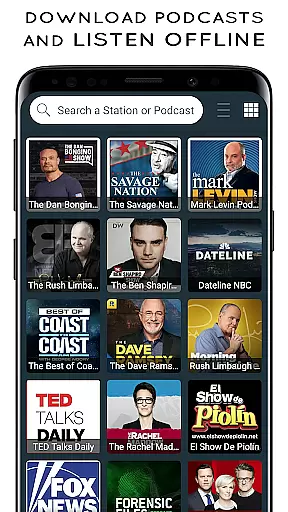
No offline mode
Limited podcast control
Ads between tracks

SqueezePlayer turns your Android phone or tablet into a SqueezeBox on its own!
 4.60
4.60
Pay Once, no monthly payment
4.60
Taal player that lets you sing any Indian & Western song with Tabla & Tanpura
4.60
The only true audiophile music player with Hi-Fi audio rendering and DSP engine
3.90
Ultimate Sonos Controller
4.70
Bass Booster & Volume Equalizer Pro improves your music and video sound quality
4.60
Offline Tunes, Unlimited Vibes
3.90
Reverse your voice & songs instantly! Fun singing challenge with cool effects.
4.60
Uninterrupted Tunes, Unmatched Vibes
3.90
Brian Eno and Peter Chilvers’ acclaimed music app Bloom, radically reinvented.
4.80
Performance-Synthesizer & Multi-Track-Sequencer, polyphonic + multi timbral!
4.70
Walkout Song DJ is the most intuitive app to manage your sports music.
4.70
Simple & Intuitive Metronome
4.70
Super Sound Editor, Song Maker & Mixer, Vocal Remover, Voice Recorder & Changer!
4.60
Visualize the guitar fretboard, master scales & play through changes like a pro!
4.50
DJ Music Mixer - DJ Remix: remix songs, make beat music & record mix of DJ.
4.40
Full featured mp3 and audio player with Chromecast and Android Auto support.
4.40
Powerful 10-Band equalizer pro with sound booster improves Android audio quality
4.30
The official Sonos app
4.10




User Reviews