
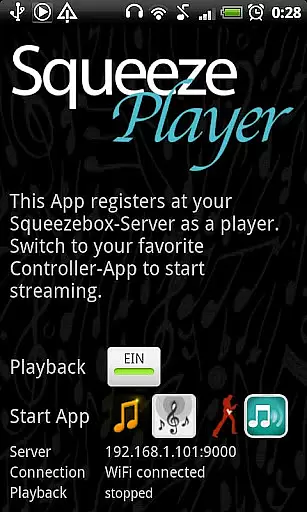
SqueezePlayer is a powerful music streaming application that transforms your Android device into a Logitech Squeezebox, enabling you to stream all your music content directly to your phone or tablet. It supports local music streaming, internet radio stations, and integrates with apps like Last.FM, Deezer, and WiMP through the Squeezebox-Server.
With support for WiFi and mobile connections, SqueezePlayer allows you to enjoy your music anywhere - whether you're at home, in the car, or on the go. The app supports various music formats including FLAC, MP3, WAV, and PCM natively, ensuring high-quality playback. For other formats, the Squeezebox-Server can transcode them on the fly.
SqueezePlayer offers an array of features designed to enhance your music streaming experience. It supports direct streaming from a Squeezebox-Server without the need for an actual Logitech Squeezebox hardware. This means you can access your entire music library remotely, provided your network is correctly configured.
The app also supports external control applications such as OrangeSqueeze and SqueezeCommander, allowing you to manage playback seamlessly. Additionally, it provides deep integration with certain controllers like OrangeSqueeze, which can automatically start SqueezePlayer from the players list, offering a cohesive user experience.
When it comes to streaming music, having a vast and diverse library is essential. SqueezePlayer excels in this area by allowing users to stream their entire Logitech Squeezebox content directly to their Android device. This includes local music files, internet radio stations, and songs from various apps like Last.FM, Deezer, or WiMP.
The app supports popular music formats such as FLAC, MP3, WAV, and PCM natively, ensuring high-quality playback without the need for conversion. Additionally, the Squeezebox Server can transcode other file types like Ogg and mp4 to FLAC or MP3 on the fly, expanding the range of playable content.
Copyright authenticity is also a priority, with SqueezePlayer ensuring that all streamed content complies with licensing agreements. While some services like Rhapsody, Napster, and Pandora are not currently supported due to licensing issues, Spotify can be accessed with the help of a triode plugin installed in a Squeezebox Server.
Audio quality is paramount for an immersive listening experience, and SqueezePlayer delivers on this front. The app supports high-fidelity audio formats, including FLAC, MP3, WAV, and PCM, which are decoded directly on the Android device for optimal sound reproduction.
For those with a keen ear for detail, SqueezePlayer offers the flexibility to adjust audio settings according to personal preferences. Whether you're using WiFi or a mobile connection, the app ensures that your music streams smoothly without compromising on quality.
To enhance the audio experience further, SqueezePlayer integrates seamlessly with the Logitech Media Server (formerly known as Logitech Squeezebox Server). This setup allows for real-time transcoding of unsupported file types to compatible formats, ensuring that users can enjoy their entire music collection without limitations.
User-friendly interface
Wide format compatibility
Remote music access
High-quality audio playback
Active developer support
Requires Squeezebox-Server setup
No standalone player controls
Limited transcoding on Touch server
Some services not supported
Network configuration needed for 3G

10-Band Audio Equalizer, Sound / Bass Booster for Spotify Users & Music Players
 4.40
4.40
Gorgeous UI, Powerful music Search and Equalizer, the great choice for you!
4.70
Permanently backup Now Playing. Maps, filters & listening stats.
4.00
AI Music Maker: Generate And Compose AI Tunes & AI Songs & AI Music & AI Melody!
4.60
Music, News & Sports Radio Tuner App. Tune in Live FM & AM Radio Stations.
4.80
The original SP-1200 experience on your iPad
4.20
Master Salsa Rhythm quickly and with a lot of fun!
4.30
Full featured mp3 and audio player with Chromecast and Android Auto support.
4.40
Customize Your Favorite Songs and Videos with booster.
4.70
JBL PartyBox APP works with 110/310/710/120/320/520/Encore/Encore 2/Encore Ess 2
4.80
Brian Eno and Peter Chilvers’ acclaimed music app Bloom, radically reinvented.
4.80
Listen radio AM / FM Stations. Live AM / FM Radio App Station. Radio Com.
4.70
The best music and audio player, with beautiful UI, music search and equalizer.
4.60
Learn the notes on the guitar fretboard fast with this easy and fun app
4.60
A synth that really lets you shape your sounds!
4.50
Offline and always ad-free - stream in the highest quality available.
4.10
VB-AUDIO Software / VBAN-Receptor allows listening to any VBAN Streams
4.10
The official Sonos app
4.10
Simply convert wav to mp3. Clear. Reliable. Safe.
4.0



User Reviews