
MapQuest is a comprehensive GPS navigation app that provides turn-by-turn directions for both driving and walking. The app offers up-to-date satellite imagery and maps, real-time traffic updates, and optimized routing to help users save time and money. With features like a speedometer, favorites for storing frequently visited locations, and alternate route options, MapQuest equips users with the tools needed to navigate efficiently across the United States and Canada.
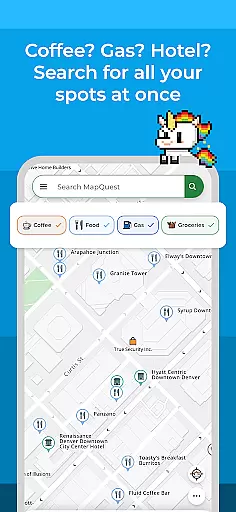
Beyond basic navigation, MapQuest allows users to search and explore nearby points of interest such as restaurants, gas stations, and hotels. It also integrates additional services like hotel booking, food ordering through GrubHub, and on-demand roadside assistance. Whether planning a trip or finding essential services, MapQuest combines practical navigation with useful lifestyle features to enhance the travel experience.
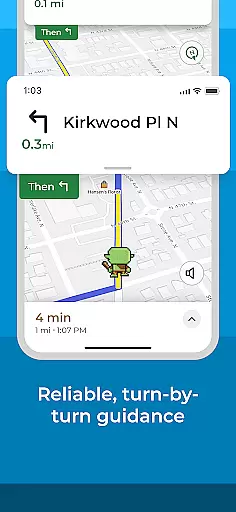
MapQuest stands out with its robust set of navigation features tailored for both drivers and pedestrians. The app provides turn-by-turn voice navigation, ensuring users can keep their eyes on the road while receiving clear directions. Real-time traffic updates and optimized routing help users avoid congestion and find the fastest routes to their destinations. A built-in speedometer compares the user's current speed with the speed limit, promoting safer driving.
In addition to navigation, MapQuest enriches the travel experience by offering layers of nearby points of interest. Users can browse menus, make reservations, and even order food directly through integrations with OpenTable and GrubHub. The app also supports multipoint routes, allowing users to plan trips with multiple stops. These features, combined with functionalities like weather updates and roadside assistance, make MapQuest a versatile tool for modern travelers.
Map accuracy is essential for reliable navigation and location-based services. MapQuest ensures this through up-to-date satellite imagery and detailed maps, providing users with the most current geographic data available.
The app's mapping features include comprehensive road networks, points of interest, and real-time updates to reflect recent changes in the environment. This meticulous attention to detail guarantees that users can trust the information displayed on their screens.
For users, this means they can confidently explore new areas, find specific destinations, and plan routes without worrying about outdated or incorrect map data. Whether driving across states or walking in a new city, accurate maps are vital for a stress-free journey.
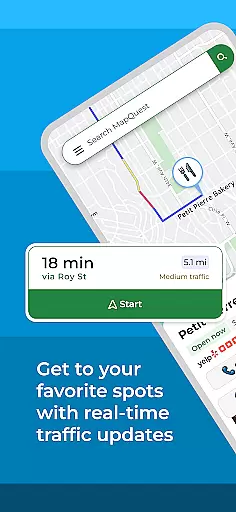
Effective route planning is crucial for optimizing travel time and resources. MapQuest offers advanced route planning tools that provide multiple route options, real-time traffic updates, and settings to avoid highways or toll roads.
Users benefit from features like optimized routing, which helps save time, gas, and money by suggesting the fastest and most efficient paths to their destinations. Alternate route choices ensure flexibility, while multipoint routes allow for complex trip planning.
With these capabilities, travelers can make informed decisions about their journeys, avoiding congestion and unexpected delays. The ability to customize route settings according to personal preferences further enhances the overall navigation experience.
User-friendly interface
Real-time traffic updates
Comprehensive POI database
Voice-guided navigation
Integrated service options
Battery consumption is high
Limited offline functionality
Occasional inaccurate directions
Ads in free version
Subscription required for premium

Route schedules, maps, and real-time tracking of MTA buses in New York City.
 4.20
4.20
Find 93 Octane Gas: Locate Gasoline Stations Selling Premium 93 Octane or Higher
4.4
Turn your tablet or Android powered unit into a full blow Android Auto headunit.
2.30
Instant diesel discounts - save big with each fill up!
4.40
"Balad" is a map and navigator with a Persian voice assistant and a complete city guide
4.40
Phone Tracker and GPS Location Sharing
4.20
Neshan: map & navigation app with 20M+ monthly active users
4.50
Track friends in real-time and explore worldwide live cameras.
4.60
GPS phone tracker, family locator, secure location sharing app
4.20
Offline maps & GPS for hiking, travel, fieldwork & outdoor adventures
4.70
Turn your Android device into a real off-road GPS using off-line topo maps!
4.40
ParkWhiz, an Arrive Mobility brand, part of the Arrive Network
4.30
Find radar, speed camera, flight tracker. Use hud, location tracker, speedometer
4.20
Navigate seamlessly with Real-Time Traffic, Offline Maps, and Voice Navigation.
4.10
Drive safe with real-time speed camera radar, police, and traffic alerts
3.80
Navigate via GPS Maps of GPS Voice Navigation, driving directions to find routes
3.60
Offline maps for phone and smart watch: topographic maps, satellite images...
3.30
Your real-time window to the world. Explore anywhere, anytime.
3.30
All of NHSA's trail information at your fingertips for the 2025-2026 season
4.1







User Reviews