
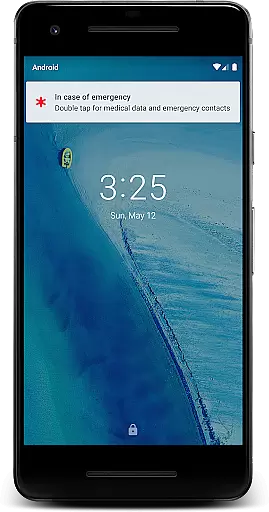
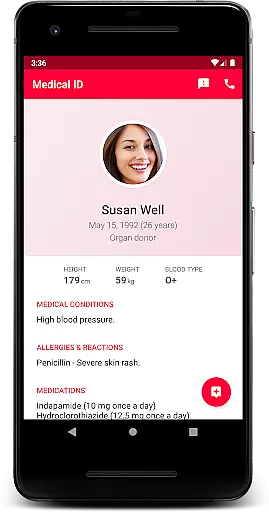
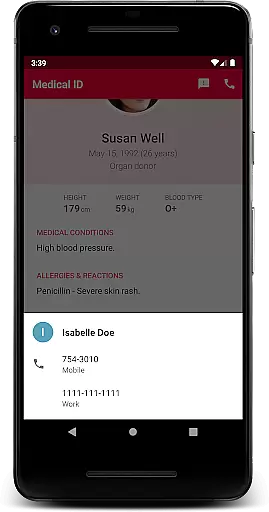
Medical ID (premium) is an essential application that allows users to create detailed medical profiles accessible directly from their device's lock screen. This feature ensures that vital information such as allergies, blood type, and emergency contacts are readily available to first responders in critical situations. The app goes beyond basic information storage by offering advanced functionalities like one-click emergency SMS alerts with location data, continuous location sharing with chosen contacts for up to 24 hours, and direct calling to emergency contacts without unlocking the device.
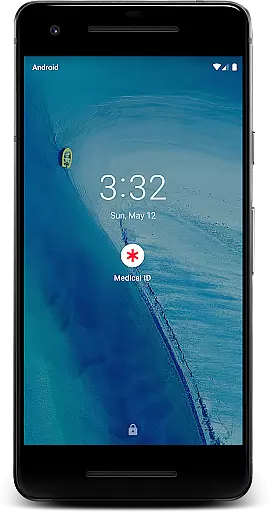
The premium version of Medical ID provides comprehensive tools including a backup feature, Body Mass Index (BMI) calculation, current GPS coordinates, and even a compass. These features collectively transform your Android device into a potentially life-saving tool during emergencies. By enabling an accessibility service, the app displays a widget over the lock screen, ensuring quick access to medical data for both individuals with disabilities and medical personnel. With its robust privacy policy and terms of use, Medical ID ensures that all personal health information remains securely on the user's device.
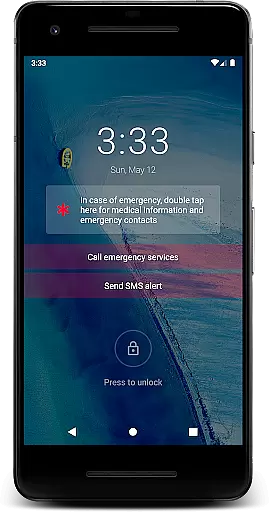
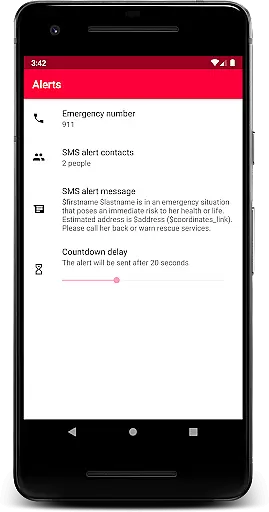
Medical ID (premium) offers a wide array of features designed to enhance user safety and convenience. One of the standout capabilities is the quick access to medical information right from the lock screen, which can be crucial in emergencies. The app includes an emergency alert feature that sends an SMS with the user's estimated location at the press of a button, ensuring timely assistance. Additionally, it supports continuous location sharing with emergency contacts even when the app is not actively running, providing peace of mind for up to 24 hours or until manually stopped.
Another significant feature is the ability to make direct calls to emergency contacts from the lock screen without needing to unlock the device. This functionality can save precious time during urgent situations. The app also includes a manual backup feature, BMI calculation, and displays the user's current location with precise GPS coordinates. Furthermore, an integrated compass adds to the utility, making this app a versatile tool for both everyday use and emergencies. All these features are supported by an accessibility service that overlays a widget on the lock screen, facilitating easy access to medical data for first responders and individuals with disabilities.
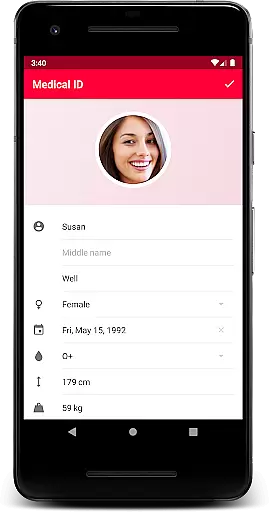
Medical ID (premium) ensures the credibility of its medical content by allowing users to input essential health information that is both accessible and secure. This app enables quick access to vital details such as allergies, blood type, and emergency contacts directly from the device's lock screen. The importance of credible medical information in emergencies cannot be overstated, as it allows first responders to make informed decisions.
The premium version of Medical ID provides comprehensive features including an emergency alert function, which sends SMS messages with the user's estimated location. It also offers a Body Mass Index (BMI) calculator and displays the current GPS coordinates. These tools are designed to assist medical personnel in assessing situations accurately and providing appropriate care.
Users benefit from having their medical profiles always up-to-date and readily available. With the ability to share location data with emergency contacts for up to 24 hours, even when the app is closed, individuals can ensure that their loved ones are aware of their whereabouts during critical times. This feature not only enhances personal safety but also supports peace of mind for both users and their families.
While Medical ID (premium) does not offer teleconsultation services directly, it enhances the quality of remote consultations through its detailed medical profiles. By providing medics and healthcare professionals with immediate access to crucial patient information, the app facilitates more accurate and efficient virtual assessments. This is particularly beneficial when time-sensitive decisions need to be made based on reliable data.
The app includes a direct call feature from the lock screen, enabling users to contact emergency services without unlocking their devices. This functionality streamlines communication between patients and medical staff, ensuring that help is summoned quickly and efficiently. Additionally, the backup feature allows users to trigger manual backups of their medical information, safeguarding against data loss.
Overall, while Medical ID focuses on information accessibility rather than live consultations, its role in supporting high-quality telemedicine interactions is significant. Users can trust that their medical details are presented clearly and accurately, aiding healthcare providers in delivering optimal care remotely. This makes the app an invaluable tool for anyone looking to enhance their medical preparedness.
User-friendly interface
Comprehensive medical info
Emergency SMS alerts
Continuous location sharing
Direct emergency calls
Premium version cost
Device compatibility issues
Requires accessibility service
Limited free version
Privacy concerns

Want to make it easier to manage your health? We’re with you, wherever you are.
 4.70
4.70
Download the PulsePoint app and use your CPR skills to save a life!
4.60
Master AEMT with 1,400+ study items, TEIs, practice tests, and scoring.
4.10
Care Simplified by MyChart
3.40
MHealth is the mobile version of MEDITECH’s Patient and Consumer Health Portal.
3.10
Zepbound & Mounjaro support & resources for savings, tracking & more
3.90
Boost reading, writing, speaking and listening with a scientifically proven app.
4.70
Tap & save. Coupons that fit in your pocket. Find low prices on prescriptions.
4.80
MyChart for Android
4.50
Live vet support by text/video
4.80
Leafly is a weed app for finding dispensaries, cannabis strains, & more.
4.70
Coaches you through labour using hypnobirthing techniques & tracks contractions
4.70
Hear far away sounds, conversations, TV and surrounding sounds more clearly.
4.70
Blue Cross and Blue Shield of Texas member information
4.60
Sync your blood glucose device, log values automatically and tame your diabetes!
4.60
Secure video visits with your VA care team from anywhere
4.50
Download OctaApp for easy access to your plasma donation info
4.40
Assess and treat left neglect more effectively in stroke and brain injury rehab.
4.30
ECG modules improve rhythm ID. ACLS is a simulator for cardiac arrest scenarios.
4.4



User Reviews