
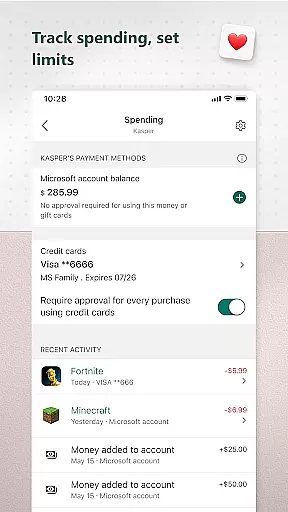
Microsoft Family Safety is a comprehensive parenting app designed to help families develop healthy digital habits while ensuring children's safety online. The app offers parental controls that allow filtering of inappropriate content, setting screen time limits across devices, and providing activity reports on kids' digital usage.
Parents can manage their children's access to apps, games, and websites, particularly through Microsoft Edge, ensuring a safer browsing experience. Kids benefit from age-appropriate content and learn responsible device usage within set boundaries. With weekly email summaries and real-time notifications, the app fosters open conversations about digital responsibility.
This app is ideal for modern families looking to balance technology use with offline activities, promoting both independence and protection in the digital world.
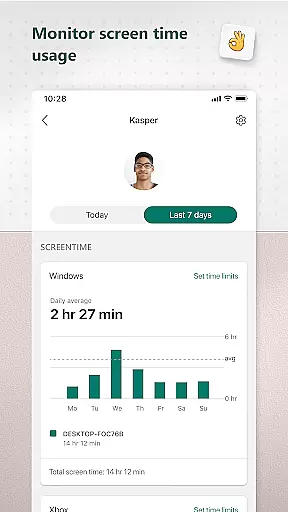
Microsoft Family Safety stands out with its robust feature set tailored for family protection. The app provides detailed activity reports, including screen time logs and app usage statistics, delivered weekly via email to keep parents informed.
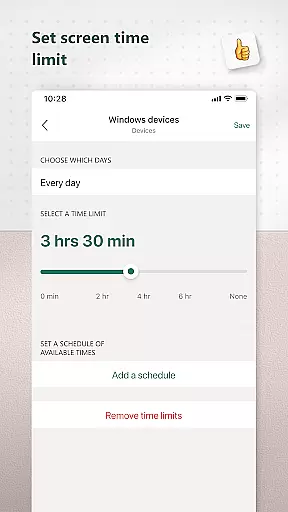
Screen time management is another key feature, allowing parents to set specific time limits on apps, games, and devices across Windows, Xbox, and Android platforms. Parents receive notifications when children request additional usage time, enabling real-time decision-making.
The content filtering system ensures safe browsing by restricting access to inappropriate websites and apps. These features collectively empower parents to guide their children's digital journey while respecting their growing independence.
Microsoft Family Safety provides a reliable parenting solution that is designed to ensure the safety of children in the digital world. The app's features are developed based on expert recommendations and adhere to strict privacy standards, ensuring that parents can trust the guidance and protection it offers.
The app includes parental controls that filter inappropriate apps and games, allowing children to explore online content safely. These controls are regularly updated to align with current expert guidelines on age-appropriate content, providing parents with peace of mind that their kids are engaging with suitable material.
Activity reporting is another key feature that supports parenting efforts by offering insights into children's digital activity. Parents receive weekly email summaries that help them understand their family's online habits, fostering open conversations about responsible internet use.
By combining expert-validated content filters with detailed activity reports, Microsoft Family Safety empowers parents to make informed decisions about their children's digital experiences while respecting their growing independence.
Microsoft Family Safety offers precise growth tracking capabilities that help parents monitor their children's digital development. The app provides detailed activity logs of screen time and online usage, enabling parents to observe patterns and trends in their kids' technology interactions.
Screen time management features allow for accurate tracking of app and game usage across multiple devices, including Xbox, Windows, and Android platforms. This cross-device monitoring ensures that parents can maintain a comprehensive view of their children's digital activities regardless of the device being used.
When children request additional screen time, the app promptly notifies parents, allowing them to make informed decisions about adjusting time limits. This real-time notification system contributes to the accuracy of growth tracking by keeping parents constantly informed about their kids' digital behavior.
The combination of detailed activity reports and precise time management tools creates a robust system for tracking children's digital growth, helping parents guide their development while maintaining appropriate boundaries.
Comprehensive parental controls
Multi-platform support
Weekly activity reports
Real-time notifications
Kid-friendly web filters
Limited iOS functionality
Requires Microsoft account
Some features are premium
Complex setup process
Dependent on child's consent

GPS phone tracker: find kids on map. Location tracking and parental control.
 4.50
4.50
All-In-One Pregnancy Tracker, Your Baby's Milestones, Growth Stages & Parenting
4.70
Discover fun videos, kids songs, bedtime stories and games
3.60
Little loved one's monitoring, Sleep tracking and Parenting content.
3.80
Real-time family location with consent, check-ins & SOS—private by default.
4.40
Pinardin - Smart Parental Control, Online Safety & GPS Tracking!
4.80
Save money on diapers. Get the Pampers Rewards app.
3.90
Speech Therapy Exercises For All!
4.40
GPS tracker app: Simple GPS phone tracker for fast family location tracking
4.60
All-In-One Pregnancy Tracker, Your Baby's Milestones, Growth Stages & Parenting.
4.90
Introduce real food to baby with First Foods® Database, baby led weaning BLW
4.80
FamilyAlbum helps you share, save, and remember your child's special moments.
4.80
App/Game blocker & GPS tracker
4.50
Find unique + popular baby names for your little peanut.
4.30
Magic chalkboard coloring and drawing!
4.20
Family parental control app: limit screen time, block apps, GPS tracker.
4.20
Protect kids online safety through GPS tracking,screen time control,app blocking
4.20
Educational resource for parents to inspire creativity in their children.
4.00
Lullabies, Night Light & Age-based Routines to help your baby fall asleep
4.3




User Reviews